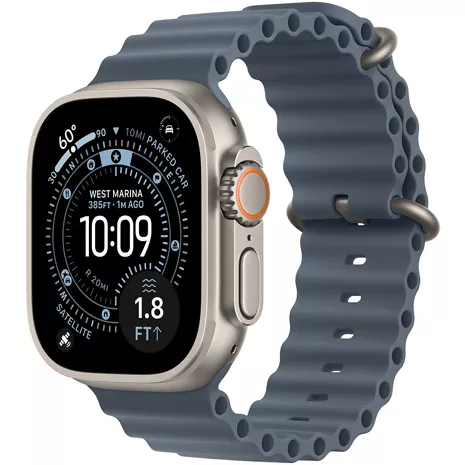
Apple Watch Ultra 3 Prepaid
Reviews
4.4
746 reviews
87% of reviewers recommend this product.
Love the Watch Face Size
VinniBoy . 1 month ago
Love the watch; terrible support from Verizon across multiple channels
LoyalVerizonCustomer . 1 month ago
- Emergency SOS, Find My, and Messages via satellite are included for free for two years with the activation of Apple Watch Ultra 3. Connection and response times vary based on location, site conditions, and other factors. Find My and Messages via satellite require a carrier plan. To send and receive SMS/MMS from cellular models of Apple Watch over satellite, your paired iPhone must be powered on and connected to Wi-Fi or an active cellular network, but your iPhone doesn't need to be nearby. SMS message rates may apply. Satellite connectivity provided by Globalstar and its affiliates. See support.apple.com/123924 for more information.
- Battery life varies by use and configuration. See apple.com/watch/battery for more information.
- When angled away from the user as compared with Apple Watch Ultra or Ultra 2.
- Hypertension notifications are not intended for use by people under 22 years old, those who have been previously diagnosed with hypertension, or pregnant persons.
- Apple Watch Ultra 3 has a water resistance rating of 100 meters under ISO standard 22810:2010. It may be used for recreational scuba diving (with compatible third-party app from the App Store) to 40 meters and high-speed water sports. Apple Watch Ultra 3 should not be used for diving below 40 meters. Water resistance is not a permanent condition and can diminish over time. For additional information, see support.apple.com/en-us/109522.
- Requires an Apple Intelligence–enabled iPhone nearby and Bluetooth headphones with device and Siri language set to English. Apple Intelligence is available in beta. Some features may not be available in all regions or languages. For feature and language availability and system requirements, see support.apple.com/en-us/121115.
- Emergency SOS requires a cellular connection or Wi-Fi calling with an internet connection from your Apple Watch or nearby iPhone. You can use cellular models of Apple Watch to make an emergency call in many locations, provided that cellular service is available. Some cellular networks may not accept an emergency call from your Apple Watch if your Apple Watch isn't activated, if it isn't compatible with or configured to operate on a particular cellular network, if isn't set up for cellular service, or if the cellular network does not support emergency calling over IMS. See support.apple.com/108374 and apple.com/watch/cellular for more information.
- Irregular rhythm notification requires the latest versions of watchOS and iOS. It is not intended for use by people under 22 years old or those who have been previously diagnosed with atrial fibrillation (AFib).
- Sleep apnea notifications are available on Apple Watch Series 9 and later, Ultra 2 and later, and SE 3. The feature is intended to detect signs of moderate to severe sleep apnea for people 18 years old or older without a diagnosis of sleep apnea.
- The Vitals app is for wellness purposes only and not for medical use.
- The Blood Oxygen app is for wellness purposes only and not for medical use. Measurements are calculated and viewed on iPhone in the Health app.
- Wireless service plan required for cellular service. Contact your service provider for more details. Connection may vary based on network availability. Check apple.com/watch/cellular for participating wireless carriers and eligibility. See support.apple.com/HT207578 for additional setup instructions.
- Data plan required. 5G is available in select markets and through select carriers. Speeds vary based on site conditions and carrier. For details on 5G support, contact your carrier and see apple.com/watch/cellular.
Apple Watch Ultra 3 requires iPhone 11 or later with iOS 26 or later.

Customizable Action Button

Rugged and ready to go

Bright, beautiful display

Multiday battery life

Ultimate running and workout companion

Safety features
Customizable Action Button
Rugged and ready to go
Design
Finishes
Titanium case, Grade 5
Colors
Natural, Black
Durability
Water resistance 100m (swim, snorkel, scuba, high-speed water sports) under ISO standard 22810:2010 | Dust resistance IP6X under IEC 60529 | EN13319 recreational scuba diving to 40m (±1m accuracy) | Tested to MIL-STD 810H against subsections for altitude, high temperature, low temperature, temperature shock, immersion, freeze with thaw, ice and freezing rain, and shock and vibration
Height
49mm
Width
44mm
Depth
12mm
Weight
Weight (natural): 61.6 grams | Weight (black): 61.8 grams
Accessibility
Overall
Features Include: VoiceOver | Zoom | On/Off Labels | Reduce Transparency | Increase Contrast | Color Filters | Text Size | Bold Text | Reduce Motion | Hourly Chimes | AssistiveTouch | Button Click Speed | Touch Accommodations | Auto-Answer Calls | Type to Siri | RTT Support | Audio Volume Balance | Auto Transcription | Live Speech | Accessibility Shortcut | Mono Audio | Taptic Time | Personal Voice | Live Listen
Vision
VoiceOver, Zoom, Large Text
Battery
Usage Time
Up to 72 hours in Low Power Mode
Battery
Multiday battery life, up to 42 hours of normal use | Built-in rechargeable lithium-ion battery
Charging Cable
Magnetic Fast Charger to USB-C Cable
Power
Fast-charge capable | Up to 80% charge in about 45 minutes | 15 minutes for up to 12 hours of normal use | 5 minutes for up to 8 hours of sleep tracking
Network
Wi-Fi
Wi-Fi 4 (802.11n)
Connectivity
L1 and L5 precision dual-frequency GPS (GPS, GLONASS, Galileo, QZSS, and BeiDou) | Cellular: 5G and LTE | Support for 2.4GHz and 5GHz Wi-Fi networks | Second-generation Ultra Wideband chip | NFC: Apple Pay, GymKit | Support for Apple Watch For Your Kids | International roaming
Performance
Bluetooth
Bluetooth 5.3
Processor
S10 chip with 64-bit dual-core processor
Storage
64GB capacity
Operating System
watchOS
Safety
Satellite connectivity (Emergency SOS, Messages, Find My) | Emergency SOS | International emergency calling | Siren | Flashlight | Crash Detection | Fall Detection | Last Emergency Call Availability Waypoint | Noise monitoring | Backtrack
Display
Type
Flat sapphire crystal display
Screen
Always‑On Retina display with wide‑angle OLEDs and LTPO3 | 1Hz refresh | Active area (422 by 514 pixels, 326 pixels per inch) | Up to 3000 nits peak brightness | 1 nit minimum brightness | Night Mode for Apple Watch Ultra faces (Modular Ultra, Wayfinder, Orienteering)
Size
49mm
SKU#
SKU#
MEWH4LW/A
What's in the box
- Apple Watch Ultra 3
- Band
- Apple Watch Magnetic Fast Charger to USB-C Cable (1m)
- Emergency SOS, Find My, and Messages via satellite are included for free for two years with the activation of Apple Watch Ultra 3. Connection and response times vary based on location, site conditions, and other factors. Find My and Messages via satellite require a carrier plan. To send and receive SMS/MMS from cellular models of Apple Watch over satellite, your paired iPhone must be powered on and connected to Wi-Fi or an active cellular network, but your iPhone doesn't need to be nearby. SMS message rates may apply. Satellite connectivity provided by Globalstar and its affiliates. See support.apple.com/123924 for more information.
- Battery life varies by use and configuration. See apple.com/watch/battery for more information.
- When angled away from the user as compared with Apple Watch Ultra or Ultra 2.
- Hypertension notifications are not intended for use by people under 22 years old, those who have been previously diagnosed with hypertension, or pregnant persons.
- Apple Watch Ultra 3 has a water resistance rating of 100 meters under ISO standard 22810:2010. It may be used for recreational scuba diving (with compatible third-party app from the App Store) to 40 meters and high-speed water sports. Apple Watch Ultra 3 should not be used for diving below 40 meters. Water resistance is not a permanent condition and can diminish over time. For additional information, see support.apple.com/en-us/109522.
- Requires an Apple Intelligence–enabled iPhone nearby and Bluetooth headphones with device and Siri language set to English. Apple Intelligence is available in beta. Some features may not be available in all regions or languages. For feature and language availability and system requirements, see support.apple.com/en-us/121115.
- Emergency SOS requires a cellular connection or Wi-Fi calling with an internet connection from your Apple Watch or nearby iPhone. You can use cellular models of Apple Watch to make an emergency call in many locations, provided that cellular service is available. Some cellular networks may not accept an emergency call from your Apple Watch if your Apple Watch isn't activated, if it isn't compatible with or configured to operate on a particular cellular network, if isn't set up for cellular service, or if the cellular network does not support emergency calling over IMS. See support.apple.com/108374 and apple.com/watch/cellular for more information.
- Irregular rhythm notification requires the latest versions of watchOS and iOS. It is not intended for use by people under 22 years old or those who have been previously diagnosed with atrial fibrillation (AFib).
- Sleep apnea notifications are available on Apple Watch Series 9 and later, Ultra 2 and later, and SE 3. The feature is intended to detect signs of moderate to severe sleep apnea for people 18 years old or older without a diagnosis of sleep apnea.
- The Vitals app is for wellness purposes only and not for medical use.
- The Blood Oxygen app is for wellness purposes only and not for medical use. Measurements are calculated and viewed on iPhone in the Health app.
- Wireless service plan required for cellular service. Contact your service provider for more details. Connection may vary based on network availability. Check apple.com/watch/cellular for participating wireless carriers and eligibility. See support.apple.com/HT207578 for additional setup instructions.
- Data plan required. 5G is available in select markets and through select carriers. Speeds vary based on site conditions and carrier. For details on 5G support, contact your carrier and see apple.com/watch/cellular.
Apple Watch Ultra 3 requires iPhone 11 or later with iOS 26 or later.
Apple Watch Ultra 3 Prepaid Reviews
4.4
746 reviews
87% of reviewers recommend this product.
Love the Watch Face Size
VinniBoy . 1 month ago
Love the watch; terrible support from Verizon across multiple channels
LoyalVerizonCustomer . 1 month ago
Hard to use
Michelle35711 . 1 month ago
On going
Styles . 1 month ago
a fine gimmick.
desginated_douglas . 1 month ago
Dsy66 . 1 month ago
Jgable77 . 1 month ago
wrong Twice!!
Real or Scam . 1 month ago
Won’t Work with Tattoos
1 month ago
Product great. Verizon trash.
Ready2gobacktoATT . 1 month ago
Apple Watch Ultra 3 Prepaid FAQs
Jojo . Sep 20, 2026
Can it check blood pressure?
The Apple Watch Ultra 3 cannot directly measure blood pressure or display specific systolic and diastolic readings -Anthony
Band . Sep 4, 2026
How do I know which band to choose as far as size small, medium or large?
The different bands have the following sizes. It is recommended to measure your wrist size first. Alpine Loop - Small (130 -160 mm), Medium (145 - 190 mm), Large (165 - 210 mm). Milanese Loop - Small (130 - 160 mm), Medium (155 - 185 mm), Large (180 - 210 mm). Ocean Band - One Size. Trail Loop - Small/Medium (130 - 180 mm), Medium/Large (145 - 220 mm). -James
Chad . Aug 21, 2026
Do I have add an additional line to use the watch
The Apple Watch Ultra 3 can be used as a standalone device with its own line. You can find more info here: https://www.verizon.com/plans/devices/smartwatches/ ~Jesse
Jeff . Aug 10, 2026
How much will it cost me to add service for an Apple Watch to my account…
Adding a line for your Apple Watch cost is based on your service plan. Sign in to My Verizon to review cost and offers. ~Maria
Dave . Jul 26, 2026
Can I use the phone on watch to make calls if not paired to a phone
John . Jul 21, 2026
is this watch waterproof?
The Apple Watch Ultra 3 is water-resistant up to 50 meters. It is not entirely waterproof. -Erica
Christina . Jul 19, 2026
Does the watch connect to my phone via blue tooth?
Indeed, almost all smartwatches, including those from Apple, Samsung, Google, and Fitbit, link to your phone using Bluetooth. -Cynthia
Jul 18, 2026
Cómo se llama su hija más pequeña
David . Jul 17, 2026
Does ultra 3 watch monitor glucose readings?
Lanny . Jul 17, 2026
What does the "rear camera" do?
There is no camera on the Apple Watch Ultra 3. -Joe