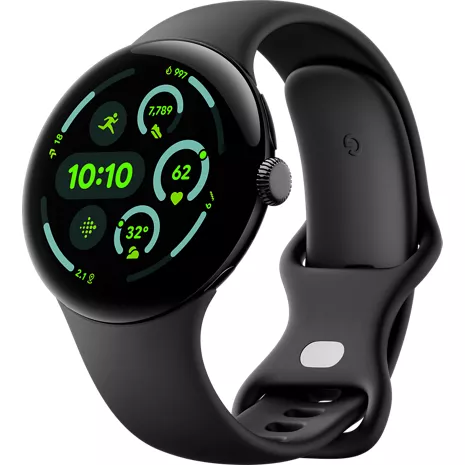
Google Pixel Watch 3 Prepaid
4.3
79 undefined
55
Still Junk google
Wolfie . 9 months
Google Team - 9 months
Hey there, Wolfie. We’re sorry to hear you’re still having heart rate issues on the Pixel Watch 3 — we’d be happy to look into your concerns further and find the best solution for you. When you get a chance, talk to us here: https://support.google.com/googlepixelwatch/gethelp
Not even remotely accurate
Wolfie . 10 months
Google Team - 9 months
Hi there, Wolfie. Sorry to see you’re running into heart rate tracking issues on the Pixel Watch 3 — we totally understand the frustration. A quick restart will normally resolve most issues — here’s how:1. On the watch, press and hold the crown for 3 seconds.
2. Scroll down and tap Restart.
3. If your watch screen is still unresponsive after a restart, perform a hard reset. Long press the crown and side button for about 35 seconds (may take longer) until the "G" logo appears. The watch should restart and be usable again once the restart completes.
Don’t hesitate to reach out to us here: https://support.google.com/googlepixelwatch/gethelp
- Works with most phones running on Android 10.0 or newer. Requires Google Account, Google Pixel Watch app, and internet access. Some features require a Google Health app and/or Google Health Premium membership. Google apps and services and Google Health Premium content and features are subject to change and are not available in all countries or languages. Google Pixel Watch is not compatible with Android (Go edition). See g.co/pixelwatch/specs for technical and device specifications.
- Compared to Google Pixel Watch 2.
- Responsive display not available for all apps or content.
- Maximum battery life is approximate and is based on testing conducted in California in 2024 on pre-production hardware and software, using default settings with a median Pixel user battery usage profile across a mix of talk, data, standby, and use of other features, or for "up to 36 hours”, the use of features that are default in Battery Saver mode. Battery life depends on features enabled, usage, environment and many other factors. Use of certain features will decrease battery life. Actual battery life may be lower.
- Charging speed based on use of in-box USB-C® Fast Charging Cable with 30W adapter (sold separately) plugged into a wall outlet. Actual results may be slower. Charging speed based on testing with fully drained device batteries. Charging testing conducted in California in 2024 on pre-production hardware and software using default settings with the device powered on. Charging speed depends upon many factors including battery age and ambient temperature.
- Works with most phones running on Android 10.0 or newer. Requires Google Account, Google Pixel Watch app, and internet access. Some features require a Google Health app and/or Google Health Premium membership. Google apps and services and Google Health Premium content and features are subject to change and are not available in all countries or languages. Google Pixel Watch is not compatible with Android (Go edition). See g.co/pixelwatch/specs for technical and device specifications.
- Some features require Google Health app. Performance of heart rate tracking may be affected by physiology, location of device and your movements and activity.
- Google apps and services are subject to change and are not available in all countries or languages.
- Some Google apps and services require a paired phone within Bluetooth range of your device and are not available in all countries or languages.
- Only available on Nest Cam (outdoor or indoor, battery), Nest Cam with floodlight, Nest Cam (indoor, wired, 2nd gen), Nest Doorbell (battery), Nest Doorbell (wired, 2nd gen), and 1st-gen Nest Cams that have been transferred to the Home app. Some features, including mobile and browser notifications, remote control, video streaming and video recording, require working internet and Wi-Fi.
- Like all heart rate tracking technologies, accuracy is affected by physiology, location of device, and your movements and activity.

Improve your training with cardio load.

Bigger display. Brighter screen.

Big-time battery.

Fast track to the finish line.

Help from Google, always at hand.

Know what your body is ready for each day.
Improve your training with cardio load.
Bigger display. Brighter screen.
Design
Bands
Active Band: Small and Large band sizes included |Small fits wrists 150-185 mm around | Large fits wrists 165-215 mm around
Finishes
Housing: 100% recycled aluminum | Active Band: Fluoroelastomer with soft-touch coating
Colors
Matte Black Aluminum case/ Obsidian Active Band | Polished Silver Aluminum Case/ Porcelain Active Band | Matte Hazel Aluminum Case/ Hazel Active Band
Height
.49 in
Width
1.77 in
Notable Materials
100% recycled aluminum
Weight
1.30 oz (without band)
Charging Port
USB-C® Charger
Battery
mAh (per hour)
420 mAh
Usage Time
Up to 30.4 hours
Network
4G
2,4,5,12,13,66
Wi-fi
802.11 a/b/g/n, 5Ghz + 2.4Ghz
Number Share Eligible
Yes
Global & Roaming Network
2,4,5,12
FCC ID
A4RGRY0E
Performance
Processor
Cortex M33 co-processor
OS
Wear OS 5.0
Memory/Storage
32GB eMMC flash | 2GB SDRAM
Display
Type
Actua display | Custom 3D Corning® Gorilla® Glass 5 | 320 ppi AMOLED LTPO display with DCI-P3 color | Responsive Display (1-60 Hz) | Always-on Display
Size
41mm | 45mm
GA05774-US
- Google Pixel Watch 3
- USB-C® Fast Charging Cable (1 m)
- Active Band
- Quick Start Guide
- Works with most phones running on Android 10.0 or newer. Requires Google Account, Google Pixel Watch app, and internet access. Some features require a Google Health app and/or Google Health Premium membership. Google apps and services and Google Health Premium content and features are subject to change and are not available in all countries or languages. Google Pixel Watch is not compatible with Android (Go edition). See g.co/pixelwatch/specs for technical and device specifications.
- Compared to Google Pixel Watch 2.
- Responsive display not available for all apps or content.
- Maximum battery life is approximate and is based on testing conducted in California in 2024 on pre-production hardware and software, using default settings with a median Pixel user battery usage profile across a mix of talk, data, standby, and use of other features, or for "up to 36 hours”, the use of features that are default in Battery Saver mode. Battery life depends on features enabled, usage, environment and many other factors. Use of certain features will decrease battery life. Actual battery life may be lower.
- Charging speed based on use of in-box USB-C® Fast Charging Cable with 30W adapter (sold separately) plugged into a wall outlet. Actual results may be slower. Charging speed based on testing with fully drained device batteries. Charging testing conducted in California in 2024 on pre-production hardware and software using default settings with the device powered on. Charging speed depends upon many factors including battery age and ambient temperature.
- Works with most phones running on Android 10.0 or newer. Requires Google Account, Google Pixel Watch app, and internet access. Some features require a Google Health app and/or Google Health Premium membership. Google apps and services and Google Health Premium content and features are subject to change and are not available in all countries or languages. Google Pixel Watch is not compatible with Android (Go edition). See g.co/pixelwatch/specs for technical and device specifications.
- Some features require Google Health app. Performance of heart rate tracking may be affected by physiology, location of device and your movements and activity.
- Google apps and services are subject to change and are not available in all countries or languages.
- Some Google apps and services require a paired phone within Bluetooth range of your device and are not available in all countries or languages.
- Only available on Nest Cam (outdoor or indoor, battery), Nest Cam with floodlight, Nest Cam (indoor, wired, 2nd gen), Nest Doorbell (battery), Nest Doorbell (wired, 2nd gen), and 1st-gen Nest Cams that have been transferred to the Home app. Some features, including mobile and browser notifications, remote control, video streaming and video recording, require working internet and Wi-Fi.
- Like all heart rate tracking technologies, accuracy is affected by physiology, location of device, and your movements and activity.
Google Pixel Watch 3 Prepaid undefined
4.3
79 undefined
55
Still Junk google
Wolfie . 9 months
Google Team - 9 months
Hey there, Wolfie. We’re sorry to hear you’re still having heart rate issues on the Pixel Watch 3 — we’d be happy to look into your concerns further and find the best solution for you. When you get a chance, talk to us here: https://support.google.com/googlepixelwatch/gethelp
Not even remotely accurate
Wolfie . 10 months
Google Team - 9 months
Hi there, Wolfie. Sorry to see you’re running into heart rate tracking issues on the Pixel Watch 3 — we totally understand the frustration. A quick restart will normally resolve most issues — here’s how:1. On the watch, press and hold the crown for 3 seconds.
2. Scroll down and tap Restart.
3. If your watch screen is still unresponsive after a restart, perform a hard reset. Long press the crown and side button for about 35 seconds (may take longer) until the "G" logo appears. The watch should restart and be usable again once the restart completes.
Don’t hesitate to reach out to us here: https://support.google.com/googlepixelwatch/gethelp
Watch while I pixel my nose
Skittles500 . 1 year
My fault for ordering the 41mm
1 year
Google Team - 1 year
Hi there, Nick. Sorry to see the size of the Pixel Watch 3 wasn’t quite what you expected. Our suggestion is to reach out to the retailer directly so they may be able to get you the device you’re looking for. If you have any questions about the device itself, talk to us here: https://support.google.com/googlepixelwatch/gethelp?sjid=1168929876280557452-NC
i love it!
1 year
The watch has great functionality, but way too big and charging hassle because charger too small
Kate . 1 year
Google Team - 1 year
Hi there, Kate. While we’re glad you like the features on the Pixel Watch 3, we hear your concerns regarding size and the charging concerns. The Pixel Watch 3 does come in two sizes, 41mm, which is the same size as the Pixel Watch 2, and the new 45mm size. Regarding the difficulty with charging, make sure you're aligning the crown with the charging cable, ensuring the 4 charging pins meet the 4 watch contacts. We’re here if you need any help: https://support.google.com/googlepixelwatch/gethelp?sjid=1168929876280557452-NC
I wonder what tile we will get next
Travis . 1 year
Google Team - 1 year
Hi there, Travis. Sorry to hear you’re running into issues with the screen of the Pixel Watch 3. A factory reset may help resolve your concern and get your watch back on track — here’s how to do so:1. Press and hold both the crown and side button for approximately 20 seconds. A dark screen with a 'G' logo will display, or a colorful 'G' logo on Pixel Watch 3. If the watch is off, press the crown briefly to power it on.
2. Upon seeing the 'G' logo, simultaneously tap the upper-left and lower-right edges of the watch face to enter 'Fastboot' mode.
3. Navigate by pressing the side button next to the crown to scroll downwards.
4. Select 'Recovery mode' by highlighting it and pressing the crown. The display will show 'No command.'
5. Activate a debug screen by pressing and holding the crown while swiping up on the screen simultaneously.
6. Scroll down to 'Wipe data or factory reset.'
7. Initiate the reset by swiping right, which will also reset your PIN.
8. Once the data wipe is complete, highlight 'Reboot system now' and swipe right or press the crown to restart the watch.
If you’re still running into any issues, reach out to us here: https://support.google.com/googlepixelwatch/gethelp?sjid=1168929876280557452-NC
Google Pixel Watch 3 Prepaid undefined
google pixel watch . Sep 25, 2026
Are they waterproof
Great question. The Pixel Watch 3 is water-resistant up to 50 meters (5 ATM), but it is not waterproof. Water resistance is not a permanent condition, and decreases or is lost over time due to normal wear and tear, repair, disassembly, or damage. You can find more information here: https://support.google.com/googlepixelwatch/answer/12652074
BROCK . Jun 18, 2026
DOES SMART WATCH REQUIRE IT OWN PHONE PLAN?
Great question, BROCK. The Pixel Watch 3 does not require its own phone plan to function. You can use the Wi-Fi version of the watch paired with your smartphone to receive notifications, track activity, without a data plan. If you choose the LTE version, you have the option to add it to a cellular plan for standalone connectivity, but it is not required. Here's a link with more details: https://support.google.com/googlepixelwatch/answer/13541778?hl=en
Mark . May 21, 2026
Does the watch detect loss of pulse?
Sharon . Oct 25, 2025
Does this watch have fall detection?
Wonderful question, Sharon! Yes, the Google Pixel Watch 3 has Fall Detection. When the watch detects a hard fall, it alerts you and asks if you’d like to call emergency services. If you don't respond, it automatically contacts them after 60 seconds. Here's a guide on more safety features: https://support.google.com/googlepixelwatch/answer/12663810
Betty . Sep 17, 2025
Can you make phone calls from this watch?
Great question, Betty. Yes! You’re able to make and receive calls on the Pixel Watch 3 when your phone is nearby. Here’s a link with more details: https://support.google.com/googlepixelwatch/answer/12674814?hl=en
Yes, you can make phone calls from a Google Pixel Watch 3. You can make calls with the LTE version of the watch even without your phone nearby, as long as you have an active cellular plan with your carrier. The Wi-Fi-only version of the watch requires a Bluetooth connection to your phone to make calls. -Cryssie
janet . Sep 3, 2025
does this watch have a fall alert feature
Wonderful question, janet! Yes, the Pixel Watch 3 has Fall Detection. When the watch detects a hard fall, it alerts you and asks if you’d like to call emergency services. If you don't respond, it automatically contacts them after 60 seconds. Here's a guide on more safety features: https://support.google.com/googlepixelwatch/answer/12663810
Pixel 3 . Sep 1, 2025
Is it easy to use?
Hey there. Yes! The Pixel Watch 3 is easy to set up and use straight out of the box. We’re also available 24/7 to help with any questions or concerns you may have: https://support.google.com/googlepixelwatch/gethelp?sjid=1168929876280557452-NC
separate phone number . Sep 1, 2025
Does it have a separate phone number
Thanks for asking. No, the Pixel Watch 3 shares a number with your phone so notifications and messages are in sync. Here’s a link to a further in-depth guide: https://support.google.com/googlepixelwatch/answer/13541778?hl=en
Alice . Aug 18, 2025
Is the watch compatible with Apple phones?
Hi there, Alice. Unfortunately, the Pixel Watch 3 isn’t compatible with any iOS devices. Here's a link with more details: https://support.google.com/googlepixelwatch/answer/12652073
The Google Pixel watch works with most phones running on Android 10.0 or newer. Requires Google Account, Google Pixel Watch app, and internet access. Some features require a Fitbit mobile app and/or Fitbit Premium membership. Google apps and services and Fitbit Premium content and features are subject to change and are not available in all countries or languages. Google Pixel Watch is not compatible with Android (Go edition). See g.co/pixelwatch/specs for technical and device specifications. -Kristen