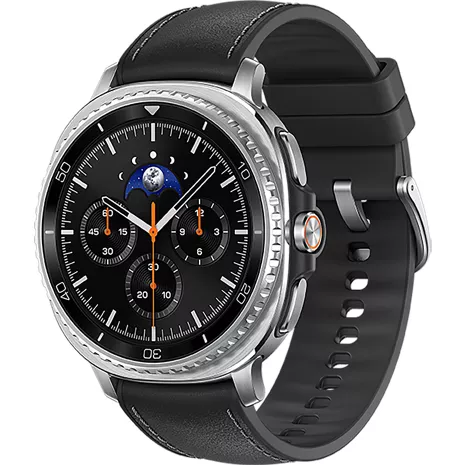
Samsung Galaxy Watch8 Classic Prepaid
4.7
2094 undefined
87
Good product
PastorG . 1 day
R&R Team - 16 hours
Hey there PastorG, We appreciate the time taken to share your thoughts with us regarding your experience using the Samsung Galaxy Watch8 Classic. Your Galaxy Watch8 Classic combines a traditional mechanical-watch aesthetic with practical smart features, daily health tracking, and hands-free control. It functions as a premium, durable daily assistant for navigation, health metrics, and smartphone controls. Voice assistance, direct wrist communication, customizable physical controls, and motion gestures are useful tools for the hands-free work you speak about. If you would like to provide any other feedback with us or if we can assist you further, please feel free to let us know by reaching out to our Samsung Support Team. Thank you for choosing Samsung! - Debra Samsung Support smsng.us/Samsung-Support Warranty Information smsng.us/Warranty-Info Facebook Messenger smsng.us/Facebook-Messenger X Messages https://smsng.us/X-Messages Samsung Community smsng.us/Samsung-Community Watch8 Classic https://www.samsung.com/us/watches/galaxy-watch8-classic/buy/galaxy-watch8-classic-46mm-white-wi-fi-bluetooth-sku-sm-l500nzwaxaa/Samsung US Originally posted on Samsung US
Favorite smartwatch yet!
2 days
R&R Team - 15 hours
Howdy Kholsh, Thanks for taking the time to share your valuable insights with us regarding your experience using the Samsung Galaxy Watch8 Classic. The transition from early Galaxy Gear watches to the modern Galaxy Watch8 Classic represents a complete evolution from basic companion accessories to full-fledged, AI-powered wrist computers! The original Galaxy Gear was a notification ticker and speakerphone strapped to your wrist with very limited standalone apps. The Watch8 Classic is a full-fledged independent computer with a rich app ecosystem, offline music, and AI assistance. So much to love about your new device! Instead of just counting steps, the Galaxy Watch8 Classic acts as a medical-grade/wellness monitor tracking heart strain, sleep architecture, body composition, and real-time athletic coaching. If you would like to share any other feedback with us regarding your experience using your new Galaxy Watch8 Classic or if we can assist you further, please do not hesitate to contact our Samsung Support Team at your earliest convenience. Thank you for being a loyal Samsung customer. - Debra Samsung Support smsng.us/Samsung-Support Warranty Information smsng.us/Warranty-Info Facebook Messenger smsng.us/Facebook-Messenger X Messages https://smsng.us/X-Messages Samsung Community smsng.us/Samsung-Community Watch8 Classic https://www.samsung.com/us/watches/galaxy-watch8-classic/Samsung US Originally posted on Samsung US
- Galaxy AI features track data and require compatible Samsung Galaxy phone, Samsung Health app and Samsung account.
- Requires compatible smartphone.
- Must have gesture settings enabled, be signed into your Samsung and Google accounts, and be connected to the internet directly (by Wi-Fi or LTE model) or via a compatible Samsung Galaxy AI phone.
- Based on typical use; results may vary.
- Galaxy AI features track data and require compatible Samsung Galaxy phone, Samsung Health app and Samsung account. Must wear device for seven nights during a 30-night period
- Requires Wi-Fi connection and Samsung and Google accounts. Galaxy AI features track data and require a compatible Galaxy wearable device (sold separately), Samsung Health app and Samsung account.
- Must be signed into your Samsung and Google accounts, and be connected to the internet directly (by Wi-Fi or LTE model) or via a compatible Samsung Galaxy AI phone.
- Requires network connection to notify emergency contact, GPS accuracy may be affected by obstructions to satellite signal such as buildings.
- Bedtime Guidance: Must wear watch for 3 consecutive nights and set optimal wake up time in the Samsung Health app.
- Sleep Apnea: The Samsung Sleep Apnea Feature is listed by Samsung Electronics Co., Ltd. Mobile experience Business with the U.S. Food and Drug Administration as an over-the-counter device to assess risk of sleep apnea. This device is intended to provide a notification of the risk of sleep apnea in users who have not been previously diagnosed with sleep apnea. It uses software algorithms to analyze input sensor signals and provide a risk assessment for sleep apnea. It is not intended to provide a stand-alone diagnosis, replace traditional methods of diagnosis (e.g., polysomnography), assist clinicians in diagnosing sleep disorders, or be used as an apnea monitor. Consult your physician if you have any questions regarding sleep apnea. Availability may vary by market, carrier, model or a paired smartphone.
- Not intended for medical use.
- Initial pairing with an eligible Android smartphone and separate qualifying wireless plan. Your carrier may not support stand-alone voice calling, or support may be available only in certain areas. Please check with your carrier for more information. Stand-alone functionality limited if paired phone is not powered on or connected to a wireless network.
- Compatible with select apps. Requires Google Gemini account. Results may vary based on input; check responses for accuracy. Google and Gemini are trademarks of Google LLC.

Power for fast-paced lifestyles.

Built to perform. Designed to impress.

Your every command, right on your wrist.

Unlock the secrets to better sleep. Know your body better, keep your heart happy.

Quick updates, at a glance. Personal AI Assistant.

Your running goals, at your pace.
Power for fast-paced lifestyles.
Built to perform. Designed to impress.
Design
Finishes
Stainless steel
Depth
0.37 in.
Width
1.62 in
Height
1.64 in
Charging Port
Wireless
Colors
Black, White
Weight
2.24oz
Notable Materials
Stainless steel
Bands
LTE: 1, 2, 3, 4, 5, 7, 8, 12, 14, 13, 18, 19, 20, 25, 26, 28, 34, 38, 39 40, 41, 66, 71
Accessibility
Auditory
Real-Time Text, TalkBack
Voice Assistant
Google Assistant, Bixby
HAC
N
Visual
High Contrast fonts, Magnification, Font size, Bold Font, Color correction, | Color inversion
Battery
Standby Time
Up to 88hrs
mAh (per hour)
445mAh
Usage Time
Up to 37.28 hours
Network
4G
LTE: 1, 2, 3, 4, 5, 7, 8, 12, 14, 13, 18, 19, 20, 25, 26, 28, 34, 38, 39, 40, 41, 66, 71
Wi-fi
S5E5535, 802.11 a/b/g/n
SAR
46mm: Head: 0.41 W/Kg (Simul: 0.54 W/Kg), Wrist: 1.04 W/Kg (Simul: 1.77 W/Kg)
Number Share Eligible
Y
Global & Roaming Network
N
FCC ID
A3LSML505
World Device
No
Additional Features
Prop 65 Warning
Reproductive Harm
Performance
Processor
Exynos W1000 (1.6GHz/1.5GHz)
OS
Wear OS 6.0
Memory/Storage
RAM: 2.0GB, Flash: 64GB
Display
Type
sAMOLED
Size
1.34”
SML505UZKV
- Samsung Galaxy Watch8 Classic
- Quick Start Guide
- Galaxy AI features track data and require compatible Samsung Galaxy phone, Samsung Health app and Samsung account.
- Requires compatible smartphone.
- Must have gesture settings enabled, be signed into your Samsung and Google accounts, and be connected to the internet directly (by Wi-Fi or LTE model) or via a compatible Samsung Galaxy AI phone.
- Based on typical use; results may vary.
- Galaxy AI features track data and require compatible Samsung Galaxy phone, Samsung Health app and Samsung account. Must wear device for seven nights during a 30-night period
- Requires Wi-Fi connection and Samsung and Google accounts. Galaxy AI features track data and require a compatible Galaxy wearable device (sold separately), Samsung Health app and Samsung account.
- Must be signed into your Samsung and Google accounts, and be connected to the internet directly (by Wi-Fi or LTE model) or via a compatible Samsung Galaxy AI phone.
- Requires network connection to notify emergency contact, GPS accuracy may be affected by obstructions to satellite signal such as buildings.
- Bedtime Guidance: Must wear watch for 3 consecutive nights and set optimal wake up time in the Samsung Health app.
- Sleep Apnea: The Samsung Sleep Apnea Feature is listed by Samsung Electronics Co., Ltd. Mobile experience Business with the U.S. Food and Drug Administration as an over-the-counter device to assess risk of sleep apnea. This device is intended to provide a notification of the risk of sleep apnea in users who have not been previously diagnosed with sleep apnea. It uses software algorithms to analyze input sensor signals and provide a risk assessment for sleep apnea. It is not intended to provide a stand-alone diagnosis, replace traditional methods of diagnosis (e.g., polysomnography), assist clinicians in diagnosing sleep disorders, or be used as an apnea monitor. Consult your physician if you have any questions regarding sleep apnea. Availability may vary by market, carrier, model or a paired smartphone.
- Not intended for medical use.
- Initial pairing with an eligible Android smartphone and separate qualifying wireless plan. Your carrier may not support stand-alone voice calling, or support may be available only in certain areas. Please check with your carrier for more information. Stand-alone functionality limited if paired phone is not powered on or connected to a wireless network.
- Compatible with select apps. Requires Google Gemini account. Results may vary based on input; check responses for accuracy. Google and Gemini are trademarks of Google LLC.
Samsung Galaxy Watch8 Classic Prepaid undefined
4.7
2094 undefined
87
Good product
PastorG . 1 day
R&R Team - 16 hours
Hey there PastorG, We appreciate the time taken to share your thoughts with us regarding your experience using the Samsung Galaxy Watch8 Classic. Your Galaxy Watch8 Classic combines a traditional mechanical-watch aesthetic with practical smart features, daily health tracking, and hands-free control. It functions as a premium, durable daily assistant for navigation, health metrics, and smartphone controls. Voice assistance, direct wrist communication, customizable physical controls, and motion gestures are useful tools for the hands-free work you speak about. If you would like to provide any other feedback with us or if we can assist you further, please feel free to let us know by reaching out to our Samsung Support Team. Thank you for choosing Samsung! - Debra Samsung Support smsng.us/Samsung-Support Warranty Information smsng.us/Warranty-Info Facebook Messenger smsng.us/Facebook-Messenger X Messages https://smsng.us/X-Messages Samsung Community smsng.us/Samsung-Community Watch8 Classic https://www.samsung.com/us/watches/galaxy-watch8-classic/buy/galaxy-watch8-classic-46mm-white-wi-fi-bluetooth-sku-sm-l500nzwaxaa/Samsung US Originally posted on Samsung US
Favorite smartwatch yet!
2 days
R&R Team - 15 hours
Howdy Kholsh, Thanks for taking the time to share your valuable insights with us regarding your experience using the Samsung Galaxy Watch8 Classic. The transition from early Galaxy Gear watches to the modern Galaxy Watch8 Classic represents a complete evolution from basic companion accessories to full-fledged, AI-powered wrist computers! The original Galaxy Gear was a notification ticker and speakerphone strapped to your wrist with very limited standalone apps. The Watch8 Classic is a full-fledged independent computer with a rich app ecosystem, offline music, and AI assistance. So much to love about your new device! Instead of just counting steps, the Galaxy Watch8 Classic acts as a medical-grade/wellness monitor tracking heart strain, sleep architecture, body composition, and real-time athletic coaching. If you would like to share any other feedback with us regarding your experience using your new Galaxy Watch8 Classic or if we can assist you further, please do not hesitate to contact our Samsung Support Team at your earliest convenience. Thank you for being a loyal Samsung customer. - Debra Samsung Support smsng.us/Samsung-Support Warranty Information smsng.us/Warranty-Info Facebook Messenger smsng.us/Facebook-Messenger X Messages https://smsng.us/X-Messages Samsung Community smsng.us/Samsung-Community Watch8 Classic https://www.samsung.com/us/watches/galaxy-watch8-classic/Samsung US Originally posted on Samsung US
Great for fitness
Jmathieus . 3 days
Samsung US Originally posted on Samsung US
Love my Watch 8 Classic
LOVE2LOVE . 4 days
Samsung US Originally posted on Samsung US
Elegant Design
ThatGuy81 . 6 days
R&R Team - 5 days
Hello there ThatGuy81, Thanks for reaching out and taking the time to share your feedback about your experience with us. Your feedback is immensely valuable to us as we continue to innovate while enhancing our product line to better meet your needs and expectations. It's wonderful to hear how pleased you've been with your purchase and how much you're enjoying the features and functionality of your Galaxy Watch8 Classic. If we can assist you further or if you would like to share additional feedback with us, please do not hesitate to contact Samsung Support at your earliest convenience. Thank you for being a valued Samsung customer. - Debra Samsung Support smsng.us/Samsung-Support Warranty Information smsng.us/Warranty-Info Facebook Messenger smsng.us/Facebook-Messenger X Messages https://smsng.us/X-Messages Samsung Community smsng.us/Samsung-Community Galaxy Watch8 Classic https://www.samsung.com/us/watches/galaxy-watch8-classic/Samsung US Originally posted on Samsung US
I absolutely love the Samsung Galaxy watch 8
MarineMomforLife . 6 days
R&R Team - 5 days
Hey there MarineMomforLife, Thank you for taking the time to share your feedback about your experience with the Samsung Galaxy Watch8 Classic. We truly value your input and are committed to continuous innovation while improving our product line to better serve our customers and meet their needs and expectations. Your feedback is not only valued, it also helps us in our ongoing efforts to enhance the customer experience. It's wonderful to hear that you've fully integrated your Galaxy Watch8 Classic into your daily life and are staying connected to what's most important to you! If you would like to share additional feedback with us or if we can further assist you, please do not hesitate to contact Samsung Support. Thank you for your continued patronage and for being a steadfast Samsung customer. - Debra Samsung Support smsng.us/Samsung-Support Warranty Information smsng.us/Warranty-Info Facebook Messenger smsng.us/Facebook-Messenger X Messages https://smsng.us/X-Messages Samsung Community smsng.us/Samsung-Community Watch8 Classic https://www.samsung.com/us/watches/galaxy-watch8-classic/Samsung US Originally posted on Samsung US
Nice looking watch
OneEyedMike . 9 days
Samsung US Originally posted on Samsung US
Tactile Control Meets Modern Performance
SamsungFan . 9 days
Samsung US Originally posted on Samsung US
I can do anything worth this watch
Shoppingmamaonline . 10 days
Samsung US Originally posted on Samsung US
Watch classic 8
CK38pa . 11 days
Samsung US Originally posted on Samsung US
Samsung Galaxy Watch8 Classic Prepaid undefined
Phone number . Oct 11, 2026
Can this watch have its own phone number and not be connected to an actual phone
The watch normally works with your phone's number for the purposes of communication. The watch can be set up in standalone mode for a child, with some restrictions on how it will function. These steps can be found at https://www.verizon.com/support/knowledge-base-310633/ -James
Joachim . Jul 15, 2026
Can you call and accept calls , send and receive text messages
Rebecca . Jun 22, 2026
Can i control spotify through the watch?