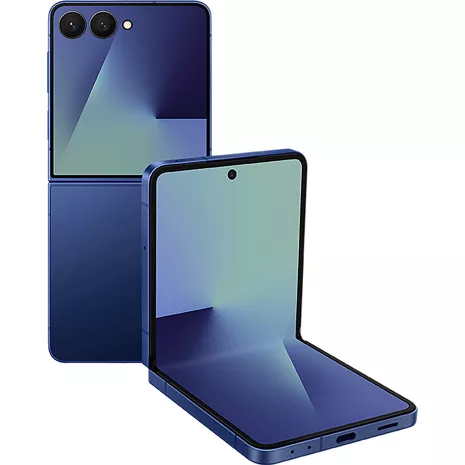
Samsung Galaxy Z Flip7 Prepaid
4.6
3447 undefined
82
I choose to only stay with Samsung Galaxy products
ACap23 . 1 day
Samsung US Originally posted on Samsung US
Forever a Z flip fan
FlipGirlie444 . 3 days
Samsung US Originally posted on Samsung US
- Display measurements are diagonal, and actual viewable area is less due to rounded corners and camera hole punch.
- Displays daily select information from select apps (some apps may require connection and/or consent to access data). Personal data intelligence must be enabled.
- Compatible with select apps. Requires Google Gemini account. Results may vary based on input; check responses for accuracy. Google and Gemini are trademarks of Google LLC.
- Auto zoom length varies and is shorter than standard zoom length.
- Based on average battery life under typical usage conditions. Average expected performance based on typical use. Actual battery life depends on factors such as network, features selected, frequency of calls, and voice, data, and other application usage patterns. Results may vary.
- Galaxy Ring AI features track data and require compatible phone and Samsung account. Galaxy AI features by Samsung will be provided for free until the end of 2025 on supported Samsung Galaxy devices. Products sold separately.
- Satellite connectivity by Verizon requires select smartphones with updated software. Must be outside with line of sight to satellite.

Stay connected over Satellite.

Flip without fear.

Bigger, better cover screen that fits you.

Stay in the now.

Make every photo a flex.

Stylish phone. Serious performance.

Put a Ring on your health.
Stay connected over Satellite.
Flip without fear.
Design
Colors
Jetblack, Coralred, Blue Shadow
Height
Folded: 3.37 in | Unfolded: 6.56 in
Width
2.96 in
Notable Materials
Foldable, Armor Aluminum, Gorilla® Glass Victus® 2
Weight
6.63 oz
Depth
Folded: 0.54 in | Unfolded: 0.25 in
Charging Port
USB Type-C
Accessibility
Overall
Accessibility Shortcut, Android Accessibility Suite, Bixby
Auditory
Hearing Aid Support, Live Caption, Live Transcribe, Real-Time Text, Sound Amplifier, Sound Notifications
Voice Assistant
Bixby, Gemini
Mobility / Cognitive
Switch Access
Hearing Aid Compatibility
Pass (2019 Standard)
Visual
Magnification, Text and display, TalkBack, Select to Speak
Network
4G
4G LTE speeds range between 11 and 75 Mbps for downloads and between 1 and 13 Mbps for uploads. Great for voice calls, downloading files, web surfing and other activities that don't require higher bandwidth.
Wi-fi
802.11 a/b/g/n/ac/ax/be, Tri Band (2.4/5/6GHz), WiFi 7
SAR
Head: 0.86 W/Kg | Body: 1.14 W/Kg | Hotspot: 1.14 W/Kg | Simul: 1.59 W/Kg
FCC ID
A3LSMF766U
Global & Roaming Network
LTE 1,3,7,8,12,18,19,20,26,28 | 5G n1,3,7,8,20,28,38,41,77,78/n257 | GSM/UMTS Quad | TDD LTE 38,39,40,41
5G Nationwide
5G speeds range between 34 Mbps and 149 Mbps for downloads and between 6 and 37 Mbps for uploads. Great for gaming, streaming, and other steady bandwidth activities
5G Ultra Wide-Band
5G Ultra Wideband speeds range between 195 and 634 Mbps for downloads and between 10 and 53 Mbps for uploads. Great for work, file-sharing, video conferencing, and other high-bandwidth activities.
World Device
Yes. Works in over 200 countries depending on your plan.
Battery
Standby Time
Up to 14 days
mAh (per hour)
4,300 mAh
Usage Time
Up to 26 hours
Powershare
Y
Wireless Charging
Fast Wireless Charging 2.0
Fast Charge
Up to 25W Super Fast Charging
Additional Features
Prop 65 Warning
Y, Reproductive Harm
Camera
Front Camera
10MP FF F2.2
Rear Camera
(Wide) 50MP OIS AF F1.8 | (UltraWide) 12MP FF F2.2 + Flash
Video
Front : 4K(3840 x 2160) @ 60fps | Back : 4K(3840 x 2160) @ 60fps
Camera Modes
Portrait, Photo, Video, Pro, Pro Video, Night, Food, Panorama, Slow Motion, Hyperlapse, Portrait Video, Dual Rec, Single Take, Dual Preview, Auto Framing, 4K Video Recording
Performance
Bluetooth
5.4
Processor
Samsung Exynos 2500 | Deca-core, 3.3GHz + 2.74GHz + 2.36GHz + 1.8GHz
OS
Android 16.0 | One UI 8.0
Expandable Memory
N
Hotspot
Up to 10 devices (4G or 5G)
Security
Fingerprint sensor | Facial recognition | Knox Secure
Memory/Storage
256GB | 512GB ROM + 12GB LPDDR5X RAM
Display
Screen Size
Main: 6.9 in | Cover: 4.1 in
Refresh Rate
120 Hz Adaptive
Screen
Dynamic AMOLED 2X | Main: Samsung Ultra Thin Glass | Cover: Gorilla® Glass Victus® 2
Aspect Ratio
Main: 21:9 (2520 x 1080) | Cover: 4.4:4 (1048 x 948)
SMF766UDBV
- Samsung Galaxy Z Flip7
- USB Cable (Type C to C)
- Quick Reference Guide / Terms & Conditions
- Display measurements are diagonal, and actual viewable area is less due to rounded corners and camera hole punch.
- Displays daily select information from select apps (some apps may require connection and/or consent to access data). Personal data intelligence must be enabled.
- Compatible with select apps. Requires Google Gemini account. Results may vary based on input; check responses for accuracy. Google and Gemini are trademarks of Google LLC.
- Auto zoom length varies and is shorter than standard zoom length.
- Based on average battery life under typical usage conditions. Average expected performance based on typical use. Actual battery life depends on factors such as network, features selected, frequency of calls, and voice, data, and other application usage patterns. Results may vary.
- Galaxy Ring AI features track data and require compatible phone and Samsung account. Galaxy AI features by Samsung will be provided for free until the end of 2025 on supported Samsung Galaxy devices. Products sold separately.
- Satellite connectivity by Verizon requires select smartphones with updated software. Must be outside with line of sight to satellite.
Samsung Galaxy Z Flip7 Prepaid undefined
4.6
3447 undefined
82
I choose to only stay with Samsung Galaxy products
ACap23 . 1 day
Samsung US Originally posted on Samsung US
Forever a Z flip fan
FlipGirlie444 . 3 days
Samsung US Originally posted on Samsung US
Z Flip 7 Phone
AGGR12 . 7 days
Samsung US Originally posted on Samsung US
I chose this product because it fits in your pocke
Alyt233 . 7 days
Samsung US Originally posted on Samsung US
I love how unique it is from other phones.
McLovin . 10 days
Samsung US Originally posted on Samsung US
This product has great accessibility folded.
Ricolonoscopy . 10 days
Samsung US Originally posted on Samsung US
Love, love, love this phone
BunniC . 11 days
Samsung US Originally posted on Samsung US
The size is perfection!
Pete4soccer . 11 days
Samsung US Originally posted on Samsung US
I LOVE THIS PHONE!!!
DaleBob . 12 days
Samsung US Originally posted on Samsung US
This product works very well!
LuckyyPhone . 13 days
Samsung US Originally posted on Samsung US