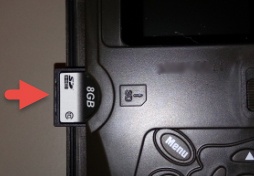
Spartan GoCam™ - Insert SD / Memory Card
Here's how to insert an SD / memory card into your Spartan GoCam.
The Spartan GoCam supports SD memory cards.
- Ensure the device is powered off.
- With the gold contacts facing down, insert the SD / Memory Card into the card slot (on the left side) until it clicks into place.