Common Camera Settings - LG G Pad™ X8.3
For info on common camera settings (e.g., storage, timer, front / rear camera, etc.), check out this.
For additional camera settings, refer to the LG G Pad X8.3 user guide.
Menu
- From a Home screen, tap theCamera icon
(at the bottom).
- Tap theMenu iconto show or hide camera options.
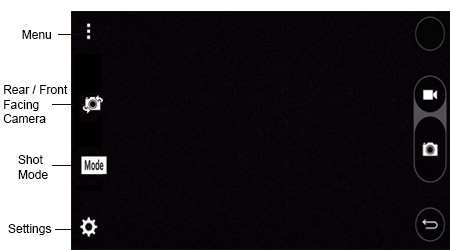

Shot Mode
- From a Home screen, tap theCamera icon
- TapModeto select an option (Auto, Panorama).

Rear or Front Facing Camera
- From a Home screen, tap theCamera icon
- Tap theCamera Facing iconto switch between rear and front-facing camera.

HDR
HDR (High Dynamic Range) - Combines photos or videos taken at different exposures for one optimal photo or video.
- From a Home screen, tap theCamera icon
- Tap theSettings icon.
- Tap theHDR iconto select an option (On, Off, Auto).

Resolution
- From a Home screen, tap theCamera icon
- Tap theSettings icon.
- Tap theResolution icon.
- Select an option:
- 4:3
- 8:5
- 16:9
- 1:1

Timer
- From a Home screen, tap theCamera icon
- Tap theSettings icon.
- Tap theTimer icon.
- Select an option:
- Off
- 3 sec
- 10 sec

Storage location
- From a Home screen, tap theCamera icon
- Tap theSettings icon.
- Tap theStorage iconto select an option:
- Internal device memory
- Memory card (SD)
