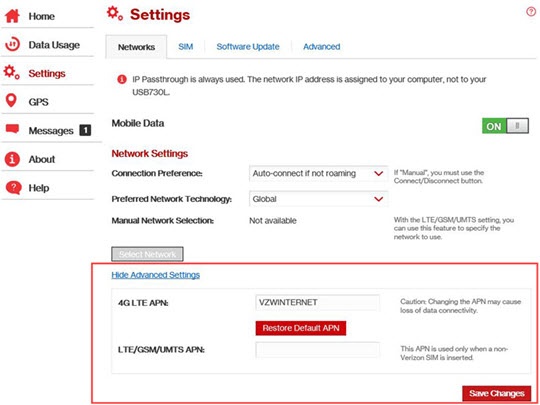
Global Modem USB730L - Edit Access Point Name (APN)
Here's how to configure the Access Point Names (APNs) your Global Modem USB730L can use.
Changing advanced settings may be harmful to the stability, performance, and security of the modem. Contact your local IT administrator prior to altering any of these settings.
LTE Access Point Name (APN) Definitions
- vzwimsUsed for connections to IMS services. Required for TXT messaging.
- vzwadminUsed for administrative functions.
- vzwinternetRequired for general Internet connections.
- vzwappRequired for PDA data service.
- vzwcfUsed for connections that must be routed through content filtering.
- xx.vzwentpUsed for connections to mobile private networks.'xx' would be replaced by the enterprise MPN identifier.
- xx.vzwstaticUsed for static IP connections.'xx' would be replaced by the appropriate static IP pool identifier.
- Connect the USB modem to the computer then access the Admin Web Interface.
- From the left menu, clickSettings.
- From the Networks tab, clickShow Advanced Settings(lower-left).
- From the 4G LTE APN field, edit the APN as required.To reset the APN clickRestore Default APN.If using a non-Verizon SIM, enter the desired APN into the 'LTE/GSM/UMTS APN' field.
- ClickSave Changes(lower-right).