Session status messages
Session Status

Due to inactivity, your session will end in approximately 2 minutes. Extend your session by clicking OK below.

Due to inactivity, your session has expired. Please sign in again to continue.

KYOCERA Cadence LTE - View Device ID

2026-10-17 01:30:50.723

KYOCERA Cadence LTE - View Device ID

Here's how to find your device ID (IMEI / MEID) for your Cadence.
  1. From the main screen, select
    Menu
    .
    Utilize the 5-way navigation pad to highlight and the center button to select.
    5-way Navigation Pad
  2. Navigate:
    Tools & Setting settings icon
    Settings
    About Phone
    .
  3. Select
    Status
    .
  4. View the IMEI.
You can also remove the battery and view the MEID inside the battery compartment.
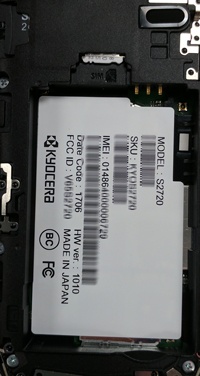
View the IMEI