Samsung SmartThings Tracker - Deactivate Tracker
Here's how to deactivate your Samsung SmartThings Tracker via the ThingSpace Portal.
- Open the SmartThings app
.
- From the SmartThings Home screen, select your tracker.
- Tap theMenu icon
then tap
Settings. - TapManage mobile service.The app opens a new window to the ThingSpace Portal.
- Enter your ThingSpace account User ID and password then tapSign in.
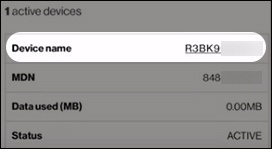
- From the 'Account Summary' screen, scroll down to the bottom then tap the highlighted device name.
- From the 'Actions' menu dropdown, tapDeactivate.
- TapConfirm.
- Once the request is successful, tapOk.