Samsung Galaxy S10 / S10+ / S10e Insert SD / Memory Card
Samsung Galaxy S10 / S10+ / S10e
Insert SD / Memory CardIf your Galaxy S10 / S10+ / S10e is low on storage, use an SD card for extra space. Follow these steps to insert or remove it without losing data.
Steps
- From the top edge of the device (display facing up), use the insertion/removal tool or a paperclip to unlock the tray by inserting it into the provided slot then remove the card tray.
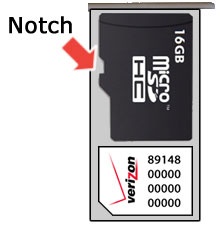
- Insert the card as shown with the gold contacts facing down.