Google Pixel 3a / 3a XL - Common Camera Settings
Here's info on common camera settings (e.g., flash, timer, front / rear camera, etc.) for your Pixel 3a / 3a XL.
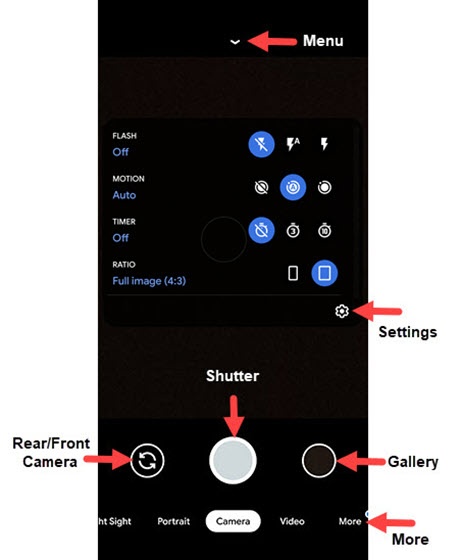
Shooting Modes
- From a Home screen, tap theCamera icon
(at the bottom).
- Scroll left or right to choose an option from the bottom of the screen:
- Night SightTap to take a low-light photo without the flash.
- PortraitTap to switch camera to portait mode.
- CameraTap to switch to camera mode.
- VideoTap to switch to video mode.
- Modes
- Panorama
- Photo Sphere
- Playground
- Lens
Rear or Front Facing Camera
- From a Home screen, tap theCamera icon
- Tap theCamera Facing iconto switch between rear and front camera.

Flash
- From a Home screen, tap theCamera icon
- Tap theMenu arrow icon
.
- Tap the applicable Flash icon:
- Flash off
- Flash auto
- Flash on


Motion
- From a Home screen, tap theCamera icon
- TapCamera(at the bottom).
- Tap theMenu arrow icon
- Tap the applicable Motion icon:
- Off
- Auto
- On


Timer
- From a Home screen, tap theCamera icon
- Tap theMenu arrow icon
- Tap the applicable Timer icon:
- Off
- 3 sec
- 10 sec


Settings
- From a Home screen, tap theCamera icon
- TapSettings.
- Tap to select an option or turn on
or off
:
- General
- Save location
- Camera sounds
- Google Lens suggestions
- Framing hints
- Save selfie as previewed
- Social Share
- Gestures
- Grid Type
- Advanced
- Photo
- Camera photo resolution
- Video
- Video stabilization
- Help and feedback
- Send feedback
- Help
