Alcatel Avalon™ - Common Camera Settings
Here's info on common camera settings (e.g., flash, timer, front / rear camera, etc.) for your Avalon.
For additional support, refer to the Camera section of the User Guide.
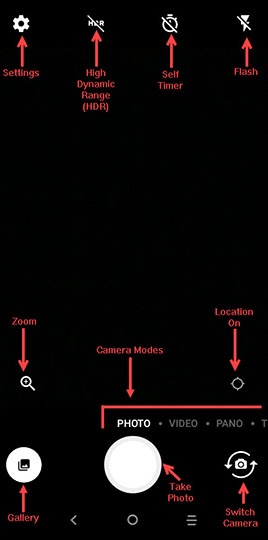
Flash
- From a Home screen, tap theCamera icon
(at the bottom).
- Tap theFlash icon
.
- Select an option:
- On
- Off
- Auto
Rear or Front Facing Camera
- From a Home screen, tap theCamera icon
- Tap theCamera Facing icon
to switch between rear and front-facing camera.
Camera Modes
- From a Home screen, tap theCamera icon
- Select an option:
- Photo
- Video
- Pano
- Time-lapse
- Instant Collage
Photo Size
- From a Home screen, tap theCamera icon
- TapSettings
.
- TapPhoto sizethen select an option:
- 4:3 (5MP)
- 16:9 (4MP)
- 2:1 (3MP)
- 4:3 (2MP)
- 16:9 (1MP)
Video Quality
- From a Home screen, tap theCamera icon
- TapSettings
- TapVideo Qualitythen select an option:
- HD 720p
- SD 480p
Storage Location
- From a Home screen, tap theCamera icon
- TapSettings
- TapStoragethen select an option:
- Internal storage
- SD storage