Orbic® Journey™ V / Orbic Journey - Auto Receive Messages
Here's how to check why you're not receiving your picture or video messages on your Orbic Journey V / Journey.
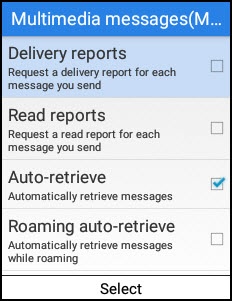
If you're not receiving picture / video messages, follow the steps below to ensure 'Auto-retrieve' is turned on.
- From the main screen, selectMenu.Utilize the 5-way navigation pad to highlight and the center button to select.
- SelectMessage
.
- Select theright soft key
to choose Options.
- SelectSettings>Multimedia messages (MMS).
- SelectAuto-retrieve.
- Press thecenter buttonon the 5-way navigation pad to enable or disable Auto-retrieve.Enabled when a checkmark
is present.