Inseego Business Phone Connect - Fax Services
Here's info on configuring fax services on your Business Phone Connect.
The Business Phone Connect offers support of Group 3 fax machines used in most homes and businesses.
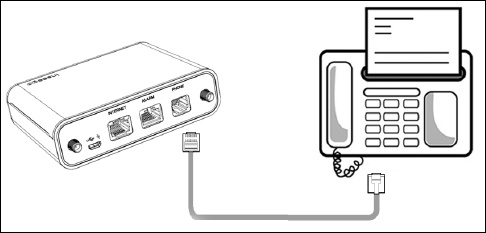
Connect the fax machine to the device and perform the following:
- Ensure you can make and receive standard phone calls.
- Power the device off and back on again.
- Verify the Error Correction Mode (ECM) setting on your fax machine is turned off.
- Lower the resolution on your fax machine to 'Standard' or 'Normal', as too high a resolution can cause the fax to fail.
- Lower the speed on your fax machine to a baud rate of 9600.For setup and advanced troubleshooting, contact the equipment manufacturer. Verizon doesn't support third-party products.