Wireless Home Phone (LVP2) - Connect Fax Services
Here's some info on using a fax machine with your Wireless Home Phone (LVP2).
Your Wireless Home Phone (LVP2) offers support of Group 3 fax machines used in most homes and businesses.
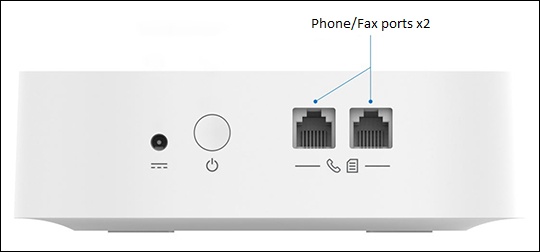
Connect the fax machine to one of the Phone/Fax ports on the back of the device then perform the following:
- Ensure you can make and receive standard phone calls.
- Wireless Home Phone (LVP2) can support either fax or voice calls, but not both simultaneously.
- Follow fax machine instructions to send or receive faxes.
Troubleshooting steps:
- Power the device off and back on again.
- Lower the speed on your fax machine to a baud rate of 9600 or less: 2400 or 4800.Your fax may be going to an analog destination and lowering the speed will help the fax go through.
- Lower the resolution on your fax machine to "Standard" or "Normal", as too high a resolution increases the amount of data that needs to be sent and the time it takes to send it.
- If the above steps do not help, then verify the Error Correction Mode (ECM) setting on your fax machine is turned off.For setup and advanced troubleshooting, contact the manufacturer of the fax machine. Verizon Wireless doesn't support third-party products.