Wireless Home Phone (LVP2) - Insert / Remove SIM Card
Here's how to properly insert or remove the SIM card for your Wireless Home Phone (LVP2).
Insert SIM Card
Do not attempt to insert/remove the SIM card while the device is powered on. Doing so may harm the SIM card and/or the device.
The Wireless Home Phone (LVP2) comes with the SIM card installed.
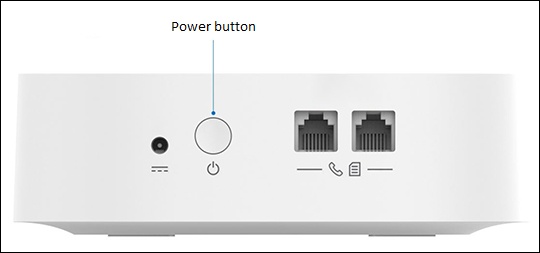
- Ensure the device is powered off.
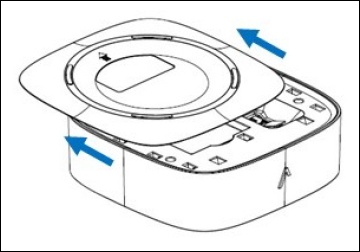
- Remove the battery cover.
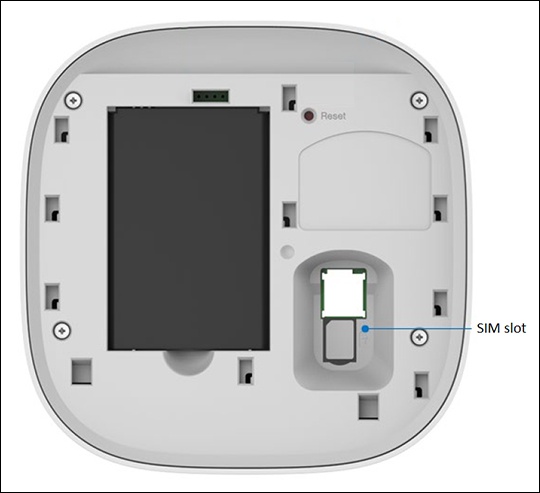
- With the gold contacts facing down, align the card (notch first) then gently push the card in until it clicks into place.
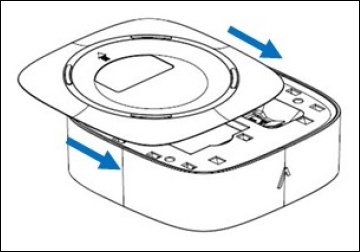
- Replace the battery cover.
Remove SIM Card
- Ensure the device is powered off.
- Remove the battery cover.
- Gently push in on the card, then carefully pull out the SIM card.The SIM card slot is spring-loaded, which utilizes a push-push type SIM card slot.If applicable, refer to Insert the SIM Card section above.
- Replace the battery cover.