LG G Pad 5 10.1 FHD - Common Camera Settings
Here's info on common camera settings (e.g., flash, timer, front / rear camera, etc.) for your G Pad 5 10.1 FHD.
If you need to adjust common camera settings (e.g., flash, timer, etc.) for your LG G Pad 5™ 10.1 FHD, follow these step-by-step instructions.
For additional info on camera settings, refer to the Camera section of the user guide.
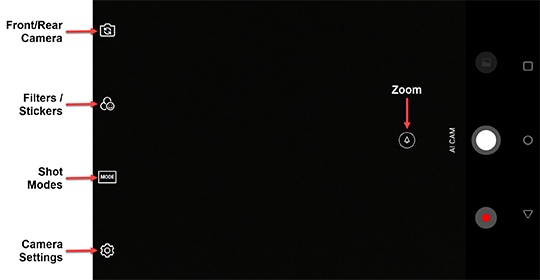
Rear or Front Facing Camera
- From a Home screen, tap theCamera icon
(lower-right).
- Tap theCamera Facing icon
to switch between rear and front-facing camera.
Filters / Stickers
- From a Home screen, tap theCamera icon
- Tap theFilters/Stickers icon
.
- Tap the desired filter effect (e.g., None, Vintage, etc.).
- To select a sticker, tap theStickers icon
then aim the camera at a subject's face.
Shot Modes
- From a Home screen, tap theCamera icon
- Tap theMode icon
.
- Select an option:
- Auto
- Food
- Panorama
- YouTube Live
Zoom
- From a Home screen, tap theCamera icon
- Touch and hold theZoom icon
then swipe left or right to increase or decrease the zoom level.
Zoom ranges from 1.0x to 8.0x.
Settings
- From a Home screen, tap theCamera icon
- Tap theSettings icon
then configure any of the following:
- TapHDRthen select the preferred option:HDR (High Dynamic Range) combines photos or videos taken at different exposures for one optimal photo or video.
- Auto
- On
- Off
- Tap any of the following switches to turn on
or off
:
- Shutter sound
- Cheese shutter
- Scan QR code
- Tag locations
- Grid
- Add SignatureTo edit your signature:
- TapAdd signature.
- Enter or edit the preferred signature.
- Select a font (e.g., Handwriting, LG Smart, etc.).
- TapADDto apply.
- To change the storage location, tapStoragethen select an option:
- SD CardThis option only appears if an SD card is inserted.
- Internal storage
- Tap theVideo size icon
(at the bottom) then select the preferred option:
- FHD 16:9 1920x1080
- HD 16:9 1280x720
- Tap theTimer icon
(lower-right) then select the preferred option:
- Off
- 3 sec
- 5 sec
- 10 sec
- If needed, tapHelpfor explanations of various camera features.