Kazuna eTalk MYFLIX - Common Camera Settings
Here's info on common camera settings (e.g., flash, timer, front / rear camera, etc.) for your eTalk MYFLIX.
If you need to adjust common camera settings (e.g., flash, filters, etc.) for your Kazuna eTalk MYFLIX™ follow these step-by-step instructions.
For additional camera support, refer to the Camera section of the user guide.
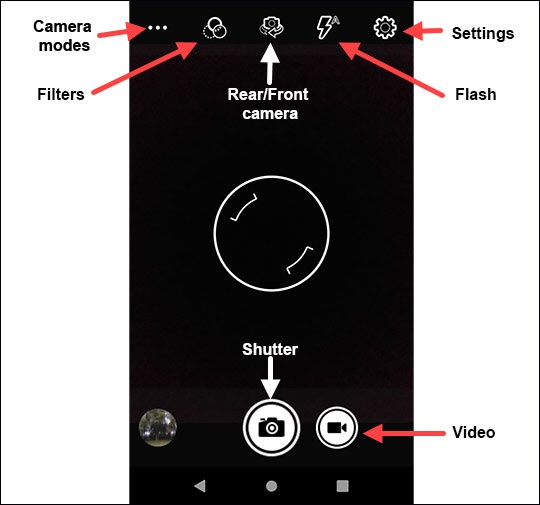
Take a Picture / Record a Video
- From a Home screen, tap theCamera icon
(at the bottom).
- Do one of the following:
- Tap theCamera iconto take a picture.
- Tap theCamcorder iconto record a video.


Camera Mode
- From a Home screen, tap theCamera icon
- Tap one of the following camera modes:
- Automatic
- HDR
- ProMode

Filters
- From a Home screen, tap theCamera icon
- Tap one of the following filters:
- Mono
- Sepia
- Negative
- Solarize
- Posterize
- Aqua

Rear / Front Camera
- From a Home screen, tap theCamera icon
- Tap theCamera Facing iconto switch between rear and front camera.

Flash
- From a Home screen, tap theCamera icon
- Tap theFlash iconto set the flash to automatic, on or off.

Settings
- From a Home screen, tap theCamera icon
- TapSettings.
- Tap any of the corresponding switches to turn the following options on
or off
:
- Camera / Video Settings:
- Continuous Shot
- Redeye Reduction
- Shutter Sound
- Image Stabilization
- GeneralTapStoragethen select Phone or SD Card.
- Picture sizeTapPicture sizethen select the preferred setting (5M pixels, 3M pixels, etc.).Selected when a dot is present.
- Picture qualityTapPicture qualitythen select the preferred setting (Low, Standard, High).Selected when a dot is present.
