Orbic Maui - View SIM Card Number
Here's how to view the SIM card number associated with your Orbic Maui.
If you need to view the SIM card number (ICCID) for the SIM card in your Orbic® Maui™ follow these step-by-step instructions.
- From a Home screen, swipe up to display all apps.
- Navigate:Settings
>
System>About phone. - TapSIM status.
- View the ICCID (SIM Card ID).
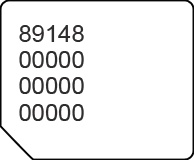
You can also remove the SIM card and view the 20-digit SIM card number (with the gold contacts facing away).