Arris NVG558 Router - Access Admin Page
Here's how to access the admin page on your NVG558 LTE router.
Ensure you have an active connection (wired or wireless) between the router and the device you're using to access the admin page.
- Establish a Wi-Fi connection with a device, locate the Wi-Fi network name starting with 'Verizon-XXXX' in the device's settings.Network name, 'Verizon-XXXX', is the network name printed on the label located on the side and bottom of the NVG558.If connecting to a computer, select the appropriate operating system for assistance:
- From the device that's connected to the router, open a web page then enterhttp://my.routerinto the URL address field.Alternatively, enter 192.168.0.1 into the URL address field.
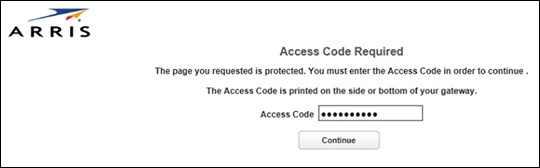
- Enter the Access Code then clickContinue.The default Access Code can be found on the bottom of the device and is different from the Wi-Fi password.