Verizon Internet Gateway Access Admin Page
Verizon Internet Gateway
Access Admin PageAccessing the admin page for your Internet Gateway lets you configure Wi-Fi or internet settings, view the firmware version or enhance security.
Before you begin
Ensure the computer is connected to the router via Wi-Fi. A wired Ethernet connection may also be used. Ensure the wireless radio is enabled.
Steps
- From the device that's connected to the Verizon Internet Gateway, open an internet browser then navigate tomynetworksettings.comor one of the following IP addresses:
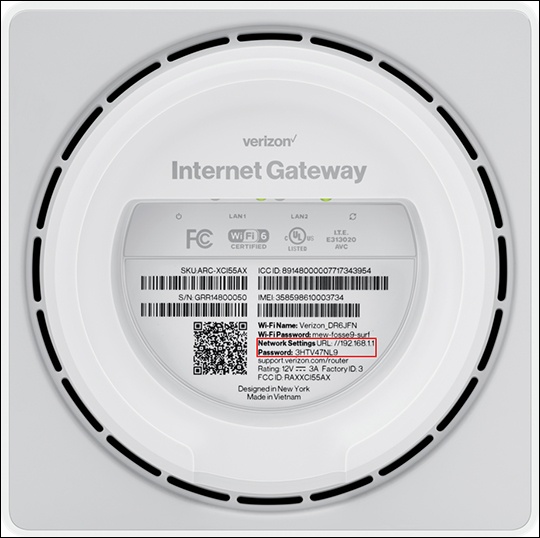
- WNC-CR200A & ARC-XCI55AX: https://192.168.1.1
- ASK-NCQ1338 & ASK-NCQ1338FA: https://192.168.0.1
You must have an active connection to the router for this page to open.You may see a security message warning that 'Your connection is not private'.To get to the login screen, clickAdvancedthenProceed to 192.168.X.X (unsafe)link. - Enter the admin password then clickLog In.Refer to the label on the bottom of the router for default network info (see example image below).If needed, you can change the sign-in credentials.