Lenovo ThinkPad X13s - Common Camera Settings
Here's info on common camera settings (e.g., flash, timer, etc.) for your ThinkPad X13s.
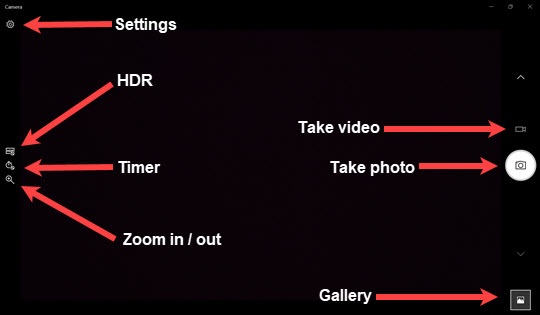
HDR
- Navigate:.Windows keyAll appsCamera
- Tap or click theHDR icon
.
- Select an option:
- Auto
- Pro
- Off

Timer
- Navigate:.Windows keyAll appsCamera
- Tap or click theTimer icon
.
- Select an option:
- Off
- 2 seconds
- 5 seconds
- 10 seconds
Zoom In / Out
- Navigate:.Windows keyAll appsCamera
- Tap or click theZoom icon
then slide the bar up and down to zoom in / zoom out.
Settings
- Navigate:.Windows keyAll appsCamera
- Tap theSettings icon
then choose any of the following options:
- Camera
- Pro ModeTap or click to turn on or off.
- Framing gridTap or click then choose an option:
- Off
- Rule of thirds
- Golden ratio
- Crosshirs
- Square
- Photos
- Photo qualityTap or click then choose an option:
- 2.1MP 16:19 (1920x1080)
- 0.9MP 16:9 (1280x720)
- 0.5MP 16:9 (960x540)
- 0.2MP 16:9 (640x360)
- 0.06MP 16:9 (320x180)
- 1.9MP 4:3 (1600x1200)
- 0.3MP 4:3 (640x480)
- 0.08MP 4:3 (320x240)
- 0.1MP 11:9 (352x288)
- 0.4MP 53:30 (848x480)
- 0.1MP 53:30 (424x240)
- Time lapseTap or click to turn on or off.
- Videos
- QualityTap or click then choose an option:
- 1080p 16:9 30fps
- 720p 16:9 30fps
- 540p 16:9 30fps
- 360p 16:9 30fps
- 180p 16:9 30fps
- 1200p 4:3 30fps
- 480p 4:3 30fps
- 240p 4:3 30fps
- 288p 11:9 30fps
- 480p 53:30 30fps
- 240p 53:30 30fps
- Flicker reductionTap or click then choose an option:
- 50 Hz
- 60 Hz
- Auto