One Talk T53W, T54W & T57W IP Desk Phones Activate / Set Up Device
One Talk T53W, T54W & T57W IP Desk Phones
Activate / Set Up DeviceActivate your One Talk T5xW series IP desk phone to get started. This ensures you can make calls, send messages and connect to your company network.
Before you begin
Activation requires a valid US address for E911 functionality.
Wi-Fi Calls always originate in the U.S., even when you're outside of the U.S.
- Calls to U.S. numbers are not billed (except for 411 or other premium calls).
- Calls to international numbers are billed according to your international long distance plan.
A soft reset is needed on the desk phone when a new endpoint is added to the One Talk MDN.
Steps
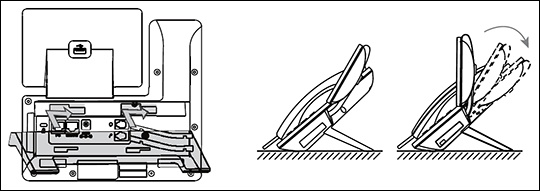
- Attach the desk mount stand.
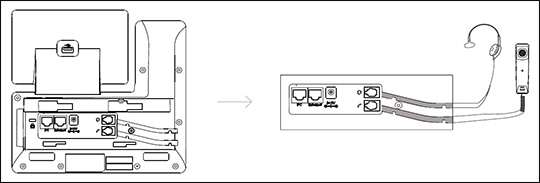
- Connect the headset.The wireless headset adapter and headset are sold separately.
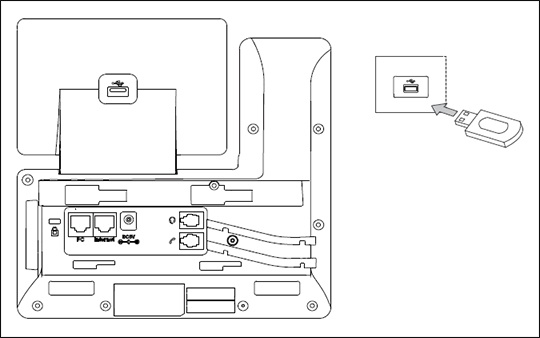
- Connect optional USB accessories as shown below:The USB port can be used to connect devices such as the EXP50 Expansion Module or a USB flash drive for call recording.
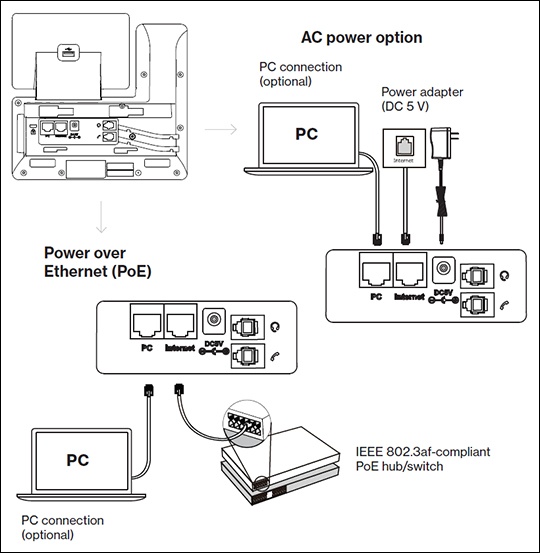
- Connect the power and Ethernet using one of the following options:Contact the IT administrator before selecting the power option.
- AC Power
- PoE (Power over Ethernet)
- Wait for the phone to finish the initialization process.The process may take up to 15 minutes.
- After successful activation, the 911 notification screen displays. PressOK.