One Talk W60 IP DECT Cordless Phone Activate / Set Up Device
One Talk W60 IP DECT Cordless Phone
Activate / Set Up DeviceActivate your One Talk W60 IP DECT cordless phone to get started. This ensures you can make calls and connect to your company network.
Before you begin
The W60 bundle includes a base station (W60) and one handset (W56HV). The W56HV handset that shipped as part of the bundle will automatically link to the base station.
Activation requires a valid US address for E911 functionality.
A soft reset is needed on the desk phone when a new endpoint is added to the One Talk MDN.
Steps
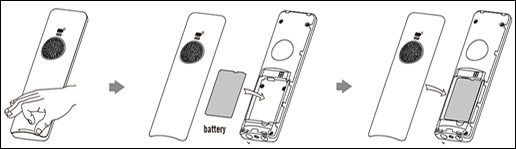
- Insert the battery into the W56HV handset.Use the supplied charging cradle power adapter (5V/600mA). With the battery charged, you can use the handset to monitor the progress of the base station initialization and registration process.
- Turn the handset on.
- Set up the base station using either the desktop or wall mount setup option.
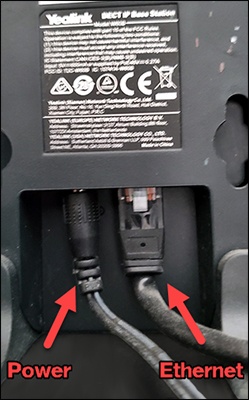
- Connect the base station to AC power and Ethernet using one of the following options:Contact your IT administrator before selecting the power option.
- AC PowerUse the supplied charging cradle power adapter (5V/600mA).
- PoE (Power over Ethernet)
- Wait for the phone to finish the initialization process.
- To register additional handsets:
- On the W60 base station, press and hold thePage/Sync Button(looks like a Wi-Fi icon) on the base station until the top LED blinks (The LED blinks fast three blinks after approximately 4 seconds).
- On the W56 handset, pressOKthen navigate: .
- Choose the desired base station then pressOK.
- After the handset finds the base station pressOK.
- Enter the base station PIN (default: 0000) then selectDoneto finish registration.
- Follow the registration steps again to register a handset to multiple base stations.Be sure to choose a base station that has not already been selected to avoid overwriting the existing selection.
- To de-register a handset from a base station:
- From the main screen, press thecenter navigation buttonon the W56HV handset then navigate: .
- Enter the base station PIN (default: 0000) then selectDone.
- From the list of handsets displayed on the LCD screen, highlight the desired handset name then pressOK.
- SelectYesto de-register the handset.