SHARP ROUVO V - Common Camera Settings
Here's info on common camera settings (e.g., flash, timer, front / rear camera, etc.) for your ROUVO V.
For additional camera settings, refer to the user guide.
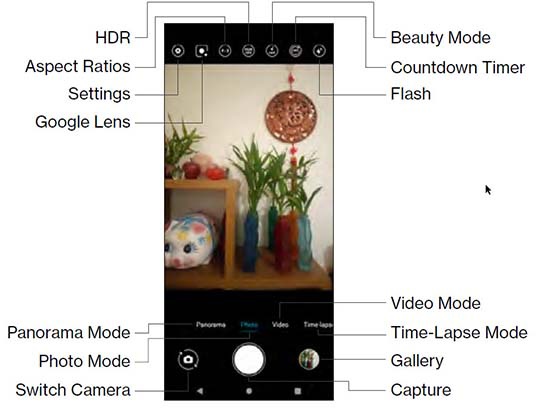
Flash
- From a Home screen, tap theCamera icon
(at the bottom).
If unavailable, swipe up from the bottom of a Home screen then tapPhone. - Tap theFlash icon.
- Select an option:
- On
- Off
- Auto

Timer
- From a Home screen, tap theCamera iconIf unavailable, swipe up from the bottom of a Home screen then tapPhone.
- TapSettings.
- TapTimer.
- Select an option:
- Off
- 3 sec
- 10 sec

HDR
HDR (High Dynamic Range) combines photos or videos taken at different exposures for one optimal photo or video.
- From a Home screen, tap theCamera iconIf unavailable, swipe up from the bottom of a Home screen then tapPhone.
- TapSettings.
- TapHDR.
- Tap an option:
- Auto
- On
- Off
Rear or Front Facing Camera
- From a Home screen, tap theCamera iconIf unavailable, swipe up from the bottom of a Home screen then tapPhone.
- Tap theCamera Facing iconto determine which camera to use:
- Select an option:
- Rear facing camera
- Front facing camera

Settings
- From a Home screen, tap theCamera iconIf unavailable, swipe up from the bottom of a Home screen then tapPhone.
- TapSettings.
- Select an option:
- Resolution
- HDR
- Timer
- Storage location
