Verizon Receiver (LV65) Router Connection
Verizon Receiver (LV65)
Router ConnectionConnecting a router to your Verizon Receiver (LV65) helps optimize your network speed and coverage. Check out this quick step-by-step walkthrough.
Steps
- Open the router box and remove the router, power adapter and Ethernet cable, the tapContinue.
- Confirm the following then tapContinue:
- The router is at least 10 feet away from cordless phones, microwaves, and any large metal objects.
- The router is away from heat sources, moisture, excessive dust or extreme cold.
- You’re able to plug the provided Ethernet cable into both the router and the receiver’s power adapter.
- Connect the router’s power adapter and plug it into a power outlet, then tapContinue.It can take up to 10 minutes for the router to power up.
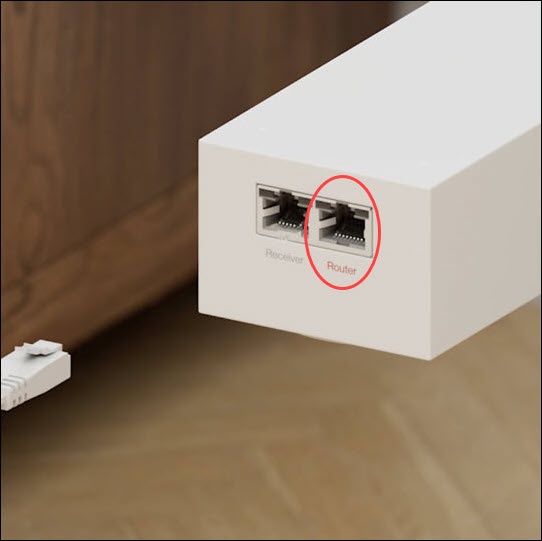
- Plug one end of the Ethernet cable into the router port on the power adapter, and the other end into the red port on the router labeled WAN, then tapContinue.
- View the LED light on the router to confirm setup, then tapContinue.If testing fails, try replacing your ethernet cable and attempt to test the connection again.If testing fails, try replacing your ethernet cable and attempt to test the connection again.
- From the 'Success! Your 5G Home Internet is ready' screen, tapConnect devicesorContinue.