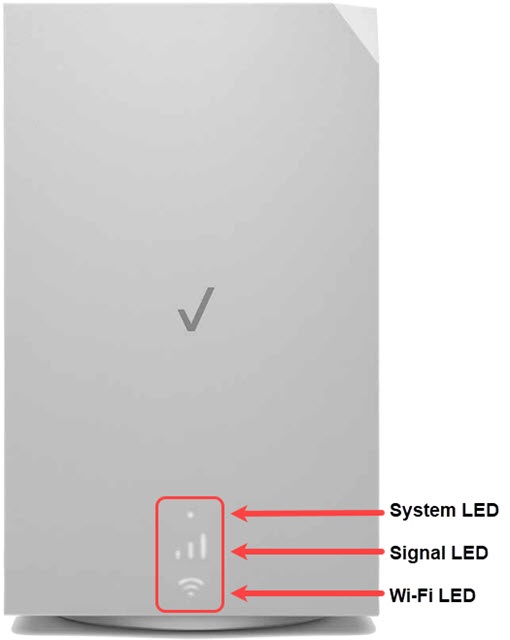
Verizon Internet Gateway (ASK-NCM1100) LED Status Indicators
Verizon Internet Gateway (ASK-NCM1100)
LED Status IndicatorsThe LED lights on your Internet Gateway (ASK-NCM1100) indicate its power or connection status. A quick glance shows whether it's working properly or needs attention.
Before you begin
After plugging it in for the first time, the Verizon Internet Gateway should take approximately 8-10 minutes to connect to our network. You may see the System LED pulsing white during this time. After 10 minutes the following table indicates the correct status.
You can also manually initiate Setup Mode by holding the WPS button for 5 seconds then release (the Wi-Fi LED on the front will have a slow blinking blue light to indicate device is in Setup mode). Setup mode remains in place for approximately 45 minutes. If the Gateway’s LED indicator blinks red, repeat setup.
Steps
- View the following info:System LED Status IndicatorsFunctionStatusLED PatternBootupSoftware updatingFast blinking whiteSystem bootingSoft pulsing whiteOtherFactory resetFast blinking yellowGateway errorSoft pulsing redActivation errorSlow blinking redGateway has no signalSolid redSignal LED Status IndicatorsFunctionStatusLED Pattern3 BarsExcellent signal strengthSolid white2 BarsGood signal strengthSolid white1 BarFair signal strengthSolid whiteWi-Fi LED Status IndicatorsFunctionStatusLED PatternRegular usagePassing signal / Setup completeSolid whiteNo internetSolid redWi-Fi disabledSolid greenPairingWPS PairingSlow blinking blueSuccessful WPS connectionFast blinking blueWPS connection timed outFast blinking redWPS Connection failedSlow blinking redOtherGateway errorSoft pulsing red