Orbic SPEED X 5G Insert / Remove SIM Card
Orbic SPEED X 5G
Insert / Remove SIM CardSwitching to a new device, traveling or troubleshooting a connectivity issue? Learn how to quickly and easily insert or remove the SIM card for your Orbic® SPEED X 5G.
Before you begin
Ensure your Orbic SPEED X 5G is powered off.
Steps
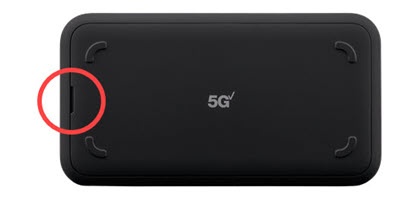
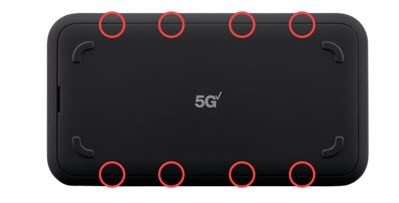
- Remove the battery cover.Place a fingernail in the notch on the top or bottom then lift the back cover.
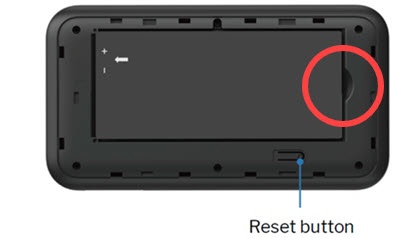
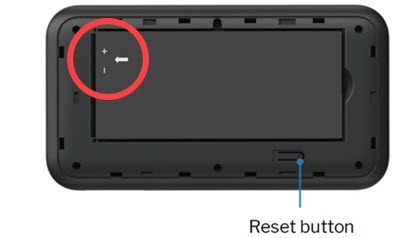
- Remove the battery.Insert your finger into the battery-removal divot to lift the battery out of the battery compartment.
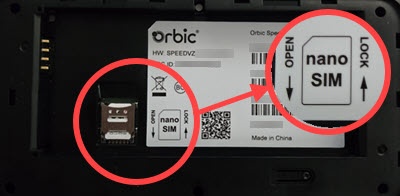
- Locate the SIM card slot, press and hold the metal card.
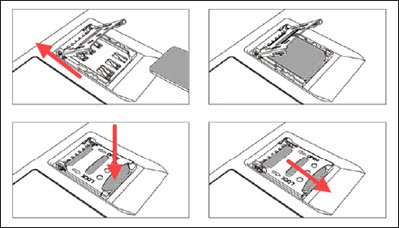
- Slide the metal card to the open position to open/release the tray.
- Insert or remove the SIM card.
- Push down on the metal tray then to close then slide to the lock position.
- Re-insert the battery.Ensure the connectors on the battery align with the connectors on the device. The white arrow should be face up and pointing to the connector.
- Replace the battery cover.Press down along the edges until it snaps into place.