Google Pixel 9a Insert / Remove SIM Card
Google Pixel 9a
Insert / Remove SIM CardSwitching to a new device, traveling or troubleshooting a connectivity issue? Learn how to quickly and easily insert or remove the SIM card for your Pixel 9a.
Before you begin
Don't try to insert or remove the SIM card while your Pixel 9a is powered on, as doing so may harm the SIM card and/or your device.
Steps
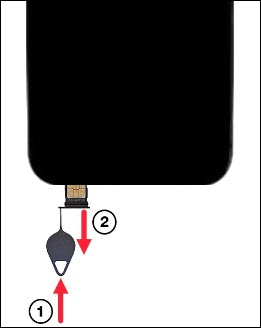
- From the bottom-left edge of the device (display facing up), insert the SIM removal tool into the hole then push in until the tray ejects.
- Do one of the following:
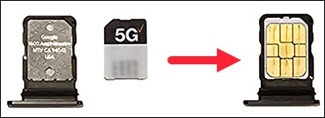
- To insert the SIM card, use the notch in the card as a guide then insert the SIM card into the tray with the gold contacts facing up.
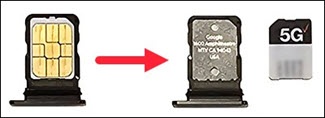
- To remove the SIM card, lift the card from the tray.
- Carefully reposition the tray into the slot then gently push it back into the phone.