TCL LINKZONE GO 5G Restore Settings to Factory Defaults
TCL LINKZONE GO 5G
Restore Settings to Factory DefaultsResetting your LINKZONE GO 5G to default settings can clear misconfigurations and software quirks while keeping your important data, files and apps intact.
Reset via Admin Website
- Access the Admin Web Interface.
- From the Network Settings section, click theNavigation arrow.
- From the left pane, clickSettingsthen clickRestart & Reset.
- From the Factory Data Reset section, clickReset.
- Review the Reset Your Device info then clickReset.
Reset via Device
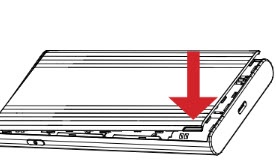
- Remove the battery cover.Using the provided notch on the lower-left side of the device with the display facing down, carefully lift then detach the cover. Set the cover aside.
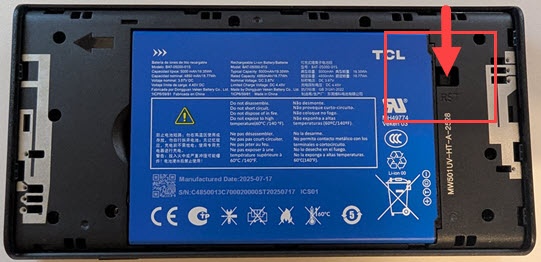
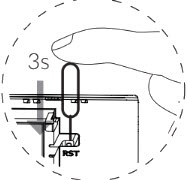
- Place one end of an unfolded paper clip into the Reset (RST) hole then press until the Resetting screen displays.
- Replace the battery cover.Set the cover on the device so the notches align then press on the cover until it clicks into place and is flat across the entire bottom surface.