One Talk W59VR PRO / W73HV Wireless Handsets Insert / Remove Battery
One Talk W59VR PRO / W73HV Wireless Handsets
Insert / Remove BatteryA quick troubleshooting step is to remove and re-insert the battery. If your One Talk W59VR PRO or W73HV handset is slow or frozen or won't power on, this may help it run properly again.
Steps
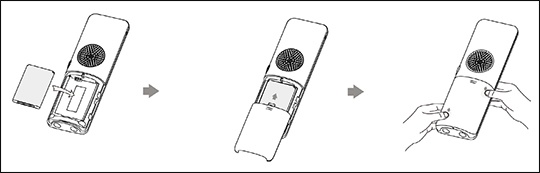
- From the back of the device, gently slide the battery cover off.
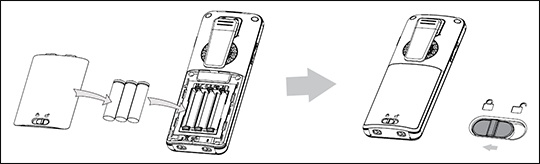
- Do one of the following:
- For the W73HV handset model, remove the battery using the diagram below.
- For the W59VR PRO handset model, slide the lock switch to the unlocked position then remove the battery cover.
- To re-insert the battery, ensure the contacts on the battery and device are aligned then press the battery into position.
- Align the cover and gently press it into place.If using the W59VR PRO handset, slide the lock switch back to the locked position.