Verizon Voice Gateway Activate / Set Up Device
Verizon Voice Gateway
Activate / Set Up DeviceActivate your Verizon Voice Gateway to get started. This ensures you can make and receive calls.
Before you begin
If your telephone base is close to the Voice Gateway, you may experience interference during calls. If this occurs, move your telephone base at least two feet away from the Voice Gateway.
Don't plug the Voice Gateway into your telephone wall jack if you have an existing telephone service. Doing so will render call functions unusable.
The Voice Gateway comes with four pre-inserted AA batteries for backup power.
Refer to the user guide for wall mounting instructions.
Steps
- Pull the battery pull tab until it comes out completely.
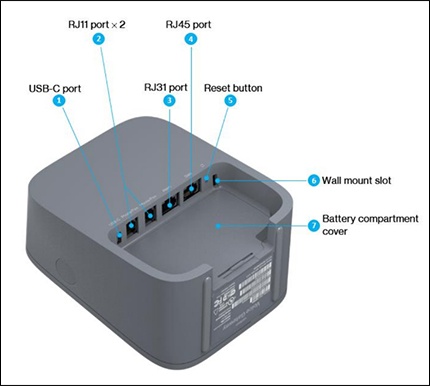
- Plug the power adapter into the USB-C port on the Voice Gateway, then plug the other end into an electrical outlet.
- Disconnect your telephone cord from your home wall jack.
- Plug that telephone cord directly into one of the RJ11 ports on the Voice Gateway.
- Verify the device powers on and displays the Verizon logo on the LCD display.
- Wait up to 10 minutes for the SIM card to automatically activate.
- Check the signal strength indicator to ensure at least two bars are displayed. If the indicator shows one bar or fewer, move the Voice Gateway to a different location for a stronger signal.
- Verify the screen displays your phone number along with confirmation that your device is activated.
- Place a call to test your service.