Verizon Voice Gateway Factory Data Reset
Verizon Voice Gateway
Factory Data ResetReset your Verizon Voice Gateway to factory settings as a final troubleshooting step, or an easy way to erase your data if you're upgrading or trading in your device.
Before you begin
Ensure the power adapter remains connected to the device for the entirety of the reset process.
A factory reset restores all device settings to their original factory values and removes custom changes.
Steps
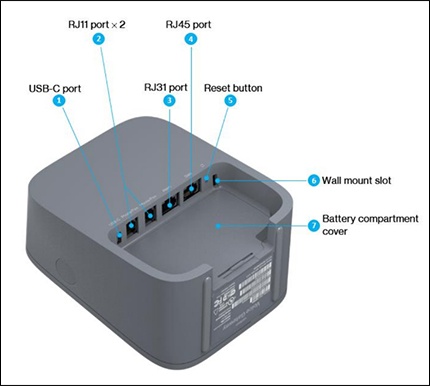
- Locate the Reset hole on the back of the device.
- Use a paper clip or a pin to press and release the button.The display screen indicates that the device is resetting.
- Allow up to 8 minutes for the device to automatically restart.