One Talk W92LTE 4G DECT Base Station LED Status Indicators
One Talk W92LTE 4G DECT Base Station
LED Status IndicatorsThe LED lights on your One Talk W92LTE 4G DECT base station indicate its power or connection status. A quick glance shows whether it's working properly or needs attention.
Before you begin
The LED indicator lights are located on the front of the device, as shown below: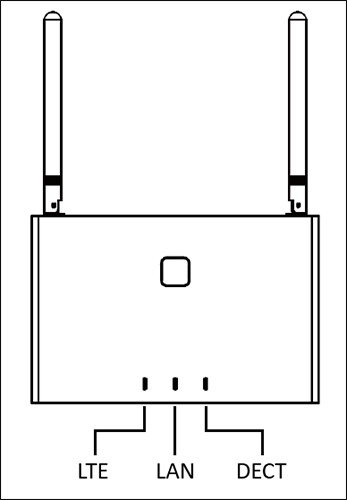
Steps
- View the status LEDs to quickly see the status of your base station:
- System events: LTE, LAN and DECT LEDs all reflect the same status during the following events:
- Power on: Red during startup, off after system is running
- Firmware update: Slow flashing green
- Switch backup: Fast flashing green
- When the base station has started successfully and the system is running normally, the LEDs reflect the following states:
- LTE LED: Illuminated when the base station is in LTE mode:
- Steady green: Connected
- Flashing green: Not connected to network
- Off: Base station switched to LAN mode
- LAN LED: Illuminated when the base station is in LAN mode:
- Steady green: Connected
- Flashing green: Not connected to network
- Off: Base station switched to LTE mode
- DECT LED: Connection status
- Connected: Steady green
- Pairing: Flashing green
- Not connected: Off