Inseego MiFi PRO M4 Insert / Remove SIM Card
Inseego MiFi PRO M4
Insert / Remove SIM CardSwitching to a new device, traveling or troubleshooting a connectivity issue? Learn how to quickly and easily insert or remove the SIM card for your MiFi® PRO M4.
Before you begin
Ensure your device is powered off.
Steps
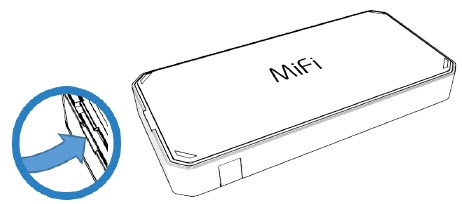
- Remove the battery cover.Using the provided notch (on the left side of the device, display facing down), carefully lift then detach the cover. Set the cover aside.
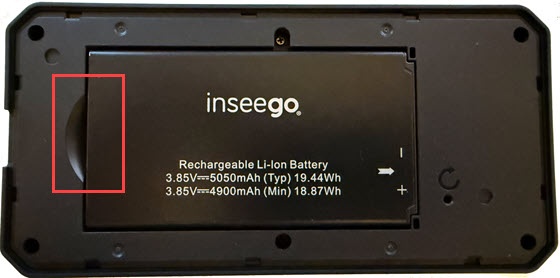
- Remove the battery.Insert your finger into the battery-removal divot to lift the battery out of the battery compartment.
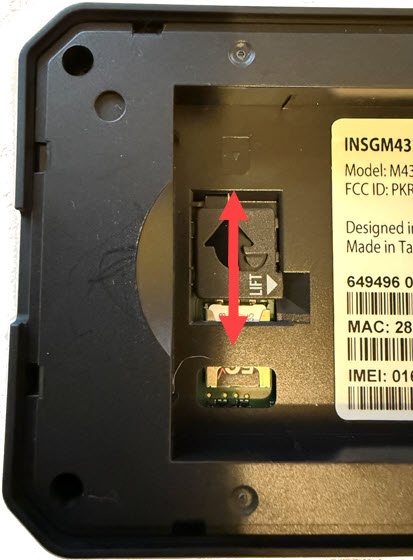
- Lift the protective cover, then insert or remove the SIM card.
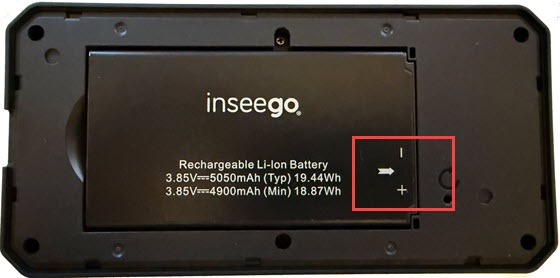
- Re-insert the battery.Ensure the connectors on the battery align with the connectors on the device. The white arrow should be face up and pointing to the connector.
- Replace the battery cover.Press down along the edges until it snaps into place.