Accessibility Resource Center Skip to main content
Personal Business
1-833-VERIZON
Contact us
Contact us
Support
Stores
Coverage map
Español
Mobile
Mobile
  • Simplicity Plan
  • Simplicity Plan
  • myPlan
  • Smartphones
  • More devices More devices
    More devices
    • Certified pre-owned phones
    • Unlocked phones
    • Basic phones
    • Tablets & laptops
    • Watches
    • Certified pre-owned watches
    • Jetpacks & hotspots
  • Bring your phone
  • Bring your phone
  • Verizon Prepaid
  • Accessories
  • Verizon One Mobile + Home
 
Home
Home
  • Shop fast, reliable Wi-Fi
  • Shop TV
  • Move your service
  • Fios accessories
  • Verizon One Mobile + Home
 
Save
Save
  • Switch to Verizon
  • Holiday deals
  • Holiday deals
  • Verizon Loyalty
  • Exclusive perks & services
  • Trade-in your device
  • Verizon Visa® Card
  • Group Save
  • Plan discounts Plan discounts
    Plan discounts
    • Verizon Forward
    • Military discounts
    • First Responder discounts
    • Nurse discounts
    • Teacher discounts
    • Student discounts
    • Employer discounts
 

  • Account overview
  • Account overview
  • Pay bill
  • Make a one-time payment
  • Register
  • Business Log in

Choose your cart:

  • Mobile solutions
  • Home solutions
Go To Cart

  • Account overview
  • Account overview
  • Pay bill
  • Make a one-time payment
  • Register
  • Business Log in

Choose your cart:

  • Mobile solutions
  • Home solutions
Go To Cart
Personal Business
1-833-VERIZON
Contact us
Contact us
Support
Stores
Coverage map
Español
Call Us: 1-800-VERIZON Call now
Loyalty you'll love. Money back. Epic experiences. Incredible deals. All for you.
end of navigation menu
  • Home
  • Prepaid
  • Tablets
  • Samsung

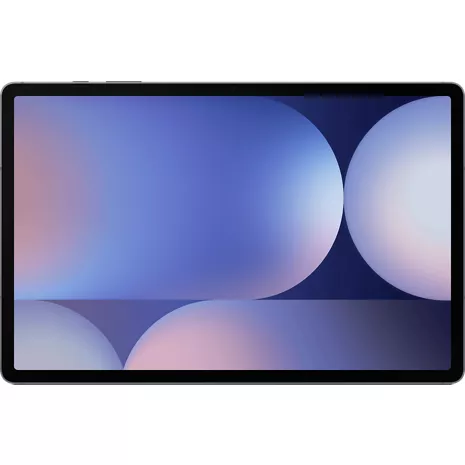
Samsung Galaxy Tab S10+ 5G Prepaid

4.8 undefined
974 Reviews
Samsung Galaxy Tab S10+ 5G Prepaid  Moonstone Gray image 1 of 1
Play videos
Color

Moonstone Gray

Storage

256 GB

Total device cost

$1249.99

Retail Price

Taxes and fees apply

This item is out of stock.

Loading...
Loading...
Loading...
Loading...
Wherever life takes you, power through all your adventures with Galaxy Tab S10+ 5G.1 Everything comes to life beautifully on an ultra-crisp Dynamic AMOLED 2X display that reduces glare. From editing photos to a video chat with your family, every experience pops on a large 12.4” screen.2 Unleash powerful AI features that simply make life easier. Learn more about your world quickly and easily using Circle to Search with Google.3 Organize notes effortlessly with Note Assist4, or create beautiful works of art with Sketch to Image.5 From the office to the classroom, it’s designed with an Armor Aluminum frame that’s not afraid to take on the occasional bumps of day-to-day life. You can even take it outside since it’s water and dust resistant.6 Pair the Galaxy Tab S10+ 5G with Verizon’s 5G Ultra Wideband network.
All Specs
undefined

4.8

4.8 undefined

974 undefined

94

As usual Fantastic hardware & software

5 undefined

Jplappo . 6 days

[This review was collected as part of a promotion.] I chose the S10+ for two reasons the original Bluetooth S Pen and the fantastic software & hardware support. The size of the tablet is just right for reading websites and digital books. Great for playing games as well. The integrated support between my phone and tablet is awesome as well. I also habe a Samsung laptop so all 3 meld into a great ecosystem. Cant wait for the new phone models to arrive for upgrading .

Samsung US Originally posted on Samsung US

My son only likes Samsung

5 undefined

Hollirock . 6 days

[This review was collected as part of a promotion.] My 9 year old has had several different brand of tablets but over the last few years he only wants a Samsung tablet. I chose Samsung since I like the phones and got a good deal on the tablet. It handles all 27,000 games my son likes to download and he wouldnt ever want any other kind of tablet. The battery life does ok considering all it has to run while hes playing on it!

Samsung US Originally posted on Samsung US

  1. 5G speeds vary and require optimal network and connection (factors include frequency, bandwidth, congestion); see carrier for availability.
  2. Measured diagonally, the Galaxy Tab S10+ screen size is 12.4" in the full rectangle and 12.4" accounting for the rounded corners. Actual viewable area is less due to the rounded corners.
  3. Requires internet connection; results may vary by uniqueness, clarity and framing of circled image and related factors.
  4. For text in Samsung Notes only (200 — 4,000 characters); requires Samsung account login and internet connection.
  5. Sketch to Image feature requires a network connection and Samsung Account login. Editing with Sketch to Image may result in a resized photo up to 12MP. A visible watermark is overlaid on the image output upon saving in order to indicate that the image is generated by AI. The accuracy and reliability of the generated output is not guaranteed.
  6. Consistent with IP68 rating, water resistant in up to 5 feet of water for up to 30 minutes. Rinse residue / dry after wet.
  7. Galaxy AI features by Samsung will be provided for free until the end of 2025 on supported Samsung Galaxy devices.
  8. Transcript Assist available only with audio files under 3 hours and recorded using the Samsung Voice Recorder app. Summarizing feature available for text in Samsung Notes only (200 - 4,000 characters). Translation feature requires language preset (English and Spanish pre-installed; other languages require free download). Samsung account login and internet connection are required.
  9. Requires a Galaxy phone with One UI 5.0 or later. Devices must be logged in to the same Samsung account and be on the same Wi-Fi network.
  10. Requires compatible Galaxy devices (PC with Windows 10 or later [2021 or later], tablet with Android 12, One UI 5.1.1, smartphone with Android 13, One UI 5.1.1), with same Samsung account and Wi-Fi network.
  11. Quick Share between Galaxy devices available with the following OS: smartphones and tablets with Android OS version 10.0 (Q) and One UI 2.1 or above, PCs running Windows 10 or later. Requires Wi-Fi and Bluetooth connection. Quick Share to iOS and Android devices available by sending shared link: individual files shared cannot exceed 10GB per file (for a total of 10GB per day) and link will expire after two days; requires an internet connection.
slide 1 of 8, From doodle to dazzling.

Experience seamless connectivity under Galaxy Connected Experience

With the Galaxy Connected Experience, you can take calls or send texts directly from your Tab — your synced devices work together to keep you connected.9 And you can use your Tab to click, type, copy or paste on another device, like your Galaxy smartphone. 10 Send and receive files in a snap from your Tab with Quick Share.11

From doodle to dazzling.

Bring your imagination to life using Sketch to Image5 with Galaxy AI.7 Whether you’re illustrating a conceptual design or creating a fun digital sticker, your sketch becomes a fully realized image in an instant. You can even use Sketch to Image to add a touch of personality to your favorite photos.

Circle and search in a snap.

Quickly search for just about anything you see on your Tab — all without switching apps — using Circle to Search with Google.3

On-the-fly notes, organized instantly.

Capture your lecture, meeting or daily notes and let Note Assist4 do the hard work of organizing and even summarizing them for you.

Your personal notetaking assistant.

Be present in meetings and let Transcript Assist8 with Galaxy AI record notes for you. It creates fast and easy transcripts of recorded meetings, lectures and conversations and summarizes them instantly. Transcript Assist can even translate to other available languages with a tap.

Big screens. Big experience.

From the couch to a café to across the world, enjoy intense colors, deep contrasts and unbelievable brilliance on a 12.4" Dynamic AMOLED 2X display.2 Plus, the screen features reduced glare and Vision Booster that automatically adjusts brightness and contrast so you see every detail, even in sunlight.

Harness the power of AI with S Pen.

Tap into the power of Galaxy AI and take your creativity to the next level with the included S Pen. Write notes and Note Assist will format your handwriting and create a summary. Or draw an image and tap the side button to activate Sketch to Image — it turns your sketch into a fully realized work of art, just like that.

Stands up to dust and water.

Confidently take your Galaxy Tab S10+ with you everywhere. With an Armor Aluminum frame, it’s designed to protect against bumps. And with an IP68 rating, it’s one of the only water- and dust resistant tablets on the market.6

Experience seamless connectivity under Galaxy Connected Experience

With the Galaxy Connected Experience, you can take calls or send texts directly from your Tab — your synced devices work together to keep you connected.9 And you can use your Tab to click, type, copy or paste on another device, like your Galaxy smartphone. 10 Send and receive files in a snap from your Tab with Quick Share.11

From doodle to dazzling.

Bring your imagination to life using Sketch to Image5 with Galaxy AI.7 Whether you’re illustrating a conceptual design or creating a fun digital sticker, your sketch becomes a fully realized image in an instant. You can even use Sketch to Image to add a touch of personality to your favorite photos.

Design

Colors

Moonstone Gray

Depth

0.22 in.

Height

7.30 in

Width

11.24 in

Notable Materials

Armor Aluminum

Weight

20.32 oz

Charging Port

USB Type-C

Accessibility

Auditory

Hearing aid support, Live Caption, Live Transcribe, Real-Time Text, Sound Amplifier, Sound Notifications

Voice Assistant

Google Assistant, Bixby

Mobility / Cognitive

Switch Access

Overall

Accessibility Shortcut, Android Accessibility Suite, Bixby

Visual

Magnification, Text and display, TalkBack, Select to Speak

Network

4G

4G LTE speeds range between 11 and 75 Mbps for downloads and between 1 and 13 Mbps for uploads. Great for voice calls, downloading files, web surfing and other activities that don't require higher bandwidth.

Wi-fi

802.11 a/b/g/n/ac/ax (2.4GHz/5GHz/6GHz) (WiFi 6E)

SAR

Body: 0.91 W/Kg | Simultaneous : 1.59 W/Kg

FCC ID

Tablet: A3LSMX828U | S Pen: A3LEJPX710

Global & Roaming Network

4G: 1, 3, 7, 8, 12, 20, 26, 28, 38, 39, 40, 41 5G: n77, n78, n257 UMTS Quad

5G Nationwide

5G speeds range between 35 Mbps and 143 Mbps for downloads and between 5 and 31 Mbps for uploads. Great for gaming, streaming, and other steady bandwidth activities.

5G Ultra Wide-Band

5G Ultra Wideband speeds range between 195 and 634 Mbps for downloads and between 10 and 53 Mbps for uploads. Great for work, file-sharing, video conferencing, and other high-bandwidth activities.

World Device

Yes. Works in over 200 countries depending on your plan.

Battery

Standby Time

Up to 600 hours

mAh (per hour)

10,090mAh

Usage Time

4G: Up to 16 hours | 5G: Up to 15 hours

Fast Charge

Y

Camera

Rear Camera

13MP AF + 8MP FF UW

Front Camera

12MP FF UW

Video Recording

UHD 4K (3840x2160) @ 30fps

Camera Modes

4K Video Recording, Dual Recording, Single Take, Auto Framing, Hyperlapse

Performance

Bluetooth

Y, BT 5.3

Processor

MediaTek Dimensity 9300+ | Octa Core (1x 3.4GHz, 3x 2.85GHz, 4x 2.0GHz)

Storage

256GB + 12GB LPDDR5X (RAM)

OS

Android 14.0

Expandable Memory

Y

Security

Fingerprint in-display, Facial recognition

Hotspot

Y

Display

Screen

12.4" Dynamic AMOLED 2X

Refresh Rate

120 Hz Adaptive

Aspect Ratio

WQXGA+ 2800 x 1752 (16:10)

SMX828UZAA

  • Samsung Galaxy Tab S10+ 5G (12.4") / 256GB
  • S Pen
  • Pre-Installed SIM Card
  • USB Cable (Type C to C)
  • Quick Reference Guide/Samsung Terms & Conditions
  1. 5G speeds vary and require optimal network and connection (factors include frequency, bandwidth, congestion); see carrier for availability.
  2. Measured diagonally, the Galaxy Tab S10+ screen size is 12.4" in the full rectangle and 12.4" accounting for the rounded corners. Actual viewable area is less due to the rounded corners.
  3. Requires internet connection; results may vary by uniqueness, clarity and framing of circled image and related factors.
  4. For text in Samsung Notes only (200 — 4,000 characters); requires Samsung account login and internet connection.
  5. Sketch to Image feature requires a network connection and Samsung Account login. Editing with Sketch to Image may result in a resized photo up to 12MP. A visible watermark is overlaid on the image output upon saving in order to indicate that the image is generated by AI. The accuracy and reliability of the generated output is not guaranteed.
  6. Consistent with IP68 rating, water resistant in up to 5 feet of water for up to 30 minutes. Rinse residue / dry after wet.
  7. Galaxy AI features by Samsung will be provided for free until the end of 2025 on supported Samsung Galaxy devices.
  8. Transcript Assist available only with audio files under 3 hours and recorded using the Samsung Voice Recorder app. Summarizing feature available for text in Samsung Notes only (200 - 4,000 characters). Translation feature requires language preset (English and Spanish pre-installed; other languages require free download). Samsung account login and internet connection are required.
  9. Requires a Galaxy phone with One UI 5.0 or later. Devices must be logged in to the same Samsung account and be on the same Wi-Fi network.
  10. Requires compatible Galaxy devices (PC with Windows 10 or later [2021 or later], tablet with Android 12, One UI 5.1.1, smartphone with Android 13, One UI 5.1.1), with same Samsung account and Wi-Fi network.
  11. Quick Share between Galaxy devices available with the following OS: smartphones and tablets with Android OS version 10.0 (Q) and One UI 2.1 or above, PCs running Windows 10 or later. Requires Wi-Fi and Bluetooth connection. Quick Share to iOS and Android devices available by sending shared link: individual files shared cannot exceed 10GB per file (for a total of 10GB per day) and link will expire after two days; requires an internet connection.

Samsung Galaxy Tab S10+ 5G Prepaid undefined

4.8

4.8 undefined

974 undefined

5 stars (825)
4 stars (100)
3 stars (23)
2 stars (9)
1 star (17)

94

As usual Fantastic hardware & software

5 undefined

Jplappo . 6 days

[This review was collected as part of a promotion.] I chose the S10+ for two reasons the original Bluetooth S Pen and the fantastic software & hardware support. The size of the tablet is just right for reading websites and digital books. Great for playing games as well. The integrated support between my phone and tablet is awesome as well. I also habe a Samsung laptop so all 3 meld into a great ecosystem. Cant wait for the new phone models to arrive for upgrading .

Samsung US Originally posted on Samsung US

My son only likes Samsung

5 undefined

Hollirock . 6 days

[This review was collected as part of a promotion.] My 9 year old has had several different brand of tablets but over the last few years he only wants a Samsung tablet. I chose Samsung since I like the phones and got a good deal on the tablet. It handles all 27,000 games my son likes to download and he wouldnt ever want any other kind of tablet. The battery life does ok considering all it has to run while hes playing on it!

Samsung US Originally posted on Samsung US

Budget tablet for editing

5 undefined

Chibinini . 6 days

[This review was collected as part of a promotion.] This is a great tablet. I chose to purchase it for my daughter since she was interested in animation and video editing. Needless to say she is now 12 and have 6 animation shorts she created off the tablet app and loves editing videos on it. It doe snot give her issues and she is learning quickly. I chose to purchase another one soon for my son who is in high school.

Samsung US Originally posted on Samsung US

Great tablet

4 undefined

Pizzaking . 8 days

[This review was collected as part of a promotion.] The tablet is amazing. It's great for school and other uses. The battery life is amazing can use all day on a single charge. The tablet is fast and it's great for note-taking. The s-pen barely has any lag and has great response. The only thing is that keyboard accessory could be improved.

Samsung US Originally posted on Samsung US

Galaxy Tab S10+: The Best Upgrade from an iPad

5 undefined

KashbaBB . 10 days

[This review was collected as part of a promotion.] Coming from an iPad, I chose to switch to the Galaxy Tab S10+ and couldn't be happier with the upgrade. Right out of the box, having the S Pen included is a huge plus. The writing experience is easily the best on the market—the latency and tip friction make taking notes for work and daily tasks feel just like writing on real paper. For entertainment, streaming, and movies, the display and sound quality are truly unmatched. Every visual is vibrant and crisp, paired with rich, immersive audio. On the software side, One UI is remarkably well-optimized for a large tablet screen, making multitasking and productivity effortless. What really completes the experience is how seamlessly it syncs with my Galaxy S26 Ultra and Galaxy Buds3 Pro. Switching audio between devices and sharing content happens instantly without a hitch. I am so glad I made the switch from iPad to Samsung!

Samsung US Originally posted on Samsung US

This product has everything I need!

5 undefined

Tea3Coffee . 17 days

[This review was collected as part of a promotion.] I choose this tablet when it first came out simply because I found a tablet would help with school and there was a great deal on it. I did feel it could be a little big for my needs, but the size ended up being perfect. Plus, it runs smoothly with no glitching when using the pen, which was a problem in my previous one. I am extremely happy with my purchase.

Samsung US Originally posted on Samsung US

Amazing picture and specs

5 undefined

Jenlovzloren . 24 days

[This review was collected as part of a promotion.] I choice to get the best for my money and this is what you wanna invest in. It's a dimensional world that you can get into your tablet is better than ny gaming devices

Samsung US Originally posted on Samsung US

Minor annoyances

3 undefined

AverageJoe . 29 days

[This review was collected as part of a promotion.] I chose the Samsung Tab S10+ for multiple reasons. With the S11 on shelves people were griping about the loss of S gesture with the S pen. I knew I wanted the S pen and the gestures seemed to matter to people. After two years I've used the s pen less than 5 times and probably didn't need the gesture feature at all. So FOMO got me. Secondly was the screen size. The 10+ was more usable as a daily driver. The ultra screen was just too big. Daily usage varies from games, to streaming, to minor office suite programs. Would i buy it again? Probably, but I'd likely get the smaller model and skip the pen. Its just not used much at all.

R&R Team - 27 days

Hi there AverageJoe, thank you for your feedback on your Samsung Galaxy Tab S10+. We are pleased to hear that you are overall happy with the usage of your device for your gaming, streaming, and some work needs. We have shared links to the full manual and the Samsung Support Team to help you further explore the capabilities of your device, customize the settings, and answer any questions you may have during your usage. We appreciate you being a Samsung customer. -Elizabeth Product Manuals https://www.samsung.com/us/support/downloads/ Samsung Support smsng.us/Samsung-Support Samsung Community smsng.us/Samsung-Community Facebook smsng.us/Facebook-Messenger X https://smsng.us/X-Messages

Samsung US Originally posted on Samsung US

Very user-friendly

5 undefined

FurFur . 1 month

[This review was collected as part of a promotion.] I have the Tab S10+ that I am very satisfied with. I am currently attending Liberty University while working toward my Bachelors. I was using my Samsung laptop when my American Bully decided it was a chew toy one day while I was gone. I then had to rely on my Tablet to be able to continue doing my coursework. I was very surprised that the Tablet has held up neck and neck with my laptop. I chose to continue using my Tablet while i save for a new laptop rather than settling for a cheap laptop.

Samsung US Originally posted on Samsung US

Portable battery and horrible storage

3 undefined

TONIV20201418 . 1 month

[This review was collected as part of a promotion.] I keep having to take things out to make room even though they're on the SD card and my children keep having headaches even though the blue light has been taking off but it is a durable tablet

R&R Team - 1 month

Hi there TONIV20201418, thank you for sharing your experience of your Samsung Galaxy Tab S10+ with us. We understand how disappointing it can be when your device is not meeting your expectations or operating as intended. We have shared links to the full manual and the Samsung Support Team to help you adjust the display settings and ensure you have adequate storage for your needs. We appreciate you being a Samsung customer. -Elizabeth Product Manuals https://www.samsung.com/us/support/downloads/ Samsung Support smsng.us/Samsung-Support Samsung Community smsng.us/Samsung-Community Facebook smsng.us/Facebook-Messenger X https://smsng.us/X-Messages

Samsung US Originally posted on Samsung US

Samsung Galaxy Tab S10+ 5G Prepaid undefined

Bean . Oct 23, 2026

Does the tablet come with a key board

Verizon Customer Support28 days

No, the Samsung Galaxy Tab S10+ 5G does not come with a keyboard in the box; it is sold separately. -Necia

Sd card . Aug 20, 2026

Does s10+ have a slot for an sd card

Verizon Customer Support3 months

Yes, a built-in microSD card slot that supports storage expansion of up to 1.5 TB. -Toni

Luis . Aug 20, 2026

Do I have to have it connected to a line? Or an this just be a simple tablet? Or is this only sold with 5g?

Verizon Customer Support3 months

Yes it does require a line of service. -Rosie

pete . Aug 15, 2026

does an Galaxy S10+ Tablet have a manufacture warranty

Verizon Customer Support3 months

The Samsung Galaxy Tab S10+ 5G comes with a 1-year warranty. ~Jesse

Greg . Jul 3, 2026

Can I download Outlook and use email and also spreadsheets

Verizon Customer Support4 months

https://www.samsung.com/us/support/answer/ANS10001915/ ~Jorge

Julie . Jun 17, 2026

can i download microsoft and google drive

Verizon Customer Support5 months

A variety of apps are available to download via the play store. For questions on specific app availability, please reach out to Samsung directly: https://www.samsung.com/us/support/contact/ -Katie

Customer . May 31, 2026

Is this tablet in stock for store pickup

Verizon Customer Support5 months

To check if the tablet is available for in-store pickup, choose your device options (color, storage) on Verizon.com, enter your zip code, and select In-Store Pickup at checkout. -Will

Charger included . May 2, 2026

Charger included

Verizon Customer Support6 months

No, the Samsung Galaxy Tab S10+ 5G generally does not include a charger~Joe M

Rock . Apr 1, 2026

Can you expand memory

Verizon Customer Support7 months

Please reach out to Customer Service for memory related concerns. https://www.verizon.com/digital/nsa/nos/ui/ngd/contactus -Sara

Showtime . Apr 1, 2026

Is this the biggest

Verizon Customer Support7 months

No, this model is not the biggest tablet we have available. Visit: https://www.verizon.com/tablets/ for more information. ~Maria

Shop
  • Devices
  • Apple iPhone 18 Pro
  • Apple iPhone Duo
  • Samsung Galaxy S26 Ultra
  • Apple Watch Series 12
  • Accessories
  • Simplicity Plan
  • Simplicity Plan
  • Verizon Prepaid
  • Home Internet & TV
  • Verizon One Mobile + Home
  • Bring your phone
  • TracFone
Support
  • Support overview
  • Return policy
  • Contact us
  • Contact us
  • Service Central
  • Business support
  • Sign in
  • Download My Verizon App
  • Lifeline
  • Accessibility
  • Network support
  • Speed Test
About Verizon
  • About us
  • Careers
  • News
  • Responsibility
  • Verizon Innovative Learning
  • Articles
  • Brochures
  • 5G overview
  • Innovation Labs
Important Consumer Information
  • Legal Terms & Notices
  • Device Payment Terms & Conditions
  • Report a security vulnerability
Follow Verizon
  • facebook-official
  • twitter
  • you-tube
  • instagram
  • TikTok
Verizon Support
  • twitter
  • Privacy Policy
  • Your Privacy Choices
  • Accessibility
  • Open Internet
  • Website Terms of Use
© 2026 Verizon