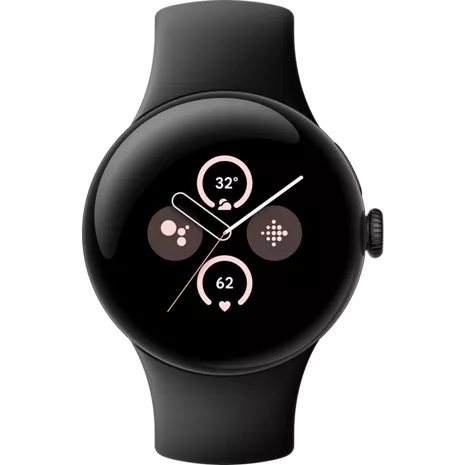
Google Pixel Watch 2 Prepaid
Reviews
4.1
148 reviews
52% of reviewers recommend this product.
The Pixel Watch 2 is Good
La40 . 4 months ago
Don't get this, get pixel watch 4
So many androids . 10 months ago
Google Team - 10 months ago
Hey there. We hear your concerns about battery life on the Pixel watch 2 — here are some tips to reduce battery consumption and get more daily use out of your watch:Shorten the screen timeout: Swipe down, tap Settings > Display > Screen timeout, and choose a shorter time, like 15 seconds. This means your watch goes to sleep more frequently when you're not using it.
Turn off Always-on Display: Swipe down and then tap Settings. Tap Display and then turn off "Always-on Display".
Turn off the Tilt-to-wake feature: Swipe down and then tap Settings. Tap Gestures and then turn off "Tilt-to-wake".
If you need any more help, reach out to us anytime here: https://support.google.com/googlepixelwatch/gethelp?sjid=1168929876280557452-NC

- Works with most phones running Android 9.0 or newer and requires a Google Account, Google Pixel Watch app, and internet access. Some features require a Fitbit account and mobile app and/or a paid subscription. Google apps and services are not available in all countries or languages. See g.co/pixelwatch/specs for technical and device specifications.
- Some features may require Fitbit app. Accuracy of heart rate tracking may be affected by physiology, location of device and your movements and activity.
- Some Google apps and services require LTE or a paired phone within Bluetooth range of your device and are not available in all countries or languages. Data rates may apply.
- Personal safety features are dependent upon network connectivity and other factors and may not be reliable for emergency communications or available in all countries or languages. See g.co/pixelwatch/personalsafety for more details.
- Compared to Google Pixel Watch (1st Gen).
- Not available in all countries. Significant changes in ambient temperature may negatively impact skin temperature tracking.
- Recycled aluminum is at least 3% of product based on weight.
- Compared to Google Pixel Watch (1st Gen) using an always-on display. Maximum battery life is approximate and is based on testing conducted on pre-production hardware and software, using default settings with a median Pixel user battery usage profile across a mix of talk, data, standby, and use of other features. Battery life depends on features enabled, usage, environment and many other factors. Use of certain features will decrease battery life. Actual battery life may be lower.
- Some features require a Fitbit mobile app.
- ECG app and irregular heart rhythm notifications are only available in select countries. Not intended for use by people under 22 years old or with other known arrhythmias. Data for irregular heart rhythm notifications is recorded only when the user is still or sleeping. See fitbit.com/ec g or fitbit.com/irregularrhythm for additional details.
- Not available in all countries. The SpO2 feature is not intended to diagnose or treat any medical condition or for any other medical purpose. It is intended to help you manage your wellbeing and keep track of your information.
- Data rates may apply. Safety Check requires location enabled and 4G LTE service or an internet connection. Safety Check is dependent upon network connectivity and other factors and may not be reliable for emergency communications or available in all areas or languages. See g.co/pixelwatch/personalsafety for more details.
- Data rates may apply. Emergency Sharing requires location enabled and 4G LTE service or an internet connection. Emergency Sharing is dependent upon network connectivity and other factors and may not be reliable for emergency communications or available in all areas or languages. See g.co/pixelwatch/personalsafety for more details. 14 Fall Detection is not available in all countries and depends on network connectivity and other factors. Your watch may not be reliable for emergency communications. Fall detection may not detect all falls. To call emergency services on a Google Pixel Watch without 4G LTE, your paired phone must be nearby. Users must grant location permission for fall detection to share location externally. Data rates may apply. See g.co/pixelwatch/personalsafety for more details.
- Emergency SOS requires location enabled and 4G LTE service or an internet connection. Emergency SOS is dependent upon network connectivity and other factors and may not be reliable for emergency communications or available in all countries or languages. See g.co/pixelwatch/personalsafety for more details.
- Google Assistant and some related features are not available in all languages. See g.co/assistant/languages for updates to language availability.
- Phone, Pixel Buds, and Pixel Tablet sold separately. Fast Pair requires location enabled.
- Requires Google Photos app.
- Car crash detection on Pixel phones and fall detection on Pixel Watch are not available in all languages or countries and may not detect all car accidents or falls. Both features are dependent upon network connectivity and other factors and may not be reliable for emergency communications or available in all areas. To call emergency services on a Wi-Fi version of Google Pixel Watch (not 4G LTE), your paired phone needs to be nearby. For car crash detection, high-impact activities may trigger calls to emergency services. See g.co/pixelwatch/personalsafety for more details.

Pixel devices are even better together.
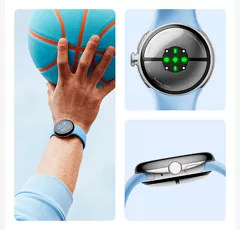
A lighter, more refined design.
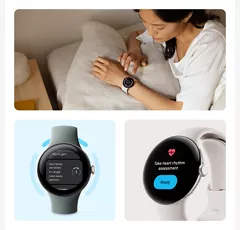
Learn more about your health.
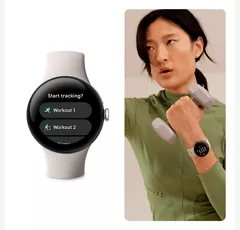
Reach your fitness goals with real-time support.
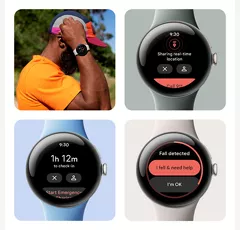
Get help in an emergency.
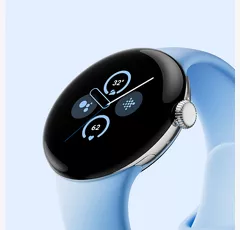
Stay on track and get things done.
Pixel devices are even better together.
A lighter, more refined design.
Design
Bands
Active Band: Small and large band sizes included Small fits wrists 130-175 mm around Large fits wrists 165-210 mm around
Finishes
Active Band: Fluoroelastomer with soft-touch coating
Colors
Hazel | Obsidian | Porcelain | Bay
Height
0.48 in
Width
41mm diameter (1.61”)
Notable Materials
Housing: 100% recycled aluminum
Weight
1.09 oz
Charging Port
USB-C® Fast Charging Cable
Accessibility
Auditory
Built-in microphone | Built-in speaker
Voice Assistant
Google Assistant, Gemini
Battery
mAh (per hour)
306 mAh (typical)
Usage Time
20.96 hrs
Network
4G
2,4,5,12,13,66
Wi-fi
Wi-Fi 802.11 a/b/g/n 2.4GHz
SAR
1.6 W/Kg
Number Share Eligible
Yes
FCC ID
A4RGD2WG
World Device
No
Performance
Processor
Qualcomm 5100 | Cortex M33 co-processor
OS
Wear OS 4.0
Memory/Storage
32 GB eMMC flash | 2 GB SDRAM
Display
Type
Custom 3D Corning® Gorilla® Glass 5 | 320 ppi AMOLED display with DCI-P3 color | Brightness boost up to 1000 nits | Always-on display
Size
41 mm
SKU#
SKU#
GA05013-US
What's in the box
- Google Pixel Watch 2
- Active band (small and large wristbands)
- USB-C® Magnetic Charging Cable
- Quick Start Guide
- Works with most phones running Android 9.0 or newer and requires a Google Account, Google Pixel Watch app, and internet access. Some features require a Fitbit account and mobile app and/or a paid subscription. Google apps and services are not available in all countries or languages. See g.co/pixelwatch/specs for technical and device specifications.
- Some features may require Fitbit app. Accuracy of heart rate tracking may be affected by physiology, location of device and your movements and activity.
- Some Google apps and services require LTE or a paired phone within Bluetooth range of your device and are not available in all countries or languages. Data rates may apply.
- Personal safety features are dependent upon network connectivity and other factors and may not be reliable for emergency communications or available in all countries or languages. See g.co/pixelwatch/personalsafety for more details.
- Compared to Google Pixel Watch (1st Gen).
- Not available in all countries. Significant changes in ambient temperature may negatively impact skin temperature tracking.
- Recycled aluminum is at least 3% of product based on weight.
- Compared to Google Pixel Watch (1st Gen) using an always-on display. Maximum battery life is approximate and is based on testing conducted on pre-production hardware and software, using default settings with a median Pixel user battery usage profile across a mix of talk, data, standby, and use of other features. Battery life depends on features enabled, usage, environment and many other factors. Use of certain features will decrease battery life. Actual battery life may be lower.
- Some features require a Fitbit mobile app.
- ECG app and irregular heart rhythm notifications are only available in select countries. Not intended for use by people under 22 years old or with other known arrhythmias. Data for irregular heart rhythm notifications is recorded only when the user is still or sleeping. See fitbit.com/ec g or fitbit.com/irregularrhythm for additional details.
- Not available in all countries. The SpO2 feature is not intended to diagnose or treat any medical condition or for any other medical purpose. It is intended to help you manage your wellbeing and keep track of your information.
- Data rates may apply. Safety Check requires location enabled and 4G LTE service or an internet connection. Safety Check is dependent upon network connectivity and other factors and may not be reliable for emergency communications or available in all areas or languages. See g.co/pixelwatch/personalsafety for more details.
- Data rates may apply. Emergency Sharing requires location enabled and 4G LTE service or an internet connection. Emergency Sharing is dependent upon network connectivity and other factors and may not be reliable for emergency communications or available in all areas or languages. See g.co/pixelwatch/personalsafety for more details. 14 Fall Detection is not available in all countries and depends on network connectivity and other factors. Your watch may not be reliable for emergency communications. Fall detection may not detect all falls. To call emergency services on a Google Pixel Watch without 4G LTE, your paired phone must be nearby. Users must grant location permission for fall detection to share location externally. Data rates may apply. See g.co/pixelwatch/personalsafety for more details.
- Emergency SOS requires location enabled and 4G LTE service or an internet connection. Emergency SOS is dependent upon network connectivity and other factors and may not be reliable for emergency communications or available in all countries or languages. See g.co/pixelwatch/personalsafety for more details.
- Google Assistant and some related features are not available in all languages. See g.co/assistant/languages for updates to language availability.
- Phone, Pixel Buds, and Pixel Tablet sold separately. Fast Pair requires location enabled.
- Requires Google Photos app.
- Car crash detection on Pixel phones and fall detection on Pixel Watch are not available in all languages or countries and may not detect all car accidents or falls. Both features are dependent upon network connectivity and other factors and may not be reliable for emergency communications or available in all areas. To call emergency services on a Wi-Fi version of Google Pixel Watch (not 4G LTE), your paired phone needs to be nearby. For car crash detection, high-impact activities may trigger calls to emergency services. See g.co/pixelwatch/personalsafety for more details.
Google Pixel Watch 2 Prepaid Reviews
4.1
148 reviews
52% of reviewers recommend this product.
The Pixel Watch 2 is Good
La40 . 4 months ago
Don't get this, get pixel watch 4
So many androids . 10 months ago
Google Team - 10 months ago
Hey there. We hear your concerns about battery life on the Pixel watch 2 — here are some tips to reduce battery consumption and get more daily use out of your watch:Shorten the screen timeout: Swipe down, tap Settings > Display > Screen timeout, and choose a shorter time, like 15 seconds. This means your watch goes to sleep more frequently when you're not using it.
Turn off Always-on Display: Swipe down and then tap Settings. Tap Display and then turn off "Always-on Display".
Turn off the Tilt-to-wake feature: Swipe down and then tap Settings. Tap Gestures and then turn off "Tilt-to-wake".
If you need any more help, reach out to us anytime here: https://support.google.com/googlepixelwatch/gethelp?sjid=1168929876280557452-NC
Died after one year
Jtb1 . 1 year ago
Google Team - 1 year ago
Hey there, Jtb1. Sorry you ran into inconsistent step counting on the Pixel Watch 2. Improve accuracy by checking your height and wrist settings in the Fitbit app — you may need to manually adjust stride length. For charging, align the crown with the cable, ensuring the 4 pins meet the watch contacts. Reach out to us if you need any help: https://support.google.com/googlepixelwatch/gethelp?sjid=1168929876280557452-NC
Granny
Suzie . 1 year ago
Pixel Watch 2
E Miller . 1 year ago
Watch
Sheila . 1 year ago
So far I love it!!
FlLisa . 1 year ago
no customer service
screwfitbit . 1 year ago
Google Team - 1 year ago
Hey there. We’re sorry your experience with the Pixel Watch 2 hasn’t been the best. We’d be happy to help support you with what you need. Reach out to us anytime here: https://support.google.com/googlepixelwatch/gethelp?sjid=1168929876280557452-NC
Pixel Watch 2
Dan S . 1 year ago
Skip this one
Egreg . 1 year ago
Google Team - 1 year ago
Hey there, Egreg. We’re happy you’re enjoying the design and taking advantage of all the features. That said, we hear your concern about battery life. Here are some tips to reduce battery consumption:Shorten the screen timeout: Swipe down, tap Settings > Display > Screen timeout, and choose a shorter time, like 15 seconds. This means your watch goes to sleep more frequently when you're not using it.
Turn off Always-on Display: Swipe down, tap Settings > Display > turn off "Always-on Display".
Turn off the Tilt-to-wake feature: Swipe down, tap Settings > Gestures > turn off "Tilt-to-wake".
Reach out to us if you need any more help.
Google Pixel Watch 2 Prepaid FAQs
Google Pixel watch . Jun 1, 2026
which of the google pixel watches have fall detection?
Hey there. All generations of the Pixel Watch have fall detection. Here's a link with more information: https://support.google.com/googlepixelwatch/answer/12663810?hl=en
Fall Detection is a standard safety feature available on most Google Pixel Watch generations. To ensure you are getting the device you need, we recommend checking the specs on the device.
Robert . May 23, 2026
Do I need to add a new device to my VzW plan for the Pixel watch to work or can it simply pair with my Pixel 10 phone
Great question, Robert. If you choose not to continue the data plan for the Pixel Watch 2, it will continue to work as normal and just be connected to your phone with Bluetooth.
The Google Pixel watch 2 can be paired with your Pixel 10 phone. -Luis
Jack . May 12, 2026
does this watch have medical alert with fall detection?
Thanks for asking, Jack. The Pixel Watch 2 includes fall detection. When a hard fall is detected, it will wait about 30 seconds, then vibrate, ring loudly, and ask if you want to call emergency services. If you don't respond, your watch vibrates and alarms, then calls emergency services after 60 seconds with an automated voice message. Here's a link with more information: https://support.google.com/googlepixelwatch/answer/12663810?hl=en
Yes, the Google Pixel Watch 2 is equipped with advanced safety features, including built-in Fall Detection and Emergency SOS functionality .-Necia
tina . Mar 20, 2026
is this watch compatible with the motorola razr phone?
Hey there, tina. The Pixel Watch 4 requires a phone running Android version 9.0 or newer. Here’s a link with more details: https://support.google.com/googlepixelwatch/answer/12652073?hl=en
You can use this watch with most Android phones running 10.0 or higher, including the Razr -Meg
Anna . Mar 10, 2026
Is it waterproof
No, it's water-resistant.~Brian
Thanks for asking, Anna. Yes, the Pixel Watch 2 has a water resistance of up to 50 meters. It can handle being worn in the rain, during sweaty workouts, and in shallow pools.
Phone Brand Usage . Dec 15, 2025
Can it be used with a Samsung phone?
Hey there. The Pixel Watch 2 can be used with phones running Android OS version 9.0 or newer. Check out this link for more details: https://support.google.com/googlepixelwatch/answer/12652073?hl=en
You can use this watch with a Samsung phone as long as you have the Pixel Watch app. -Meg
Google Pixel Watch 2 . Sep 4, 2025
Can you receive and respond to text messages from the watch?
Thanks for the inquiry. Yes, You can make calls and send text messages from the Pixel Watch 3. Just stay connected with Wi-Fi and keep your phone close for calls and texts. Check out this guide for more information: https://support.google.com/googlepixelwatch/gethelp?sjid=1168929876280557452-NC
Yes you can.
Water proof . Aug 11, 2025
Is this watch water proof
We appreciate the inquiry. The Pixel Watch 2 has a water resistance rating of 50 meters, meaning you can take it swimming with you and have it track your sessions. Here’s a link with more information: https://support.google.com/fitbit/answer/14237015
No, watches are generally not "waterproof", but rather "water-resistant" to varying degrees. Watches are rated for water resistance, often indicated on the case back or dial, in meters, atmospheres (ATM), or bars. -Cynthia
Water proof . Aug 11, 2025
Is this watch water proof
We appreciate the inquiry. The Pixel Watch 2 has a water resistance rating of 50 meters, meaning you can take it swimming with you and have it track your sessions. Here’s a link with more information: https://support.google.com/fitbit/answer/14237015
Google Pixel Watch 2 is not waterproof, but it is water-resistant up to 50 meters (5 ATM). This means it can withstand being submerged in water to that depth, making it suitable for activities like swimming and showering. However, it's not recommended for high-velocity water activities like water skiing or scuba diving.
Carsar . Jul 22, 2025
Can it be used with iPhone
Hi there, Caesar. Unfortunately, the Pixel Watch 2 isn’t compatible with any iOS devices. Here's a link with more details: https://support.google.com/googlepixelwatch/answer/12652073
No, the Pixel Watch 2 is not compatible with iPhones. Details and specs here: https://www.verizon.com/connected-smartwatches/google-pixel-watch2/ ~Maria