Accessibility Resource Center Skip to main content
Personal Business
1-833-VERIZON
Contact us
Support
Stores
Coverage map
Español
Mobile
Mobile
  • Simplicity Plan
  • Simplicity Plan
  • myPlan
  • Smartphones
  • More devices More devices
    More devices
    • Certified pre-owned phones
    • Unlocked phones
    • Basic phones
    • Tablets & laptops
    • Watches
    • Certified pre-owned watches
    • Jetpacks & hotspots
  • Bring your phone
  • Bring your phone
  • Verizon Prepaid
  • Accessories
 
Home
Home
  • Shop fast, reliable Wi-Fi
  • Shop TV
  • Move your service
  • Fios accessories
 
Save
Save
  • Switch to Verizon
  • Phone deals
  • Discover Verizon Loyalty
  • Verizon One - Mobile & Internet
  • Exclusive perks & services
  • Trade-in your device
  • Earn with Verizon Visa® Card
  • Group Save
  • Plan discounts Plan discounts
    Plan discounts
    • Verizon Forward
    • Military discounts
    • First Responder discounts
    • Nurse discounts
    • Teacher discounts
    • Student discounts
    • Employer discounts
 

  • Account overview
  • Account overview
  • Pay bill
  • Make a one-time payment
  • Register
  • Business Log in

Choose your cart:

  • Mobile solutions
  • Home solutions
Go To Cart

  • Account overview
  • Account overview
  • Pay bill
  • Make a one-time payment
  • Register
  • Business Log in

Choose your cart:

  • Mobile solutions
  • Home solutions
Go To Cart
Personal Business
1-833-VERIZON
Contact us
Support
Stores
Coverage map
Español
Call Us: 1-800-VERIZON Call now
Loyalty you'll love. Money back. Epic experiences. Incredible deals. All for you.
end of navigation menu
  • Home
  • Home/Office Solutions
  • Verizon

Verizon Voice Gateway

4.3 undefined
3 Reviews
Starts at $2.77/mo$99.99
Verizon Voice Gateway Slate Blue image 1 of 1
Starts at $2.77/mo$99.99

Color

Loading...
Loading...
Loading...
Loading...
The Verizon Voice Gateway connects your existing landline phone1 to the Verizon 4G/5G network for reliable, high-quality voice service. It even lets you keep your old phone number2. The Voice Gateway comes with all the features you have come to expect, including call forwarding, voicemail, fax compatibility and E911. Make the most of it with Verizon, the nation's most awarded network.
All Specs
undefined

4.3

4.3 undefined

3 undefined

100

Not exactly as advertised

4 undefined

Noviceretiree . 2 days

Check Mark Graphic
Works well with one corded phone plugged into the device. Does not work throughout the house if the Gateway is plugged directly into the wall jack. There are Verizon tech reports that say it will work that way, but it doesn’t.
5 undefined

Clara62 . 20 days

Check Mark Graphic
Looks nice on my desk without taking up too much space. No problem setting it up.
  1. Landline phone not included.
  2. Eligibility to port your home number varies.
  3. Based on average battery life under typical usage conditions. Average expected performance based on typical use. Actual battery life depends on factors such as network, features selected, frequency of calls, and voice data, and other application usage patterns. Results may vary.
  4. If the landline phone to which the Voice Gateway is connected requires external electric power to operate, service (including the ability to make and receive 911 calls) will not be available during a power outage.
slide 1 of 5, Easy-to-read display.

Easy to navigate.

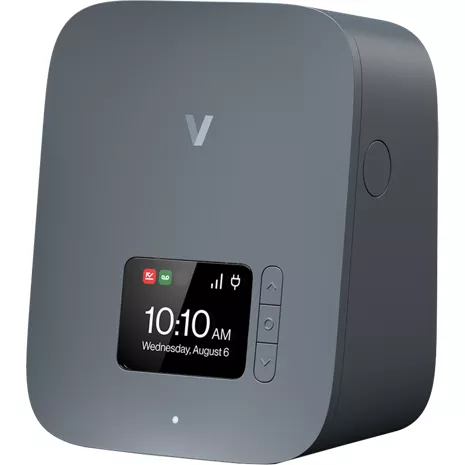
The 3-button menu layout makes it simple to navigate. Check incoming and outgoing calls, notifications, caller ID, change settings and more with the press of a button.

Easy-to-read display.

The built-in color LCD display allows you to keep track of your connection, missed calls, voicemails, battery power and other notifications

The features you love.

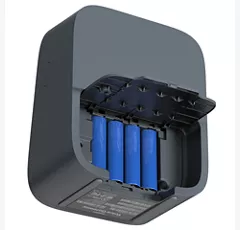
Get access to the same features you’d enjoy from your traditional landline phone. You can even stay in touch during a power outage for up to 24 hours3 with built-in AA batteries4.

Hear and be heard.

An innovative 4G/5G receiver and antenna design work together to dramatically improve signal coverage and voice quality for your phone calls. HD voice quality means you can hear and be heard without unnecessary background noise or static.

Ports and Connectivity.

With 2 RJ11 ports, you never need to disconnect your voice connection or TTY device to use another compatible feature. The second RJ11 port can be used to connect your fax machine. Ethernet port can be used to connect to your Wi-Fi router for VoIP.

Easy to navigate.

The 3-button menu layout makes it simple to navigate. Check incoming and outgoing calls, notifications, caller ID, change settings and more with the press of a button.

Easy-to-read display.

The built-in color LCD display allows you to keep track of your connection, missed calls, voicemails, battery power and other notifications

Design

Size

5.9" (height) x 2.9" (depth) x 4.7" (width)

Weight

15.3 oz (without external antenna) | 16.5 oz (with external antenna)

Display

2.4" LCD, RGB

Battery

Battery

AA Lithium Iron Disulfide (Li-FeS2) battery x 4 (non-rechargeable) | 24 hours standby time

Network

LTE/5G Bands

B2/B4/B5/B13/B48/B66 | N2/n5/n48/n66/n77

Performance

Wi-Fi

Wi-Fi 6, 2.4 GHz and 5 GHz

Memory

Flash: 512MB | RAM: 512MB

Ethernet

1 Gbps

Ports

RJ45 (Ethernet) | RJ11 x 2 (Phone/Fax) | RJ31 (Alarm)

Power

USB-C Type

VG10A

  • Verizon Voice Gateway, VG10A
  • External Antenna (2)
  • USB-C Power Adapter
  • RJ11 cable
  • Mounting bracket
  • Quick start guide
  1. Landline phone not included.
  2. Eligibility to port your home number varies.
  3. Based on average battery life under typical usage conditions. Average expected performance based on typical use. Actual battery life depends on factors such as network, features selected, frequency of calls, and voice data, and other application usage patterns. Results may vary.
  4. If the landline phone to which the Voice Gateway is connected requires external electric power to operate, service (including the ability to make and receive 911 calls) will not be available during a power outage.

Verizon Voice Gateway undefined

4.3

4.3 undefined

3 undefined

5 stars (1)
4 stars (2)

100

Not exactly as advertised

4 undefined

Noviceretiree . 2 days

Check Mark Graphic
Works well with one corded phone plugged into the device. Does not work throughout the house if the Gateway is plugged directly into the wall jack. There are Verizon tech reports that say it will work that way, but it doesn’t.
5 undefined

Clara62 . 20 days

Check Mark Graphic
Looks nice on my desk without taking up too much space. No problem setting it up.

Clarity but...

4 undefined

Nick H . 25 days

Check Mark Graphic
Very simple to set up. Worked immediately. Signal strength in my area is at two, but every once in a while I do get 1 out 3 bars. The one thing I do like is the clarity of the calls, no static etc. Oh and that is another thing, dial tone. Yes, there truly is a dial tone just like Plain Ole Telephone Service(POTS). Just a cautionary note, when switching from POTS to wireless, you may not receive calls on your Voice Gateway, until Verizon disconnects POTS to your location. You can use the Voice Gateway to make calls, but your POTS phone is the one that will receive the call, until Verizon disconnects. As to icons, use the menu selector buttons, minimalist, but practical.

Verizon Voice Gateway undefined

CONNIE . Oct 4, 2026

Can i receive voicemail messages or will i have to have a phone with a answering machine on it?

Verizon Customer Support12 hours

The Verizon Voice Gateway can receive voicemail messages. Here is more information below: https://www.verizon.com/support/verizon-voice-gateway/ Please contact us on another platform if you still have further questions or need more details. https://www.verizon.com/support/contact-us/ -Sean

Mike . Sep 27, 2026

How do I set up this modem and connect it to my phone,and will I need additional cables

Verizon Customer Support5 days

Connect your telephone directly to an RJ11 port on the back of the Verizon Voice Gateway using a standard telephone cord. The box includes the power adapter and the device uses standard analog telephone cords (RJ11) that come with your regular landline phone. ~Maria

DOC286 . Sep 24, 2026

Is there a way to connect an external antenna instead of the small antennas that come with the device?

Casper . Sep 22, 2026

How many phones can you hook up on Verizon voice gateway

Verizon Customer Support9 days

You can directly connect up to two analog devices (e.g. phone, fax machine) to the Verizon Voice Gateway. -Joe

voice gateway . Sep 22, 2026

What do the symbols mean?

Verizon Customer Support9 days

Here is the exact breakdown of what the symbols on your Verizon Voice Gateway's LCD screen mean: 📶 5G/LTE Signal (1-3 bars): Shows your wireless network connection strength. (If it shows 1 bar or fewer, try moving the gateway closer to a window). 🌐 Wi-Fi Signal (1-4 bars): Shows your local Wi-Fi transmission strength. 🔌 AC Power: Confirms the gateway is plugged into a wall outlet and receiving proper power. 🔋 Battery (1-4 bars): Shows the internal backup battery level. If you see an icon showing no battery, the batteries are missing. 🖥️ Ethernet: Confirms the device is successfully hooked up to a physical Ethernet network. 📞 Missed Calls: Alerts you that you have unread or missed phone calls. ⚠️ E911 Only: This means the device currently has restricted network access and can only be used to place emergency calls.

David . Sep 21, 2026

Is a cell phone plan required with this device?

Verizon Customer Support9 days

No, you do not need an existing Verizon cell phone (mobile) plan or a mobile phone to use the Verizon Voice Gateway. -Sarge

George . Sep 19, 2026

Cannot receive calls

Verizon Customer Support13 days

If you need help with your service or device, reach out to us here: https://www.verizon.com/digital/nsa/nos/ui/ngd/contactus ~Peter

landline device . Sep 18, 2026

how to set correct time on this device?

Verizon Customer Support16 days

The clock sets automatically. If it is not showing correct please reach out to us so we can help troubleshoot through our Contact Us page here. -Josh https://www.verizon.com/digital/nsa/nos/ui/ngd/contactus

wireless home phone . Sep 15, 2026

messages full not receiving any calls, how do I retrieve messages to eliminate

Verizon Customer Support18 days

To troubleshoot your device visit: https://www.verizon.com/digital/nsa/nos/ui/troubleshooting/acss/verizon-voice-gateway-overview or contact us at www.vzw.com/contactus -James

Call filtering . Aug 18, 2026

I want to use call filter plus to block all the spam calls. How can I do that if I can’t download the app to it to configure it. I can’t even do it from one of my other wireless devices.

Shop
  • Devices
  • Apple iPhone 18 Pro
  • Apple iPhone Duo
  • Samsung Galaxy S26 Ultra
  • Apple Watch Series 12
  • Accessories
  • Simplicity Plan
  • Verizon Prepaid
  • Home Internet & TV
  • Verizon One - Mobile & Internet
  • Bring your phone
  • TracFone
Support
  • Support overview
  • Return policy
  • Contact us
  • Service Central
  • Business support
  • Sign in
  • Download My Verizon App
  • Lifeline
  • Accessibility
  • Network support
  • Speed Test
About Verizon
  • About us
  • Careers
  • News
  • Responsibility
  • Verizon Innovative Learning
  • Articles
  • Brochures
  • 5G overview
  • Innovation Labs
Important Consumer Information
  • Legal Terms & Notices
  • Device Payment Terms & Conditions
  • Report a security vulnerability
Follow Verizon
  • facebook-official
  • twitter
  • you-tube
  • instagram
  • TikTok
Verizon Support
  • twitter
  • Privacy Policy
  • Your Privacy Choices
  • Accessibility
  • Open Internet
  • Website Terms of Use
© 2026 Verizon