Accessibility Resource Center Skip to main content
Personal Business
1-833-VERIZON
Contact us
Support
Stores
Coverage map
Español
Mobile Mobile
Mobile
 
Home Internet Home Internet
Home Internet
 
Shop
Shop
  • Devices Devices
    Devices
    • Smartphones
    • Certified pre-owned phones
    • Featured smartphones Featured smartphones
      Featured smartphones
      • Apple iPhone 17 Pro
      • Apple iPhone 17 Pro Max
      • Samsung Galaxy S26 Ultra
      • Google Pixel 10 Pro
    • Upgrade your device
    • Bring your own device
    • Unlocked phones
    • Other phones
    • Trade in your device
    • Tablets & laptops
    • Watches
    • Certified pre-owned watches
    • Jetpacks & hotspots
  • Mobile plans Mobile plans
    Mobile plans
    • Shop all plans
    • Unlimited
    • International & travel
    • Connected devices
    • Bring your own device
    • Connected car plans
  • Home internet plans Home internet plans
    Home internet plans
    • Shop all home solutions
    • Fios Home Internet
    • 5G Home Internet
    • Wi-Fi Backup
    • Home phone
    • Fios TV
    • Moving
    • Fios accessories Fios accessories
      Fios accessories
      • Accessories overview
      • Shop all accessories
      • Cables & connectors
      • Networking & Wi-Fi
      • TV accessories
      • Phone equipment
    • 5G Home accessories
    • Verizon Forward
  • Products & plan perks Products & plan perks
    Products & plan perks
    • Shop all
    • Plan perks
    • Entertainment
    • International & travel
    • Family
    • Protection
    • Home products
    • Mobile productivity
    • Banking & cards
  • Accessories Accessories
    Accessories
    • Shop all accessories
    • Phone & tablet accessories Phone & tablet accessories
      Phone & tablet accessories
      • Shop all
      • Phone cases
      • Phone screen protectors
      • Tablet accessories
      • Chargers & cables
      • Phone attachments
      • MagSafe compatible
      • Verizon accessories
    • Wearable tech Wearable tech
      Wearable tech
      • Shop all wearable tech
      • Smart watches
      • Fitness trackers
      • Watch accessories
      • AI glasses
      • Smart rings
    • Charging
    • Audio
    • Gaming
    • Smart home
    • Deals
  • Verizon Prepaid Verizon Prepaid
    Verizon Prepaid
    • Prepaid overview
    • Prepaid plans Prepaid plans
      Prepaid plans
      • Phone plans
      • Smartwatch plans
      • Tablet plans
      • Hotspot & router plans
      • International plans
    • Devices Devices
      Devices
      • Smartphones
      • Smartwatches
      • Tablets
      • Hotspots & routers
      • Basic phones
      • Bring your own device
    • Deals Deals
      Deals
      • All deals
      • Home Internet
    • Why Verizon Prepaid
    • Perks & services
  • myAccess
  • myAccess
 
Deals
Deals
  • Shop all deals
  • My offers
  • Free phones
  • Mobile + Home
  • Accessories
  • Verizon Visa® Card
  • Check discounts
 

  • Account overview
  • Account overview
  • Pay bill
  • Make a one-time payment
  • Register
  • Business Log in

Choose your cart:

  • Mobile solutions
  • Home solutions
Go To Cart

  • Account overview
  • Account overview
  • Pay bill
  • Make a one-time payment
  • Register
  • Business Log in

Choose your cart:

  • Mobile solutions
  • Home solutions
Go To Cart
Personal Business
1-833-VERIZON
Contact us
Support
Stores
Coverage map
Español
Call Us: 1-800-VERIZON Buy now
Get our best deals on phones, tablets, home internet and more.
end of navigation menu
  • Home
  • Home/Office Solutions
  • Verizon

Verizon Wireless Home Phone LVP2

3.5 out of 5 rating
1567 Reviews
Starts at $2.77/mo$99.99
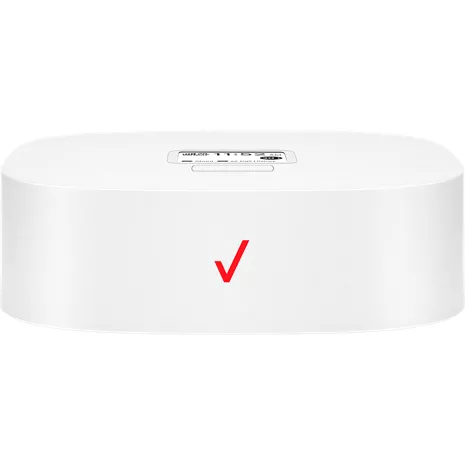
Verizon Wireless Home Phone LVP2 White image 1 of 1
Starts at $2.77/mo$99.99

Color

One-time activation fee of $40.

Device unlocking policy

The Verizon Wireless Home Phone connects your existing landline phone to the Verizon 4G LTE network for reliable, high-quality voice service. It even lets you keep your old phone number.1 The Wireless Home Phone comes with all the features you ve come to expect, including call forwarding, voicemail, fax compatibility and E911. Make the most of it with Verizon, the nation's most awarded network.
All specs

Reviews

3.5

3.5 out of 5 rating

1567 reviews

51% of reviewers recommend this product.

So-so. Basic function is OK but "features" and "support" are not.

2 out of 5 rating

trying to keep it simple . 4 months ago

Check Mark GraphicYes, I'd recommend this product.
I got this for my mom (age 95) who recently moved into a retirement home and wanted to keep a landline. I was wary of how polarized the reviews are on this (love/hate, not much in the middle) but this ended up being the best option given the implosion of landline service from the local telephone company. The good side: we got it home and plugged in and it did work right away, for placing and receiving calls. She hasn't had any of the issues other reviewers report, of calls dropping randomly or bad sound quality. The bad side: the local "world of wireless" store, while an authorized Verizon dealer, had almost ZERO knowledge on how these work and they didn't keep any inventory so we had to order and wait almost 2 weeks to get it. After a couple weeks of use, we realized the unit was not showing when there are voicemail messages - there's supposed to be an icon with # of messages on the (tiny) screen. The retrieval method is really cumbersome (must use the phone to navigate menu and listen to robot voice prompts, like 1990's phone banking), the display does nothing to help with that. I found a diagram on your site showing the menu tree for all the features and it says 'personal options' has a toggle to turn the voicemail message notification on/off -- don't know why it wouldn't default to 'on' -- but when I followed the menu steps in, the prompts (and functions) don't match up to the menu diagram. So I called the place we bought this from and they said they have no more access to current docs or tech support than the average customer. In the end, I'm bypassing the clumsy voicemail in the LVP2 by setting a regular (1990's era) phone machine to pick up on 4 rings, intercepting the call before the LVP2 sends it to its voicemail. Some designer got happy with the look of this thing but it's like they did no usability testing, and there's just no excuse for changing the menu sequences without giving people access to updated documentation. I checked yes on "would you recommend to a friend" because the basic phone function works, but would also caution anyone to be aware of the shortcomings.

Great option from having to carry a cell phone around your house all day

5 out of 5 rating

Us331242 . 6 months ago

Check Mark GraphicYes, I'd recommend this product.
I absolutely love this option! It lets me use my trusty standard landline phone set, which is a Panasonic Link2cell 6-handset system. It’s so convenient to have a regular phone that doesn’t break the bank and rings throughout the house. I don’t have to worry about searching for my cell phone or carrying it with me all day. Plus, as a caregiver for my senior parents, this makes things so much simpler. They don’t want to deal with a smartphone, and this system lets them answer calls, make calls, save contacts, block spam calls, and hear the phone ring anywhere in the house. I’ve been using it for over ten years now, and while the service had a few bumps at the start—like calls disconnecting unexpectedly or getting a recording asking me to activate service—none of those issues were too big to handle! The sound quality is fantastic, sometimes even better than my cellphone, especially since landline phones usually have better speakers and can connect to hearing devices that smartphones can’t. Setting it up is super easy! It comes with an RJ45 cable and an AC adapter. You just plug in the power, connect the RJ45 cable to the wireless device, find an open wall jack, and link it up. Once you turn on the device, it connects to Verizon, and voilà—you have a dial tone! When I started, Verizon typically inserted the SIM card and transferred my landline number. I did need to change the SIM card once in all these years, but it was a breeze to do—just grab a screwdriver! One of my favorite features is how portable it is! If you’re a snowbird with homes in different places, you can take this anywhere Verizon works. There’s no need to set up home service in both locations; your landline number travels with you, just like your cellphone! This is the best and most user-friendly option for older adults, disabled individuals, or anyone who prefers a straightforward phone. Plus, 911 service is available and works well. Just a tip: if you take it between different locations, you might need to register it at each place. As a caregiver, I’ve used 911 and had no issues getting connected to the right service. I do wish it had a few extra features like video capabilities and the ability to save photos as a screensaver, but that might complicate the simplicity I love so much!
All reviews
1 Eligibility to port your home number varies. Service is not equivalent to landline phone service and not compatible with any home security systems. Customers must provide their own home or office phone equipment.
2 Based on average battery life under typical usage conditions. Average expected performance based on typical use. Actual battery life depends on factors such as network, features selected, frequency of calls, and voice data, and other application usage patterns. Results may vary.
3 While the Wireless Home Phone does have a backup battery, if the landline phone to which the Wireless Home Phone is connected requires external electric power to operate, service (including the ability to make and receive 911 calls) will not be available during a power outage.
4 You will need at least moderate Verizon Wireless coverage throughout your location to properly use the Wireless Home Phone service. The Wireless Home Phone device is designed to provide coverage at your location that is consistent with other Verizon Wireless devices, but Verizon Wireless does not represent that Wireless Home Phone service will be equivalent to landline phone service.
slide 1 of 7, The features you love.

Conference in.

Get everyone on the same page, even when you’re not in the same room. The Wireless Home Phone supports conference calls with up to 6 people.

The features you love.

Get access to the same features you'd enjoy from your traditional landline phone. You can even stay in touch during a power outage for up to 24 hours2 thanks to a rechargeable battery backup.3

Stay connected.

The Wireless Home Phone supports a full range of 4G bands (B2/B5/B13/B4), allowing you to enjoy maximum coverage at your home or office4.

Hear and be heard.

An innovative LTE receiver and antenna design work together to dramatically improve signal coverage and voice quality for your phone calls. HD voice quality means you can hear and be heard without unnecessary background noise or static.

Easy-to-read display.

The built-in LED screen allows you to keep track of your connection, missed calls, voicemails, battery power and more. The screen lights up when in use and dims when idle to save power.

Easy to navigate.

The menu makes it simple to navigate. Check incoming and outgoing calls, notifications, caller ID and more with the press of a button.

Dual ports.

With 2 RJ11 ports, you never need to disconnect your voice connection or TTY device to use another compatible feature. If you require your fax machine to send or receive important documents, the second port is there when you need it.

Conference in.

Get everyone on the same page, even when you’re not in the same room. The Wireless Home Phone supports conference calls with up to 6 people.

The features you love.

Get access to the same features you'd enjoy from your traditional landline phone. You can even stay in touch during a power outage for up to 24 hours2 thanks to a rechargeable battery backup.3

Design

Depth

1.81 in.

Size

145 x 145 x 46 mm (with rubber foot)

Weight

15.87 oz.

Display

LCD size 1.77 inch, Resolution 128 (RGB)*160, Display mode Normally white, Pixel pitch 0.073(W)*0.219(H), Active area 28.03(W)*35.04(H)

Performance

Processor

GCT GDM7243Q

SKU#

SKU#

WHPLVP2

What's in the box

  • Wireless Home Phone Model #: LVP2
  • Standard li battery
  • Wall charger
  • RJ11 cable
  • Quick reference guide
1 Eligibility to port your home number varies. Service is not equivalent to landline phone service and not compatible with any home security systems. Customers must provide their own home or office phone equipment.
2 Based on average battery life under typical usage conditions. Average expected performance based on typical use. Actual battery life depends on factors such as network, features selected, frequency of calls, and voice data, and other application usage patterns. Results may vary.
3 While the Wireless Home Phone does have a backup battery, if the landline phone to which the Wireless Home Phone is connected requires external electric power to operate, service (including the ability to make and receive 911 calls) will not be available during a power outage.
4 You will need at least moderate Verizon Wireless coverage throughout your location to properly use the Wireless Home Phone service. The Wireless Home Phone device is designed to provide coverage at your location that is consistent with other Verizon Wireless devices, but Verizon Wireless does not represent that Wireless Home Phone service will be equivalent to landline phone service.

Verizon Wireless Home Phone LVP2 Reviews

3.5

3.5 out of 5 rating

1567 reviews

5 stars (762)
4 stars (205)
3 stars (127)
2 stars (76)
1 star (397)

51% of reviewers recommend this product.

So-so. Basic function is OK but "features" and "support" are not.

2 out of 5 rating

trying to keep it simple . 4 months ago

Check Mark GraphicYes, I'd recommend this product.
I got this for my mom (age 95) who recently moved into a retirement home and wanted to keep a landline. I was wary of how polarized the reviews are on this (love/hate, not much in the middle) but this ended up being the best option given the implosion of landline service from the local telephone company. The good side: we got it home and plugged in and it did work right away, for placing and receiving calls. She hasn't had any of the issues other reviewers report, of calls dropping randomly or bad sound quality. The bad side: the local "world of wireless" store, while an authorized Verizon dealer, had almost ZERO knowledge on how these work and they didn't keep any inventory so we had to order and wait almost 2 weeks to get it. After a couple weeks of use, we realized the unit was not showing when there are voicemail messages - there's supposed to be an icon with # of messages on the (tiny) screen. The retrieval method is really cumbersome (must use the phone to navigate menu and listen to robot voice prompts, like 1990's phone banking), the display does nothing to help with that. I found a diagram on your site showing the menu tree for all the features and it says 'personal options' has a toggle to turn the voicemail message notification on/off -- don't know why it wouldn't default to 'on' -- but when I followed the menu steps in, the prompts (and functions) don't match up to the menu diagram. So I called the place we bought this from and they said they have no more access to current docs or tech support than the average customer. In the end, I'm bypassing the clumsy voicemail in the LVP2 by setting a regular (1990's era) phone machine to pick up on 4 rings, intercepting the call before the LVP2 sends it to its voicemail. Some designer got happy with the look of this thing but it's like they did no usability testing, and there's just no excuse for changing the menu sequences without giving people access to updated documentation. I checked yes on "would you recommend to a friend" because the basic phone function works, but would also caution anyone to be aware of the shortcomings.
Report as inappropriate

Great option from having to carry a cell phone around your house all day

5 out of 5 rating

Us331242 . 6 months ago

Check Mark GraphicYes, I'd recommend this product.
I absolutely love this option! It lets me use my trusty standard landline phone set, which is a Panasonic Link2cell 6-handset system. It’s so convenient to have a regular phone that doesn’t break the bank and rings throughout the house. I don’t have to worry about searching for my cell phone or carrying it with me all day. Plus, as a caregiver for my senior parents, this makes things so much simpler. They don’t want to deal with a smartphone, and this system lets them answer calls, make calls, save contacts, block spam calls, and hear the phone ring anywhere in the house. I’ve been using it for over ten years now, and while the service had a few bumps at the start—like calls disconnecting unexpectedly or getting a recording asking me to activate service—none of those issues were too big to handle! The sound quality is fantastic, sometimes even better than my cellphone, especially since landline phones usually have better speakers and can connect to hearing devices that smartphones can’t. Setting it up is super easy! It comes with an RJ45 cable and an AC adapter. You just plug in the power, connect the RJ45 cable to the wireless device, find an open wall jack, and link it up. Once you turn on the device, it connects to Verizon, and voilà—you have a dial tone! When I started, Verizon typically inserted the SIM card and transferred my landline number. I did need to change the SIM card once in all these years, but it was a breeze to do—just grab a screwdriver! One of my favorite features is how portable it is! If you’re a snowbird with homes in different places, you can take this anywhere Verizon works. There’s no need to set up home service in both locations; your landline number travels with you, just like your cellphone! This is the best and most user-friendly option for older adults, disabled individuals, or anyone who prefers a straightforward phone. Plus, 911 service is available and works well. Just a tip: if you take it between different locations, you might need to register it at each place. As a caregiver, I’ve used 911 and had no issues getting connected to the right service. I do wish it had a few extra features like video capabilities and the ability to save photos as a screensaver, but that might complicate the simplicity I love so much!
Report as inappropriate

Don't buy it.

1 out of 5 rating

Megz . 8 months ago

Very problematic! It cuts out and ends a call frequently after 2 min of conversation with a beep, beep, beep, sound and calls have to be remade. Not worth the money!
Report as inappropriate

This product works great for my mother in law

5 out of 5 rating

Soninlaw . 8 months ago

Check Mark GraphicYes, I'd recommend this product.
They had their home phone for more than 50 years but couldn’t move the number to their new home. This box made it possible! Worked perfectly in no time . Just plugged it in an it worked ever since. Got international calling and unlimited national calls for less than the land line cost. Would recommend.
Report as inappropriate

Verizon service

5 out of 5 rating

Michael Gent . 9 months ago

My wife and have had Verizon home phone for several years. Recently our unit malfunctioned an I hade to buy a new unit. After hyooking it up I received an error message and was directed to contact customer service. I made an appointment for the next day. I received a call from the service rep Ali within 2 minutes of the appointment. She worked with me and we had the unit operating properly within 30 minutes. Ali was very professional and pleasant t. She was a joy to work with. Should I ever have issues with any of my Verizon phones, I hope that I can speak with her.
Report as inappropriate

Very disappointed! Avoid!

1 out of 5 rating

Blind Bob . 9 months ago

Avoid this device! This is the second one I thought maybe it was just specifically the device I had but the second one is doing exactly the same thing I received four bars and the connection! But it sounds that I’ve been told by many people I’m talking in a tin can and it is multiple times disconnected on me Both devices so it must be the model! I previously had the T 2000 had some issues with that a few years ago at the beginning, but it sounded great. This thing supposedly is an upgrade I thought upgrades were supposed to be an improvement and they want $99 for this? And when I’ve taken it back they’re saying there might be a $50 fee? Why should I pay for something that is defective? I didn’t design this disappointed Verizon. Very disappointed!
Report as inappropriate

The best home phone service

5 out of 5 rating

Dean . 9 months ago

Check Mark GraphicYes, I'd recommend this product.
Top of the line home phone service and you can even travel with it. Take your home phone with you wherever you go. Just plug it in and good to go.
Report as inappropriate

Great Idea, Not Reliable

2 out of 5 rating

9 months ago

I've been using this device for about 2 weeks and so far I'm not that impressed. When it works, it works well, with clear voices and good connection. However, half the time I go to use the phone, I have an instant busy signal....even before I dial a number. I have found if I turn off the device and turn it back on it seems to clear the problem. Using chat tech support is useless. It take those people so long to respond. It is at least a 5 minute wait between when you ask or answer a question and when they respond. I plan to eliminate my land line in the next couple months. I'll just deal wth the problem until such time that I dump the whole unit.
Report as inappropriate

Felt like a Verizon employee

1 out of 5 rating

Fran g . 10 months ago

Purchased a Verizon lvl-2 wireless home connector because the one I had for two years had to have software update several time a year and caused loss of service so we purchased a new one and I needed to be on the phone performing tests removing battery and help the Verizon technicians who except for the last one were reading me instructions on how to update their brand new product . From around 10:00 AM on and off till around 8 :00 PM then a follow up phone call the next day I couldn’t understand them and they were not knowledgeable enough to perform an update on their own device. They honestly spent at least a 1/2 hour thru the day being polite and asking how my day was and that was the most irritating part of the day . I kept asking to get to the point and get done but I’m sure their higher ups have the idea they will be so polite the customer won’t care that the Verizon tech didn’t know much and wasted the customer’s time . It the only service available otherwise we would get someone else !!!
Report as inappropriate

Wonderful alternative to a cell phone

5 out of 5 rating

PYaeger . 10 months ago

Check Mark GraphicYes, I'd recommend this product.
My mother in law recently moved to assisted living and we had to figure out a new phone for her. She is 80 and has dementia and cell phones are too much for her to learn. With Verizon’s home phone option, we could plug in her familiar handset from her apartment. It works great!
Report as inappropriate

Verizon Wireless Home Phone LVP2 FAQs

Annette . Mar 7, 2026

Can you plug 2 phone line cables to operate 2 corded phones with one of these devices

Answer from Verizon Customer Support10 days

Yes, there are 2 available ports. -Jazzy

Was this answer helpful?

Report as inappropriate

Lisa . Feb 19, 2026

if i hook to my fax machine is the fax number the same as the phone number?

Answer from Verizon Customer Support27 days

Yes the number assigned with the device will be the number used -Anthony

Was this answer helpful?

Report as inappropriate

Dschilling . Jan 20, 2026

How can i improve signal with the wireless home phone inside? Steel building blocks the outside cell service.

Answer from Verizon Customer Support1 month

Hello, please contact us here: https://www.verizon.com/support/contact-us/#mobile so we can assist you with your concern. -Cait

Was this answer helpful?

Report as inappropriate

Janes . Jan 19, 2026

Can I use this for my fax machine

Answer from Verizon Customer Support1 month

Yes Wireless Home Phone 2 is compatible with Group3 FAX machines.-Cryssie

Was this answer helpful?

Report as inappropriate

Deanna . Jan 15, 2026

how much a month for the land line replacement i now have and can i keep my existing att number?

Answer from Verizon Customer Support2 months

Please reach out to Customer Service for any billing related concerns. https://www.verizon.com/digital/nsa/nos/ui/ngd/contactus -Sara

Was this answer helpful?

Report as inappropriate

Lee Means . Jan 14, 2026

How do i transfer my exsisting home phone number to verizon

Answer from Verizon Customer Support2 months

You can transfer an existing number through your My Verizon account, by phone, or in a store. Check out steps on how to complete this here, https://www.verizon.com/support/local-number-portability-faqs/. -Danielle

Was this answer helpful?

Report as inappropriate

Sara S . Jan 7, 2026

Can this be connected through WI FI in a low cell signal area?

Answer from Verizon Customer Support2 months

The Verizon Wireless Home Phone connects your existing landline phone to our 4G LTE network for voice service. To check the coverage in your area, please https://www.verizon.com/coverage-map/. -Necia

Was this answer helpful?

Report as inappropriate

Home phone box . Jan 7, 2026

How long does it take to activate?

Answer from Verizon Customer Support2 months

You can find the steps for activation the Verizon Wireless Home Phone LVP2 using this link: https://www.verizon.com/support/knowledge-base-229716/ If you are transferring an exisitng landline to Verizon, it can take 2-10 days. ~Jesse

Was this answer helpful?

Report as inappropriate

wireless home phone . Dec 31, 2025

can i plug a cordless phone into this uniu

Answer from Verizon Customer Support2 months

Yes, cordless phones are compatible with Verizon Wireless Home Phone LVP2. -Art

Was this answer helpful?

Report as inappropriate

WHPLVP2 . Dec 22, 2025

What does it mean when light keeps blinking

Answer from Verizon Customer Support2 months

Learn what the LED indicator means here: https://www.verizon.com/support/knowledge-base-229723/ For help, please contact us: https://www.verizon.com/digital/nsa/nos/ui/ngd/contactus -Joseph

Was this answer helpful?

Report as inappropriate
Shop
  • Devices
  • Accessories
  • Plans
  • Prepaid
  • Home Internet & TV
  • Deals
  • Mobile + Home discount
  • Bring your own device
  • TracFone
Top Device Brands
  • Samsung
  • Apple
  • Google
  • Amazon
Support
  • Support overview
  • Return policy
  • Contact us
  • Community Forums
  • Business support
  • Sign in
  • Download My Verizon App
  • Lifeline
  • Accessibility
  • Network support
  • Speed Test
About Verizon
  • About us
  • Careers
  • News
  • Responsibility
  • Verizon Innovative Learning
  • Articles
  • Brochures
  • 5G overview
  • Innovation Labs
Most Popular
  • Apple iPhone 17
  • Apple iPhone 17e
  • Samsung Galaxy S26 Ultra
  • Apple AirPods Max
  • Disney+, Hulu, & ESPN+ (With Ads)
  • Apple Watch Series 11
  • Fios
  • Verizon Visa® Card
Top Accessory Brands
  • Otterbox
  • ZAGG
  • Beats
  • Mophie
  • JBL
  • Fitbit
  • Elizabeth James
Important Consumer Information
  • Legal Terms & Notices
  • Device Payment Terms & Conditions
  • Report a security vulnerability
Follow Verizon
  • facebook-official
  • twitter
  • you-tube
  • instagram
  • TikTok
Verizon Support
  • twitter
  • Privacy Policy
  • Your Privacy Choices
  • Your Privacy Choices
  • Accessibility
  • Open Internet
  • Website Terms of Use
© 2026 Verizon