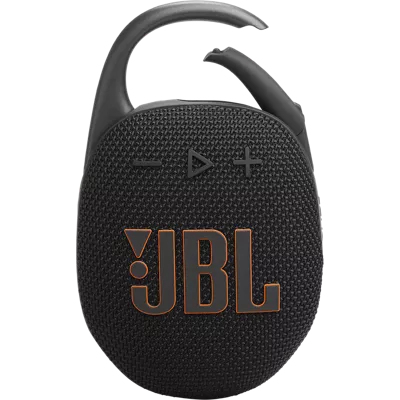
158 reviews
97% of reviewers recommend this product.
Art2 . 28 days ago
Customer Support - 27 days ago
We appreciate your feedback. If your JBL Clip 5 turns off randomly, please make sure that the speaker is fully charged before using it. If this still does not resolve the issue, proceed to perform the reset. To reset the speaker, remove the speaker from your source device's Bluetooth settings. Power on the speaker, then press and hold the Volume + button and Play/Pause button together for 2 seconds until the speaker turns off. Pair the speaker again to your device to see if it fixes the issue. However, if your product keeps disconnecting from your device, feel free to contact our customer support directly for us to know more about the issue and to assist you further with your concern. https://support.jbl.com/us/en/#contactjbl.com Originally posted on jbl.com
GCK1997 . 28 days ago
Customer Support - 27 days ago
Thank you for your feedback. Feel free to contact us directly so we can assist you further regarding the design of your JBL Clip 5 speaker. https://support.jbl.com/us/en/#contactjbl.com Originally posted on jbl.com
SKU#
JBLCLIP5BLKAM
Art2 . 28 days ago
Customer Support - 27 days ago
We appreciate your feedback. If your JBL Clip 5 turns off randomly, please make sure that the speaker is fully charged before using it. If this still does not resolve the issue, proceed to perform the reset. To reset the speaker, remove the speaker from your source device's Bluetooth settings. Power on the speaker, then press and hold the Volume + button and Play/Pause button together for 2 seconds until the speaker turns off. Pair the speaker again to your device to see if it fixes the issue. However, if your product keeps disconnecting from your device, feel free to contact our customer support directly for us to know more about the issue and to assist you further with your concern. https://support.jbl.com/us/en/#contactjbl.com Originally posted on jbl.com
GCK1997 . 28 days ago
Customer Support - 27 days ago
Thank you for your feedback. Feel free to contact us directly so we can assist you further regarding the design of your JBL Clip 5 speaker. https://support.jbl.com/us/en/#contactjbl.com Originally posted on jbl.com
Mn vcvhhhh . 1 month ago
Customer Support - 1 month ago
Thanks for your feedback. We appreciate your input, and we'll make sure to forward it to the appropriate team.jbl.com Originally posted on jbl.com
Schmidt CRNA . 1 month ago
jbl.com Originally posted on jbl.com
Momooo . 1 month ago
jbl.com Originally posted on jbl.com
Adamsfamily . 1 month ago
Customer Support - 1 month ago
Thanks for your feedback. We appreciate you bringing this to our attention and we would like to work with you regarding your personalized JBL Clip 5. You may reach out to us directly for further assistance using this link: https://support.jbl.com/us/en/#contactjbl.com Originally posted on jbl.com
robinfreak . 1 month ago
jbl.com Originally posted on jbl.com
Steddie . 1 month ago
Customer Support - 1 month ago
Thank you for your feedback on our JBL Clip 5. Our JBL Clip 3 featured a speakerphone with a built-in microphone, which was convenient for taking phone calls. In our recent Clip series like our JBL Clip 5 does not include a built-in microphone, as this model focuses on music playback. If you are looking for a portable speaker with a speakerphone, you might want to check out our JBL Go 2. Please note that this unit is currently out of stock, but you may be able to find it through our authorized third-party sellers.jbl.com Originally posted on jbl.com
Jon65 . 1 month ago
jbl.com Originally posted on jbl.com
Courtk94 . 1 month ago
Customer Support - 1 month ago
Thanks for sharing your feedback on our JBL Clip 5. We value your input, and we'll make sure to forward your feedback to the appropriate team.jbl.com Originally posted on jbl.com
Gay dinosaur . Jan 24, 2026
What's the best clip speaker
Thanks for your question. We would like to recommend our JBL Clip 5, the latest in the JBL Clip lineup, offering improved sound, longer battery life, IP67 waterproof and dustproof durability, and a built-in carabiner for easy portability. It also features multi-speaker connection by Auracast.
Js13 . Dec 11, 2025
Can I use this in the shower?
Thanks for your question. Yes, you can use our JBL Clip 5 in the shower. It has an IP67 rating, making it dustproof and capable of being submerged in 1m of water for 30 minutes. Please make sure that the unit is completely dry before charging it. Also, please note that the Maximum Operation Temperature of it is 45 degrees Celsius.
alisonjo315 . Dec 7, 2025
Will black and orange be available in time for Christmas?
AMB29 . Nov 10, 2025
Can the speaker stand on its own on a flat surface? Or must it be clipped to something?
EAHMK . Nov 9, 2025
Can I use 2 of them as rear surround speakers for my LG TV of 2025 with Auracast and can they stay connected with the mains through usbc all the time?
Thanks for your question. Yes, our JBL Clip 5 can remain connected to a power outlet via USB‑C for charging, but while it can form a stereo pair through Auracast using the JBL Portable app, this feature only works when paired with a phone or tablet, since the app is not available for TVs. So, even though our Clip 5 can connect to your LG TV via Bluetooth, you won’t be able to stereo pair them directly through the TV.
Ginn . Nov 7, 2025
How close does it need to be near your Bluetooth device to stay connected?