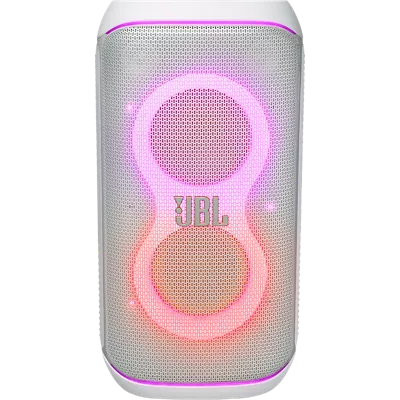
JBL PartyBox Club 120 Portable Wireless Party Speaker
Color
This item is out of stock.
Free returns within 30 days.Details
¹ Battery life and charge cycles vary with use, settings, and other factors; actual results will vary.
Reviews
4.6
47 reviews
100% of reviewers recommend this product.
Partybox 120 is a disappointment
Laurentiu . 24 days ago
Customer Support - 21 days ago
Thank you for your feedback. Source devices (phones, tablets, etc.) all behave a bit differently. Some have very loud outputs, and some can be quite a bit lower, even at maximum volumes. It is possible that the output level of your source device or song causes the unit to reach maximum undistorted volume before actually reaching 100% on the volume control. So, if the issue only occurs when the volume is getting near to maximum, this would confirm that the issue is the result of an extremely loud source device or song recording. Please try these following basic troubleshooting steps. 1. Try turning off the Equalizer (EQ) off. If this does not resolve the issue, proceed to the step 2. 2. Connect the speaker to your other source device, like smart-phone, tablets and iPads etc. If the issue persist, proceed to the reset procedure. 3. To reset, press and hold the play/paus and the light buttons for more than 10 seconds or until the speaker turns off. Once done, try to pair the speaker again to your device. If the issue persist, feel free to contact our customer support for further assistance. https://support.jbl.com/us/en/#contactjbl.com Originally posted on jbl.com
Great speakers to invest in
KCUniv3rsity . 27 days ago
jbl.com Originally posted on jbl.com
Features
- Multi-speaker connection by Auracast™
- Up to 12 hours of playtime¹
- Dual mic and guitar inputs
- Powerful JBL Pro Sound
- Futuristic lightshow
- Foldable handle
- Splash proof
- AI Sound Boost
- JBL PartyBox app
- Made in part with recycled materials
Specs
- Dimensions: 11.69 x 11.35 x 22.44 in.
- Weight: 24.35 lbs
SKU#
SKU#
JBLPBCLUB120SWAM
What's in the box
- JBL PartyBox Club 120 Portable Wireless Party Speaker
- Quick-start guide
- Safety instruction and warranty card
- AC power cord
JBL PartyBox Club 120 Portable Wireless Party Speaker Reviews
4.6
47 reviews
100% of reviewers recommend this product.
Partybox 120 is a disappointment
Laurentiu . 24 days ago
Customer Support - 21 days ago
Thank you for your feedback. Source devices (phones, tablets, etc.) all behave a bit differently. Some have very loud outputs, and some can be quite a bit lower, even at maximum volumes. It is possible that the output level of your source device or song causes the unit to reach maximum undistorted volume before actually reaching 100% on the volume control. So, if the issue only occurs when the volume is getting near to maximum, this would confirm that the issue is the result of an extremely loud source device or song recording. Please try these following basic troubleshooting steps. 1. Try turning off the Equalizer (EQ) off. If this does not resolve the issue, proceed to the step 2. 2. Connect the speaker to your other source device, like smart-phone, tablets and iPads etc. If the issue persist, proceed to the reset procedure. 3. To reset, press and hold the play/paus and the light buttons for more than 10 seconds or until the speaker turns off. Once done, try to pair the speaker again to your device. If the issue persist, feel free to contact our customer support for further assistance. https://support.jbl.com/us/en/#contactjbl.com Originally posted on jbl.com
Great speakers to invest in
KCUniv3rsity . 27 days ago
jbl.com Originally posted on jbl.com
JBL
party box club 120 . 1 month ago
jbl.com Originally posted on jbl.com
Talk about bass
Chico69 . 1 month ago
jbl.com Originally posted on jbl.com
Perfect fort portable DJ setup
dNATURED . 2 months ago
jbl.com Originally posted on jbl.com
Dontrix . 3 months ago
jbl.com Originally posted on jbl.com
Great speaker
Daljit . 4 months ago
jbl.com Originally posted on jbl.com
Great speaker
Dan604 . 4 months ago
jbl.com Originally posted on jbl.com
Great Fun, PartyBox rocks!
Special_K . 4 months ago
jbl.com Originally posted on jbl.com
Freakin' Awesome!!
Brianh3MTA3 . 5 months ago
jbl.com Originally posted on jbl.com
JBL PartyBox Club 120 Portable Wireless Party Speaker FAQs
TamSTER . Sep 16, 2025
How can I pair to JBL Party box to my computer so I can run a karaoke program
Thanks for your question. Our JBL Partybox Club 120 can connect to your computer via Bluetooth or a wired connection using 3.5mm jack. If you need more help, please contact us directly via this link: https://support.jbl.com/us/en/#contact
mamalon . Sep 5, 2025
can it connect to the partybox 110 ?
Thanks for your question. Yes, you can sync our JBL PartyBox Club 120 with our PartyBox 110. First, connect your PartyBox Club 120 to your phone via Bluetooth and open the JBL Portable app. Select your PartyBox Club 120, then choose “Connect to previous model.” You should see the JBL PartyBox 110 appear as an option. Just make sure it’s turned on, and then you can link them together for synchronized playback.
Watts . Nov 29, 2024
What are the max output watts?
Maximum Speaker output watts are 160 Watts for the JBL PartyBox Club 120 Portable Wireless Party Speaker.
Boombox3Killer . Apr 7, 2024
Given the price point is similar, Is the sound output 'louder' than a Boombox 3?
Thank you for your inquiry. When it comes to loudness, our JBL PartyBox Club 120 is typically 'louder' than our JBL Boombox 3 due to its larger size and higher wattage, which allows it to deliver a more potent audio performance given its design and focus on party settings. However, for users who prioritize portability along with a strong and balanced sound, the Boombox 3 could be a more suitable choice. It's important to note that user preference can vary greatly based on the intended use and environment in which the speaker will be used.