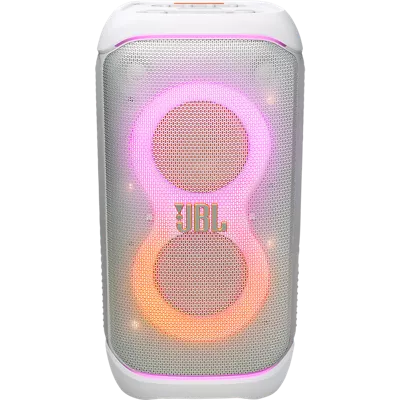
72 reviews
100% of reviewers recommend this product.
Parkermrdog . 9 days ago
jbl.com Originally posted on jbl.com
Stephanie421 . 1 month ago
jbl.com Originally posted on jbl.com
SKU#
JBLPBSTAGE320SWAM
Stephanie421 . 1 month ago
jbl.com Originally posted on jbl.com
Walking Party . 1 month ago
jbl.com Originally posted on jbl.com
school . 2 months ago
jbl.com Originally posted on jbl.com
JBL Mikey . 2 months ago
jbl.com Originally posted on jbl.com
Kevins71 . 3 months ago
jbl.com Originally posted on jbl.com
Coach cheer . 4 months ago
Customer Support - 3 months ago
Thanks for bringing this to our attention. We recommend connecting the device to another unit or resetting it by pressing and holding the light and play buttons until the speaker shuts off. If you need further assistance, please contact us directly through this link: https://support.jbl.com/us/en/#contactjbl.com Originally posted on jbl.com
Randyshark7 . 4 months ago
jbl.com Originally posted on jbl.com
Andersonp . 4 months ago
jbl.com Originally posted on jbl.com
Cstaats . 4 months ago
jbl.com Originally posted on jbl.com
JMONEY . Feb 10, 2026
What does it mean by fast charging the speaker?
Thanks for your question. Fast charging means the JBL Partybox Stage 320 can recharge more quickly than normal when using a compatible fast‑charging power adapter. Please ensure your power adapter is rated for 5 V / 2.1 A to enable faster charging.
dschucker . Feb 2, 2026
Instead of holding a microphone, I want to know if there is a headset w\microphone that can be used so we don't have to hold a microphone when speaking. We have the JBL PartyBox Stage 320
Thank you for your inquiry. We understand that it's convenient to have a headphones with mic than holding a mic itself. While our JBL PartyBox Stage 320 doesn't support connecting headphones (even those with mics) for voice input, wireless microphones can be used for it. We appreciate you sharing this feedback. This will help us improve our products in the future.
Steph78737 . Nov 28, 2025
How big of a room will this work with?
Thank you for your inquiry. We do not have a specific measurement for how wide our JBL Partybox Stage 320 can play music. We can say that the speaker will perform in a room larger than 50 square meters. However, it still depends on how crowded the space is.
Bigustmjj . Nov 18, 2025
can the party box be connected to the jbl boom box
Thanks for your question. Yes, it will connect via the auxiliary wired connection. However, due to the JBL Boombox's smaller size compared to the Partybox Stage 320, you may notice a difference in sound volume. For optimal performance, we recommend using speakers with a similar wattage output.
ChadGouthro . Oct 25, 2025
What is the main difference between the 310 and the 320?
Mt09shadow . Oct 9, 2025
Can the partybox 320 can be sync to the partybox 310?
Thanks for your question. Yes, you can sync our JBL PartyBox Stage 320 with our PartyBox 310. First, connect your PartyBox Stage 320 to your phone via Bluetooth and open the JBL Portable app. Select your PartyBox Stage 320, then choose “Connect to previous model.” You should see the JBL PartyBox 310 appear as an option. Just make sure it’s turned on, and then you can link them together for synchronized playback.
PorterJ . Sep 22, 2025
Is there a way to restrict access to who can pair to the speaker?
Popoy . Sep 18, 2025
Do the white colorway on jbl party box 320 will get yellowish overtime?
Thanks for your inquiry. White electronic devices, like our JBL PartyBox Stage 320, can darken over time due to several factors. This can be caused by prolonged exposure to sunlight or UV light, heat, dust and dirt, and chemical reactions, such as cleaners or pollutants. We recommend storing the speaker in a dry place and wiping the surface with a clean cloth to prevent dirt build up.