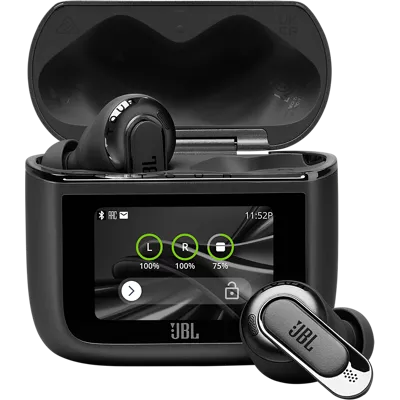
JBL Tour Pro 3 True Wireless Noise Cancelling Earbuds with Smart Charging Case
Color
This item is out of stock.
Free returns within 30 days.Details
¹ Battery life and charge cycles vary with use, settings, and other factors; actual results will vary.
Reviews
4.3
63 reviews
97% of reviewers recommend this product.
nice features
lesr53 . 17 days ago
Customer Support - 17 days ago
Thanks for your feedback. Our JBL Tour Pro 3 TWS also come with multiple eartip sizes to ensure a personalized and secure fit. Additionally, the JBL Headphones app includes a "Check My Best Fit" feature to help you find the most comfortable option. To link up your JBL Tour Pro 3 TWS to your mobile device, make sure the earbuds are in pairing mod,e and the LED is blinking blue quickly. If not, reset them by tapping either side twice while wearing, then hold the third tap for 5 seconds, place them back in the case, and try again. If you need more help, please contact us at (800) 336-4525. We are available Monday to Friday from 9:00 am to 11:00 pm (ET) and Saturday to Sunday from 9:00 am to 5:00 pm (ET).jbl.com Originally posted on jbl.com
Cm45 . 28 days ago
jbl.com Originally posted on jbl.com
Features
- Legendary JBL Pro sound with hybrid dual-driver
- True Adaptive Noise Cancelling 2.0, real time calibration and custom control
- 6 mics for perfect call with JBL Crystal AI Algorithm
- Smart Charging Case™
- Immersive JBL Spatial 360 sound with Head Tracking
- A personalized sound experience
- Automatically connect to the world around you or have a chat
- Stay in control with the JBL Headphones app
- Up to 44 hours of music playback¹
- Fast Pair enabled by Google and Microsoft swift pair
- Bluetooth 5.3 LE audio
Specs
- Dimensions: 1.17 x 2.4 x 2.2 in.
- Weight: 2.91 oz.
SKU#
SKU#
JBLTOURPRO3LTTAM
What's in the box
- JBL Tour Pro 3 True Wireless Noise Cancelling Earbuds with Smart Charging Case
- Smart charging case
- USB Type-C to Type-C cable
- USB Type-C to Analog 3.5mm cable
- 5 Sizes of eartips
- Set of foam tips
- Quick start guide, safety sheet, warranty card, warning sheet
JBL Tour Pro 3 True Wireless Noise Cancelling Earbuds with Smart Charging Case Reviews
4.3
63 reviews
97% of reviewers recommend this product.
nice features
lesr53 . 17 days ago
Customer Support - 17 days ago
Thanks for your feedback. Our JBL Tour Pro 3 TWS also come with multiple eartip sizes to ensure a personalized and secure fit. Additionally, the JBL Headphones app includes a "Check My Best Fit" feature to help you find the most comfortable option. To link up your JBL Tour Pro 3 TWS to your mobile device, make sure the earbuds are in pairing mod,e and the LED is blinking blue quickly. If not, reset them by tapping either side twice while wearing, then hold the third tap for 5 seconds, place them back in the case, and try again. If you need more help, please contact us at (800) 336-4525. We are available Monday to Friday from 9:00 am to 11:00 pm (ET) and Saturday to Sunday from 9:00 am to 5:00 pm (ET).jbl.com Originally posted on jbl.com
Cm45 . 28 days ago
jbl.com Originally posted on jbl.com
Music just sounds better.
Fryin Brian . 1 month ago
jbl.com Originally posted on jbl.com
Dual capacity ear buds.
Suze Cody . 1 month ago
jbl.com Originally posted on jbl.com
Awesome set of buds!
Nikkim8624 . 1 month ago
jbl.com Originally posted on jbl.com
Mistakes were made
Trajan . 1 month ago
Customer Support - 1 month ago
We'd like to work with you directly to address the issues you're experiencing with your unit. Please contact our customer support team via this link: https://support.jbl.com/us/en/#contactjbl.com Originally posted on jbl.com
Best set I’ve ever had!
Chase07 . 2 months ago
jbl.com Originally posted on jbl.com
Fritz 101 . 2 months ago
jbl.com Originally posted on jbl.com
Not So Great
Chevron73 . 3 months ago
Customer Support - 3 months ago
Thanks for your feedback. Our JBL Tour Pro 3 TWS has up to 11 hours of battery life with ANC off and has up to 8 hours of battery life with ANC on. This may vary depending on volume and music content. If the speaker doesn't meet the advertised playtime hours even at low to mid-volume levels, there could be a problem with the battery of the unit. Please contact our Customer Support, so we can assist you.jbl.com Originally posted on jbl.com
JBL Pro3 rules the day!
Delio226 . 3 months ago
jbl.com Originally posted on jbl.com
JBL Tour Pro 3 True Wireless Noise Cancelling Earbuds with Smart Charging Case FAQs
Oddiohead . Jan 3, 2026
Can I use either or bud by itself
Thanks for your question. Yes, you can use one earbud at a time. Our JBL Tour Pro 3 TWS supports mono mode, which allows you to use one earbud while the other is in the charging case.
Anonamys . Dec 11, 2025
Is the case like a mp3 player?
Thanks for your question. The charging case of our JBL Tour Pro 3 is not the same as an MP3 player. It is primarily designed for charging, controlling earbud functions, and storing the earbuds, whereas an MP3 player is a device specifically for playing audio files.
CHICAGO BEARS . Dec 10, 2025
Can you use these for regular android cell phones
Thanks for your question. Yes, our JBL Tour Pro 3 TWS can connect to any Bluetooth-enabled source device, whether it be an iPhone, Android, other smartphones, or a tablet.
Kell11 . Nov 17, 2025
Will they pair the the iPhone 17 max
Thanks for your question. Yes, our JBL Tour Pro 3 can connect to any Bluetooth-enabled source device, whether it be an iPhone 17 Pro Max, other smartphones, or a tablet.
Jspee508 . Nov 11, 2025
Does it announce caller by contact name not by digits of phone number on Iphone? I tried bose and will only announce digits of phone number caller not by the name in my contacts
Thank you for your question. The JBL Tour Pro will output whatever sound your phone is producing. You can change this feature in your phone's settings. If you have any further questions, I recommend contacting technical support for your phone's manufacturer.
02846472 . Nov 10, 2025
Can i play doom on it
Thanks for your question. You can try playing video games while your JBL Tour Pro 3 is connected to see if it works, although we cannot guarantee that it will.
Boblo . Oct 14, 2025
On my laptop, I need to plug in the case (can't use bluetooth). I've tried using the USB-C port, but I can't get audio. I can only get audio using the audio port. Is there something special I need to do so I can get power and audio through my USB-C?
Thank you for your question. Please use your USB Type-C cable to connect your JBL Tour Pro 3's case to your laptop. Play some audio, and if the sound does not come from the earbuds, go to the audio settings on your laptop. In the output device options, you should be able to see your JBL Tour Pro 3; select it as your output device. If this does not resolve the issue, please contact our customer support team through our official website or toll-free hotline.
Chris Etheridge . Sep 12, 2025
Do they read text messages ?
Yes, the JBL Tour Pro 3 headphones with smart case does read text messages using Google Assistant. See more details here: https://www.jbl.com/heygoogle.html#:~:text=JBL%20and%20Google%20Assistant,to%20get%20help%20from%20Google. -Joe
Tree89 . Sep 10, 2025
My jbl speaker has a constant red light, and will not charge. What should I do?
Thanks for your inquiry. We recommend using other charging cable and adapter to know if it is an issue with the cable or the adapter of your JBL Tour Pro 3. The charging port may alo become clogged with sand or grit. Please examne the port and use compressed air to clean if necessary. If you need more help, please contact us.
Aaron . Sep 4, 2025
Can you track these like air pods?
Yes, you can track the JBL Tour Pro 3 earbuds using the "Find My Buds" feature in the free JBL Headphones app. This feature helps you locate lost or misplaced earbuds nearby by making them emit a beeping sound.