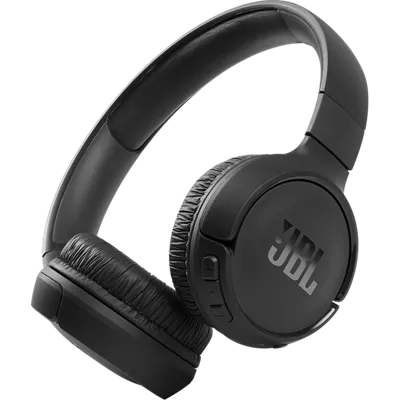
JBL Tune 510BT Headphones
Color
This item is currently only available for Express Pickup.
Free returns within 30 days.Details
Get it fast
Free Express Pickup
Select a storeLong lasting battery.
Outlast even your longest playlist with up to 40 hours of battery life.¹ And, if you need a quick charge, you can get up to 2 hours of battery life in 5 minutes.¹
¹ Battery life and charge cycles vary with use, settings, and other factors; actual results will vary.
Reviews
4.0
209 reviews
86% of reviewers recommend this product.
I like the way the collapse
Stephen 459 . 7 days ago
jbl.com Originally posted on jbl.com
Earpad broke off in 30 days
CVMsoFL . 18 days ago
Customer Support - 17 days ago
We'd like to work with you directly to address the issues you're experiencing with your unit. Please contact our customer support team via this link: https://support.jbl.com/us/en/#contactjbl.com Originally posted on jbl.com
Features
- JBL Pure Bass Sound
- Wireless Bluetooth 5.0 streaming
- Up to 40 hours of battery life¹
- Up to 2 hours of battery life with a 5 minute charge¹
- Multi-point connections
- Hands-free calls
- Lightweight, comfortable, foldable design
- Voice assistant compatible
Specs
- Weight: 5.6 oz.
- Driver size: 1.26 inches dynamic driver
- Power supply: 5V/1A
- Headset battery type: Lithium-ion battery (3.7V/450mAh)
- Charging time: 2 hrs
- Music playtime with BT on: up to 40 hrs
- Frequency response: 20Hz — 20kHz
- Impedance: 32 ohm
- Sensitivity: 103.5dB SPL@ 1kHz 1mW
- Maximum SPL: 95dB
- Microphone sensitivity: -29dBV@1kHz/Pa
- Bluetooth version: 5.0
- Bluetooth profile version: A2DP v1.3, AVRCP v1.6, HFP v1.7s
- Bluetooth transmitter frequency range: 2.4GHz — 2.4835GHz
- Bluetooth transmitted power: <8dBm
- Bluetooth transmitted modulation: GFSK, π/4 DQPSK, 8DPSK
- Maximum operation temperature: 45°C
SKU#
SKU#
JBLT510BTBLKAM
What's in the box
- JBL Tune 510BT Headphones
- USB-C charging cable
- Warranty card
- Warning card
- Quick start guide
JBL Tune 510BT Headphones Reviews
4.0
209 reviews
86% of reviewers recommend this product.
I like the way the collapse
Stephen 459 . 7 days ago
jbl.com Originally posted on jbl.com
Earpad broke off in 30 days
CVMsoFL . 18 days ago
Customer Support - 17 days ago
We'd like to work with you directly to address the issues you're experiencing with your unit. Please contact our customer support team via this link: https://support.jbl.com/us/en/#contactjbl.com Originally posted on jbl.com
Basic at most
bbop716 . 21 days ago
Customer Support - 20 days ago
Thanks for your feedback. If you made your purchase directly from us, we have a 30-day return policy for refunds. You can initiate the return process by visiting this link: https://www.jbl.com/findorder.jbl.com Originally posted on jbl.com
Good Product!
straykidslover143 . 26 days ago
jbl.com Originally posted on jbl.com
Glitchy features
Anonymous67575 . 1 month ago
Customer Support - 1 month ago
Thank you for your feedback. If the battery light indicator of your JBL Tune 510BT is off, please try performing a power cycle by pressing and holding the power button for 30 seconds while the unit is not plugged into a power source, to see if the unit will unlock. We also recommend trying other charging cable and adapter. While it is uncommon, the power source might not be enough to charge your headphones. Please try plugging it to other outlet. For further assistance, please contact us.jbl.com Originally posted on jbl.com
50/50
JGAL2 . 1 month ago
Customer Support - 1 month ago
Thanks for your feedback. Bluetooth will perform well for up to 30 feet. However, walls, obstacles, and other wireless devices can impede that 30-foot range. If it works well at 10 feet or less, it is likely that there is something interfering with your wireless Bluetooth signal, causing these dropouts. Another possibility is that sometimes a Bluetooth connection can become corrupt. Try the following steps to unpair and re-repair your Bluetooth connection. First, forget/unpair the headphones on your device, then perform manual pairing. Next, try to connect the headphones to a different device (phone/tablet/music player) to see if it fixes the problem. Last is reset, turn the headphones on then press and hold "Volume +" and "Volume -" for more than 5 seconds. The headphones will turn off, and reboot to factory default. You may need to 'forget' the headphones in Bluetooth settings on your phone/tablet in order to pair it again. If the issue remains, please contact us for further assistance.jbl.com Originally posted on jbl.com
Mclovin it
Retta . 2 months ago
jbl.com Originally posted on jbl.com
Basss
Ant23 . 2 months ago
jbl.com Originally posted on jbl.com
JBL Tune 510BT
Steve74 . 2 months ago
jbl.com Originally posted on jbl.com
Sound quality is nice but break easily
Taslima . 2 months ago
Customer Support - 2 months ago
Thank you for your feedback. We would like to work with you directly to address your concerns. Please contact us.jbl.com Originally posted on jbl.com
JBL Tune 510BT Headphones FAQs
NikkiB . Dec 4, 2025
Can you use these for gaming ?
Thanks for your question. Yes, you can use our JBL Tune 510BT for gaming, but since it’s a Bluetooth headphone, you may experience a slight audio delay in fast-paced games. It works fine for casual gaming, but it was mainly designed for music listening and everyday use. If you’re looking for something optimized for gaming, we recommend checking out our JBL Quantum series.
Dog Momma . Dec 4, 2025
Are these Tune 510BT noise cancelling?
Thanks for your question. Our JBL Tune 510BT does not have noise-cancelling, it’s a standard Bluetooth headphone without ANC.
Larry1963 . Nov 27, 2025
How do I know what model I have
Thank you for your inquiry. The model name is usually visible on the original box or on the product itself. If it’s not, we can verify it using the product’s serial number. For further assistance, please contact our customer support.
Eric C . Nov 21, 2025
does it connect wired as well
Thank you for your inquiry. The JBL Tune 510BT headphones do not have an audio port for connecting with a wired audio cable. However, you can still enjoy audio using their Bluetooth functionality. Simply pair the headphones with your Bluetooth-enabled device to listen to music or other audio content.
Jmrty . Nov 12, 2025
How long is charging cable?
Thanks for your question. The charging cable of our JBL Tune 510BT is 0.25m long.
Kaptaink . Oct 21, 2025
How can I set volume to mid range (5) instead of the default (10)
Thank you for your question. Unfortunately, we cannot modify the mid-range frequencies of our JBL Tune 510BT headphones, as this feature is not supported by our JBL Headphone app. As an alternative, you can download a music player app that includes a built-in equalizer, allowing you to adjust the sound to your preference.
Donald . Aug 1, 2024
How does these headphones work. I’m looking to purchase headphones to assist my 86 year old Mom with hearing people and the TV.
These headphones will connect to devices via bluetooth. -Joseph
WillMac . Apr 11, 2024
How to reattach the earphone cushions
Thank you for reaching out. We're here to help with your JBL Tune 510BT. Our customer support sent you an email from HCG Customer Support for further assistance with replacing your ear pads.
TimothyMB . Mar 20, 2024
What does a white light on the TUNE510BT mean? I turned on my headphones and all I get is a white light.
Thanks for reaching out. The white light of the JBL Tune 510BT when blinking indicates that the unit is turned on, on the other hand, if it's a solid white, it means the unit is fully charged. To enter into pairing mode for the first time, press the power button for five seconds so you can connect it to your device. It will show a blinking blue light. Make sure that the Bluetooth on your mobile phone is turned on, then look for the name of the headphones on the available devices. Tap JBL Tune 510BT and the blue light should be solid once successfully connected.
Mike Merlin . Jan 11, 2024
Are these headphones dual voltage? 110-240V?
Thanks for your inquiry. Our JBL Tune 510BT only requires a 5V/1A power supply.