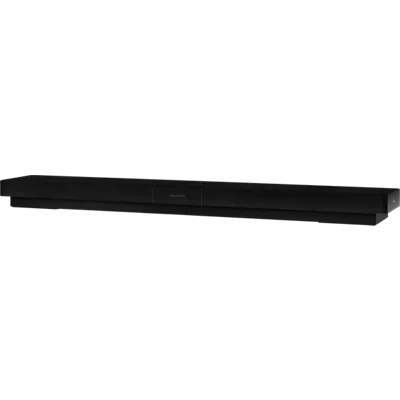
Verizon Stream TV Soundbar Pro with Bang & Olufsen Audio
All-in-one solution.
Streamline your home theater equipment by combining 4K Ultra HD¹ streaming and expansive virtual surround sound in one convenient device. Simplify your living room setup even further by connecting your game consoles or other media devices to the 3 HDMI inputs.
Immersive sound.
Get the sound quality your TV has been missing. Bang & Olufsen signature audio design with 9 built-in speakers and spatial sound from Dolby Atmos bring an immersive audio experience to your living room.
Thousands of movies and TV shows.
Hundreds of streaming apps are available to download from the Google Play Store³ - including Netflix, Disney+, Apple TV app and so many more. New releases and old favorites can be rented or purchased in the Stream TV Store² and free live channels are available from Pluto TV - just press the Guide button.
Stunning modern design.
Elevate the style of your home theater with the timeless design and unrivaled craftsmanship of Bang & Olufsen. Set on a table or mount on the wall - the choice is yours.
Next gen remote.
The Stream TV Voice Remote connects via bluetooth and can control power and volume on your TV, sound bar, or audio receiver, allowing you to control your entertainment system from a single remote. The Google Assistant³ button activates voice-powered search and the Find My Remote button makes your remote beep so you can quickly find it when it's misplaced.
Simple, customizable user interface.
Pin your favorite apps to the home screen for easy access or find your next favorite movie with personalized recommendations. When you know exactly what you want to watch, the intelligent search feature will show results across all of your subscribed services.
¹ 4K compatible devices required. 4K content viewing will be impacted by additional factors like internet speed, Home Network congestion and operating system of devices used for content access.
² Purchase or rent available through Stream TV or Stream TV app on Android Platform. App purchases are not supported on iOS.
³ Google service terms apply.
Reviews
3.1
661 reviews
43% of reviewers recommend this product.
A Good Device
Dave . 18 days ago
The Verizon Team - 13 days ago
Thanks for the wonderful review! One product for all of your streaming needs - that's the Stream TV experience! Please report any feedback or concerns through the mobile app (settings > help > report a problem) or send an email to android-appsupport@verizon.com. Thank you!Service is so so if you don’t need to watch sports, Service is OK do not I do not recommend
Dave K . 1 month ago
Features
- 4K UHD compatible streaming¹
- Bang & Olufsen design and audio tuning
- Dolby Atmos immersive sound
- HDMI input management for 3 external devices
- Customizable user interface
- Google Assistant voice & text search³
- Chromecast built in³
- Wall mount or tabletop setup
- Find My Remote
- Pluto TV integration
- Stream TV smartphone or tablet app²
Specs
- Dimensions: 37.4 x 5.9 x 2.6 in.
- Video: Up to 2160p (4K UHD) at 60 FPS, HDMI 2.1 with HDCP 2.2 and CEC support
- Drivers: 2 x 4.5 in. woofer drivers, 4 x 4 in. full-range drivers, 3 x 2 in. tweeters
- Amplifiers: 2 x 50W for woofer drivers, 4 x 50W for full-range drivers, 3 x 50W for tweeters
- Audio Formats: Dolby Atmos / Dolby Digital Plus / MP3 / AAC / MPEG
- Frequency Range: 34 Hz - 23,200 Hz
- Max Sound Pressure Level: 93 dB SPL
- Bass Capacity: 81 dB SPL
- Inputs: 3x HDMI 2.1, 1 RJ45 Ethernet, DC Power input
- Wireless: WiFi 6 - dual band 2.4GHz & 5.0GHz, Bluetooth 5.0
- Operating System: Android TV 11
- Voice Control: Google Assistant
- 2GB of RAM
- 16GB of onboard storage (actual available/formatted may be less)
SKU#
SKU#
ASK-STI6250
What's in the box
- Verizon Stream TV Soundbar Pro
- Stream TV Voice Remote
- HDMI cable
- Power supply
- Mounting hardware and template
Verizon Stream TV Soundbar Pro with Bang & Olufsen Audio Reviews
3.1
661 reviews
43% of reviewers recommend this product.
A Good Device
Dave . 18 days ago
The Verizon Team - 13 days ago
Thanks for the wonderful review! One product for all of your streaming needs - that's the Stream TV experience! Please report any feedback or concerns through the mobile app (settings > help > report a problem) or send an email to android-appsupport@verizon.com. Thank you!Service is so so if you don’t need to watch sports, Service is OK do not I do not recommend
Dave K . 1 month ago
Cancel all subscription. Refund asap.
Lizzy . 1 month ago
Terribly slow!
Joe R . 2 months ago
The Verizon Team - 2 months ago
Thanks for taking the time to leave us a review, Joe. Please report any feedback or concerns through the mobile app (settings > help > report a problem) or send an email to android-appsupport@verizon.com. Our support team can definitely help. Thank you.Great addition
Millissa . 2 months ago
The Verizon Team - 2 months ago
Thanks for the wonderful review, Millissa! One product for all of your streaming needs - that's the Stream TV experience! We wish you all the best.Horrible is being kind about this remote
Bad product from start to . 2 months ago
Great
Hlsjr . 2 months ago
The Verizon Team - 2 months ago
Thanks for the wonderful review! One product for all of your streaming needs - that's the Stream TV experience! We wish you all the best.Terrible! Free...ok. Paid for - big no no
Lucy S . 2 months ago
The Verizon Team - 2 months ago
Thanks for taking the time to leave us a review. We're sorry to hear about the issues you've been experiencing with your Stream TV Soundbar. We'd like to investigate this further and help you out. Please report any feedback or concerns through the mobile app (settings > help > report a problem) or send an email to android-appsupport@verizon.com. Our support team can definitely help. Thank you.Endless entertainment
Dave o . 3 months ago
Faulty after a year
YDE1 . 4 months ago
The Verizon Team - 4 months ago
Thanks for taking the time to leave us a review, YDE. We're sorry to hear about the issues you've been experiencing with your Stream TV Soundbar with Bang & Olufsen Audio. Please report any feedback or concerns through the mobile app (settings > help > report a problem) or send an email to android-appsupport@verizon.com. Our support team can definitely help. Thank you.Verizon Stream TV Soundbar Pro with Bang & Olufsen Audio FAQs
Subwoofer Connection . Nov 27, 2025
Can this device work with an external subwoofer?
synch new remote . Nov 22, 2025
i just bought a new remote. where can i find instuctions on how to use it?
Thank you for purchasing the Stream TV Voice Remote. You can find more information on how to use the remote on our website at: https://www.verizon.com/support/residential/tv/equipment/stream-tv-landing/remote -Christy
Steffon . Nov 20, 2025
How do i access closed caption on voice remote
Use the remote to navigate to Menu > Settings > System > Accessibility > Closed Captions and select a CC option. https://www.verizon.com/support/residential/tv/programs-features/closed-captioning
mikesound87 . Nov 20, 2025
Can I watch regular TV with this box, or do I need to go through an app to do that
This box does not support regular TV. You are able to use the stream box for apps such as Netflix, Disney+, Apple TV app etc.
Nov 19, 2025
I need a remote for the Verizon sound bar mine is lost
For assistance with this product please contact us at https://www.verizon.com/digital/nsa/nos/ui/ngd/contactus -Katie
Chas . Nov 1, 2025
How to put sound bar in pairing mode
Click here: https://www.verizon.com/support/knowledge-base-240437/ for instuctions to pair your Soundbar. -Lauren
Oct 29, 2025
Can the stream device get connectivity through the USB-C?
Yes, but not directly for a standard internet connection; the Verizon Stream TV device gets its data via a specialized USB-C adapter, which is the Verizon Stream TV MoCA Ethernet Adapter. This adapter connects to your router (via Ethernet or coax), and then provides both power and data to the Stream TV device through a single USB-C cable. The USB-C port on the Stream TV device by itself is only used for power. -Red
Annette . Oct 15, 2025
I dont have a Verizon account. How do i set the soundbar up? It keeps asking me to sign into Verizon.
During the device set up select "No Account" or "Skip" if you do not have a Verizon account. You can add one later. For a complete set-up guide visit https://www.verizon.com/support/knowledge-base-240465/ -James
Annette . Oct 8, 2025
Do you have to have a subscription with Verizon to be able to use this?
Rochelle Abram . Oct 1, 2025
My tv isn't a smart TV, does this allow you to stream content similar to a Roku Stick?
Yes, this will allow you to stream content to your TV. You will need to have an HDMI connection in order to be compatible. Click here: https://www.verizon.com/support/stream-tv-faqs/ for more info. -Lauren