Change the Admin Password - Verizon Jetpack® 4G LTE Mobile Hotspot - AC791L
This info is for the admin password, not the one to connect your device to your Verizon Jetpack - AC791L.
This info doesn't apply to changing the password used to connect to your Verizon Jetpack via Wi-Fi. The Administration Password is used to log in to the device web interface to manage settings (e.g. network name, network password, etc.).
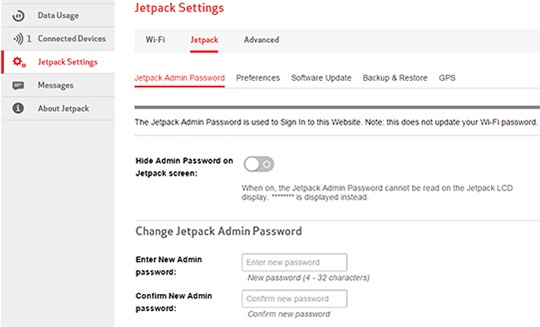
- Log into the Admin Web Interface.
- From the left menu, clickJetpack Settings.
- From the Jetpack tab, clickJetpack Admin Password.
- From the Change Jetpack Admin Password section, enter the following information:
- Enter New Admin passwordThe password must be at least 4 characters.
- Confirm New Admin password
- Security challenge question (select from dropdown box)
- Security challenge answer
- ClickSave(located at the bottom).The save option only appears after a change is made.