Turn Network Name (SSID) On / Off - Verizon Jetpack 4G LTE Mobile Hotspot - AC791L
Here's how to display or not display the Wi-Fi name of your 4G LTE Mobile Hotspot - AC791L to other devices.
To broadcast or not broadcast your Wi-Fi name to other devices, view this info.
- Your Verizon Jetpack® 4G LTE Mobile Hotspot - AC791L has a network name or SSID (Service Set Identifier) assigned to it.
- While the SSID is typically broadcast by default, it can be turned off for greater security.
- When turned off, any device attempting to connect for the first time must know the SSID name and password to set up a manual connection to it.For the easiest connection experience, it's recommended to leave broadcast on.
- Access the Admin Web Interface.
- From the left menu, navigate: .
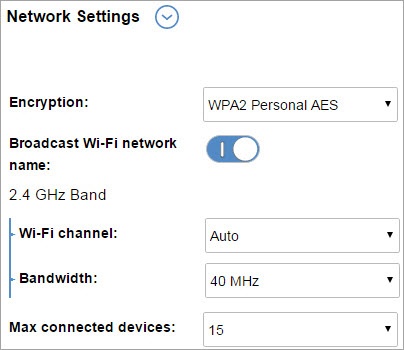
- From Network Settings, click theblue arrowto display more options.
- TapBroadcast Wi-Fi network nameto turn on
or off
On means the device is broadcasting and visible to Wi-Fi devices. - ClickSave(located at the bottom).The save option only appears once a change is made.