MAC Filtering - Verizon Jetpack® 4G LTE Mobile Hotspot - AC791L
To control MAC address access for your Verizon Jetpack - AC791L, view this info.
- Access the Admin Web Interface.
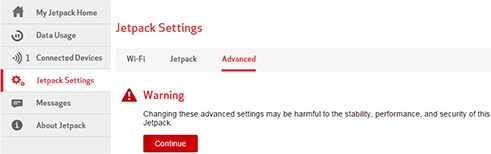
- From the left menu, clickJetpack Settings.
- From the Advanced tab, then clickContinue.
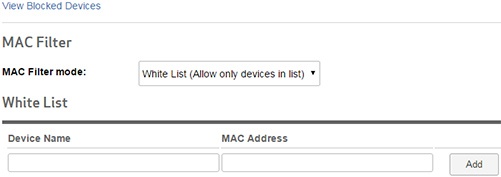
- From the Advanced tab, clickMAC Filter.
- Select one of the following options from the MAC Filter mode dropdown menu.
- None
- Black List (Block all devices in list)
- White List (Allow only devices in list)
- After selecting an option above, enter the device name and MAC address then clickAdd.The device name and MAC Address fields are present if None is selected.The image below is an example of adding a device to the White List.
- ClickSave(located at the bottom).The save option only appears after a change is made.