Battery Power Management Settings - Verizon Jetpack® 4G LTE Mobile Hotspot - AC791L
Here's how to configure display, sleep and power-down options for your Verizon Jetpack - AC791L.
If you want to change settings on your Jetpack to help maximize battery life, view this info.
The Jetpack display is designed to dim to save battery life. The Battery Power Management Settings only apply when the device isn't being charged.
The Sleep option can be selected from the device.
- Access the Admin Web Interface.
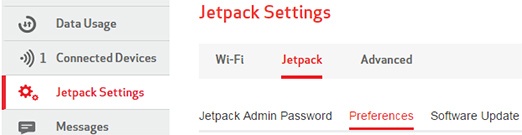
- From the left menu, clickJetpack Settings.
- From the Jetpack tab, clickPreferences.
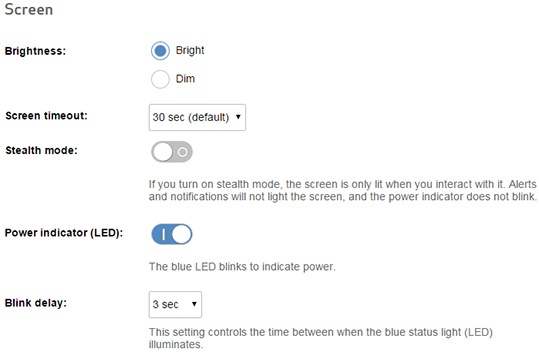
- Configure the following settings:
- Brightness:
- Bright
- Dim
- Screen timeout (select from the dropdown menu):
- 30 sec (default)
- 1 minute
- 5 minutes
- 10 minutes
- Never
- Stealth mode:When turned on, the screen is only lit when interacting with it. Alerts and notifications do not light the screen and power indicator does not blink.
- Slide the switch to turn onor off.
- Power indicator (LED):When turned on, the blue LED blinks to indicate power.
- Slide the switch to turn on or off.
- Blink delay (select from the dropdown menu):
- 1 sec
- 3 sec
- 5 sec
- 10 sec
- 15 sec
- ClickSave(located at the bottom).The save option only appears once a change has been made.


Sleep Option
- In order to ensure the device is powered on, press thePower button(located on the top edge).
- SelectSettings.Utilize the navigation buttons (left/right arrows) to scroll through the options and the Select button (check mark) to select.
- SelectSleep.
- Select one of the following options:
- After 5 mins (default)
- After 15 mins
- After 30 mins
- After 60 mins
- Never sleep
- SelectOKto confirm.