Insert / Remove SIM Card - Verizon Jetpack 4G LTE Mobile Hotspot - AC791L
Here's how to properly insert or remove a SIM card for your Jetpack - AC791L.
Instructions on inserting/removing your SIM can help with activation issues/errors and connectivity issues.
- Ensure your Verizon Jetpack® is powered off.Press and hold thePower button(top of the device) until "Shutting down" displays then release.
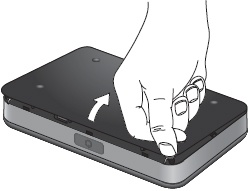
- Press your finger against the battery door removal tab, then lift and remove the battery cover.
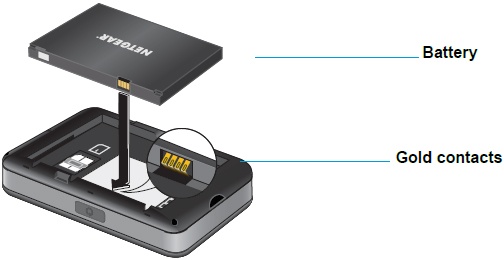
- Insert your finger into the battery removal divot and lift the battery out of the battery compartment.
- Do one of the following:
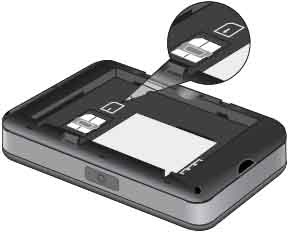
- Insert SIM cardPush the SIM card toward the SIM card slot to insert it (gold contacts facing down with the notched edge at the bottom right). Carefully slide the card until it clicks into place.
- Remove SIM cardCarefully slide the card backward to remove.
- Re-insert the battery.
- Replace the back cover.